Page 1 :
C - Decision Making, There come situations in real life when we need to make some decisions, and based on these decisions, we decide what should we do next. Similar, situations arise in programming also where we need to make some, decisions and based on these decisions we will execute the next block of, code. For example, in C if x occurs then execute y else execute z. There, can also be multiple conditions like in C if x occurs then execute p, else if, condition y occurs execute q, else execute r. This condition of C else-if is, one of the many ways of importing multiple conditions., , Decision making statements in programming languages decides the, direction of flow of program execution. Decision making statements, available in C or C++ are:, 1. if statement, 2. if..else statements, 3. nested if statements, 4. if-else-if ladder, 5. switch statements, 6. Jump Statements:, a. break, b. continue, c. goto, d. return, if statement in C
Page 2 :
if statement is the most simple decision making statement. It is used to, decide whether a certain statement or block of statements will be executed, or not i.e if a certain condition is true then a block of statement is executed, otherwise not., Syntax:, if(condition), {, // Statements to execute if, // condition is true, }, , Here, condition after evaluation will be either true or false. C if statement, accepts boolean values – if the value is true then it will execute the block of, statements below it otherwise not. If we do not provide the curly braces ‘{‘, and ‘}’ after if(condition) then by default if statement will consider the first, immediately below statement to be inside its block., Example:, if(condition), statement1;, statement2;, // Here if the condition is true, if block, // will consider only statement1 to be inside, // its block.
Page 3 :
Flowchart, , // C program to illustrate If statement, #include <stdio.h>, int main() {, int i = 10;, if (i > 15), {, printf("10 is less than 15");, }, printf("I am Not in if");, }, , Output:, I am Not in if, As the condition present in the if statement is false. So, the block below the, if statement is not executed., if-else in C, The if statement alone tells us that if a condition is true it will execute a, block of statements and if the condition is false it won’t. But what if we want, to do something else if the condition is false. Here comes the
Page 4 :
C else statement. We can use the else statement with if statement to, execute a block of code when the condition is false., Syntax:, if (condition), {, // Executes this block if, // condition is true, }, else, {, // Executes this block if, // condition is false, }, , Flowchart:, , Example:, // C program to illustrate If statement, #include <stdio.h>, int main() {, int i = 20;
Page 5 :
if (i < 15), printf("i is smaller than 15");, else, printf("i is greater than 15");, return 0;, }, , Output:, i is greater than 15, The block of code following the else statement is executed as the condition, present in the if statement is false., nested-if in C, , A nested if in C is an if statement that is the target of another if statement., Nested if statements means an if statement inside another if statement., Yes, both C and C++ allows us to nested if statements within if statements,, i.e, we can place an if statement inside another if statement., Syntax:, if (condition1), {, // Executes when condition1 is true, if (condition2), {, // Executes when condition2 is true, }, }
Page 6 :
Flowchart, , Example:, // C program to illustrate nested-if statement, #include <stdio.h>, int main() {, int i = 10;, if (i == 10), {, // First if statement, if (i < 15), printf("i is smaller than 15\n");, // Nested - if statement, // Will only be executed if statement above, // is true, if (i < 12), printf("i is smaller than 12 too\n");, else, printf("i is greater than 15");, }, return 0;, }, , Output:
Page 7 :
i is smaller than 15, i is smaller than 12 too, , if-else-if ladder in C, Here, a user can decide among multiple options. The C if statements are, executed from the top down. As soon as one of the conditions controlling, the if is true, the statement associated with that if is executed, and the rest, of the C else-if ladder is bypassed. If none of the conditions are true, then, the final else statement will be executed., Syntax:, if (condition), statement;, else if (condition), statement;, ., ., else, statement;
Page 8 :
Example:, // C program to illustrate nested-if statement, #include <stdio.h>, int main() {, int i = 20;, if (i == 10), printf("i is, else if (i == 15), printf("i is, else if (i == 20), printf("i is, else, printf("i is, }, , Output:, i is 20, , 10");, 15");, 20");, not present");
Page 9 :
Jump Statements in C, These statements are used in C orC++ for unconditional flow of control, through out the funtions in a program. They support four type of jump, statements:, , 1. C break: This loop control statement is used to terminate the loop. As, soon as the break statement is encountered from within a loop, the, loop iterations stops there and control returns from the loop, immediately to the first statement after the loop., Syntax:, 2. break;, Basically break statements are used in the situations when we are not, sure about the actual number of iterations for the loop or we want to, terminate the loop based on some condition., , Example:, // C program to illustrate, // Linear Search, #include <stdio.h>, void findElement(int arr[], int size, int key), {, // loop to traverse array and search for key, for (int i = 0; i < size; i++) {, if (arr[i] == key) {
Page 10 :
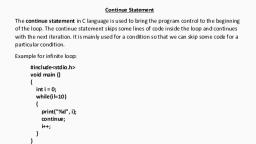
printf("Element found at position: %d", (i +, 1));, break;, }, }, }, int main() {, int arr[] = { 1, 2, 3, 4, 5, 6 };, // no of elements, int n = 6;, // key to be searched, int key = 3;, // Calling function to find the key, findElement(arr, n, key);, return 0;, }, , Output:, Element found at position: 3, 3. C continue: This loop control statement is just like the break, statement. The continue statement is opposite to that of, break statement, instead of terminating the loop, it forces to execute, the next iteration of the loop., As the name suggest the continue statement forces the loop to, continue or execute the next iteration. When the continue statement is, executed in the loop, the code inside the loop following the continue, statement will be skipped and next iteration of the loop will begin., Syntax:, 4. continue;
Page 11 :
Example:, // C program to explain the use, // of continue statement, #include <stdio.h>, int main() {, // loop from 1 to 10, for (int i = 1; i <= 10; i++) {, // If i is equals to 6,, // continue to next iteration, // without printing, if (i == 6), continue;, else, // otherwise print the value of i, printf("%d ", i);, }, return 0;, }, , Output:, 1 2 3 4 5 7 8 9 10, 5. C goto: The goto statement in C/C++ also referred to as unconditional, jump statement can be used to jump from one point to another within a
Page 12 :
function., Syntax:, 6. Syntax1, , |, , Syntax2, , 7. ---------------------------8. goto label;, , |, , label:, , 9. ., , |, , ., , 10., , ., , |, , ., , 11., , ., , |, , ., , 12., , label:, , |, , goto label;, , In the above syntax, the first line tells the compiler to go to or jump to, the statement marked as a label. Here label is a user-defined identifier, which indicates the target statement. The statement immediately, followed after ‘label:’ is the destination statement. The ‘label:’ can also, appear before the ‘goto label;’ statement in the above syntax., , Below are some examples on how to use goto statement:, Examples:, // C program to print numbers, // from 1 to 10 using goto statement, #include <stdio.h>, // function to print numbers from 1 to 10
Page 13 :
void printNumbers(), {, int n = 1;, label:, printf("%d ",n);, n++;, if (n <= 10), goto label;, }, // Driver program to test above function, int main() {, printNumbers();, return 0;, }, , Output:, 1 2 3 4 5 6 7 8 9 10, 13. C return: The return in C or C++ returns the flow of the execution to, the function from where it is called. This statement does not, mandatorily need any conditional statements. As soon as the, statement is executed, the flow of the program stops immediately and, return the control from where it was called. The return statement may, or may not return anything for a void function, but for a non-void, function, a return value is must be returned., Syntax:, return[expression];, Example:, // C code to illustrate return, // statement, #include <stdio.h>, // non-void return type, // function to calculate sum, int SUM(int a, int b), {, int s1 = a + b;, return s1;, }, // returns void, // function to print, void Print(int s2), {, printf("The sum is %d", s2);, return;, }, int main()