Page 1 :
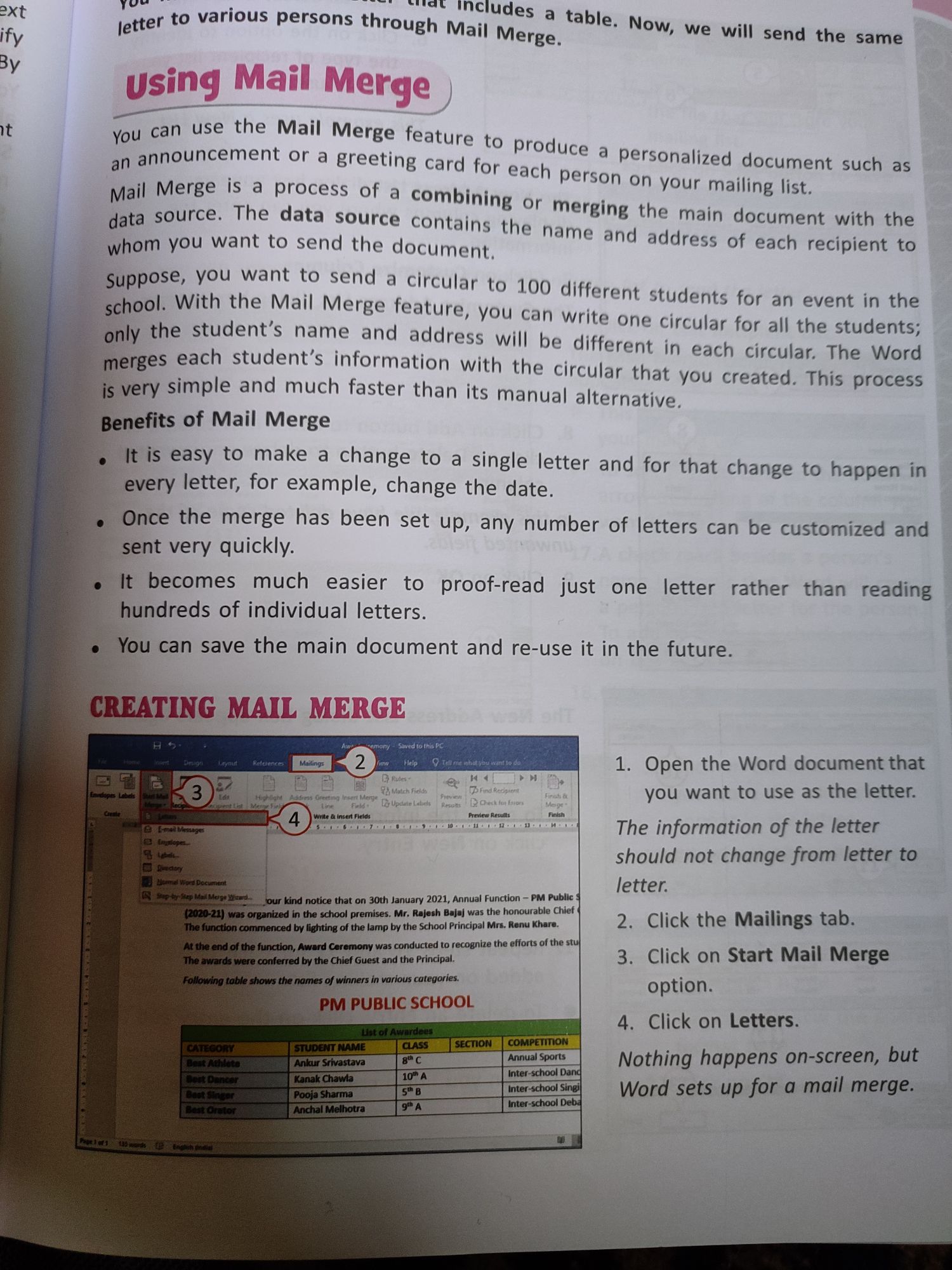
xt OM SSSSS UC, , jetter to various persons through Mallee a ta, , 4 etaeees ble, Now, we will send the same, , BY using Mail Merge, , i you can use the Mail Merge feature, ne announcement or a greeting card for each pers, , jl Merge is a process of <¢ Ini, Ma Be The dat a combining or merging the mai, data s' ; @ source contains the n sre main document with the, , whom you want to send the document and address of each recipient to, , to prod, u 2 i, ce a personalized document such as, , °0N ON your mailing list., , , , , , , , , , , , , , , , , , , , , , , , , Suppose, you want to send a circular to 100 different, , school. With the well Merge feature, you can write one circulz, , only the student’s pame and address will be different in ph toy a). Wie, saeere, erges each student’s information with the circular that ct circular, The Word, , very simple and much faster than its manual alternate created. This process, , Benefits of Mail Merge ,, , students for an event in the, , , It is easy to make a change to a single letter and for, very letter, for example, change the date., , ince the merge has been set up,, ‘sent very quickly., , that change to happen in, any number of letters can be customized and, , becomes much easier to proof-read just one letter rather than reading, hundreds of individual letters., , fou can save the main document and re-use it in the future., , ‘ING MAIL MERGE, , be ee %, Q ee 03 i 1. Open the Word document that, ae ; you want to use as the letter., , The information of the letter, , should not change from letter to, , letter., , 2. Click the Mailings tab., , 3. Click on Start Mail Merge, option., , 4. Click on Letters., , that on 30th January 2021, Annual Function — PM Public, ‘Mr, Rajesh Bajaj was the honourable Chief, , Nothing happens on-screen, but, Word sets up for a mail merge.