Page 1 :
Avanthi Degree & P.G College, Narayanaguda –Hyderabad, , Department of Computer Science, B.Sc. I Year I Semester, , Programming in C, Name : ________________________________, Roll No :_______________________________, Group & Section : ____________________, , The expert in anything was once a beginner, , UNIT – I, , Page 0
Page 2 :
Programming in C, Unit – I, , Computer Fundamentals: Introduction of Computers, Classification of Computers,, Anatomy of a Computer, Memory Hierarchy, Introduction to OS, Operational, Overview of a CPU., Program Fundamentals: Generation and Classification of Programming Languages,, Compiling, Interpreting, Loading, Linking of a Program, Developing Program,, Software Development., Algorithms: Definitions, Different Ways of Stating Algorithms (Step-form, Pseudocode, Flowchart), Strategyfor Designing Algorithms, Structured Programming, Concept., Basics of C: Overview of C, Developing Programs in C, Parts of Simple C Program,, Structure of a C Program,Comments, Program Statements, C Tokens, Keywords,, Identifiers, Data Types, Variables, Constants,Operators and Expressions, Expression, Evaluation–precedence and associativity, Type Conversions., Unit – II, , Input-Output: Non-formatted and Formatted Input and Output Functions, Escape, Sequences,, Control Statements: Selection Statements – if, if-else, nested if, nested if-else,, comma operator, conditional operator, switch; Iterative Statements–while, for, dowhile; Special Control Statement–goto, break, continue, return, exit., Arrays and Strings: One-dimensional Arrays, Character Arrays, Functions from, ctype.h, string.h, Multidimensional Arrays., Unit – III, , Functions: Concept of Function, Using Functions, Call-by-Value Vs Call-by-reference,, Passing Arrays to Functions, Score of Variables, Storage Classes, Inline Functions, and, Recursion., Pointers: Introduction, Address of Operator (&), Pointer, Uses of Pointers, Arrays and, Pointers, Pointers and Strings, Pointers to Pointers, Array of Pointers, Pointer to, Array, Dynamic Memory Allocation., Unit – IV, , User-defined Data Types: Declaring a Structure (Union) and its members,, Initialization Structure (Union),Accessing members of a Structure (Union), Array of, Structures (Union), Structures verses Unions, Enumeration Types., Files: Introduction, Using Files in C, Working with Text Files, Working with Binary, Files, Files of Records, Random Access to Files of Records, Other File Management, Functions., Text : Pradip Dey, Manas Ghosh, Computer Fundamentals and Programming in C, (2e), UNIT – I, , Page 1
Page 3 :
C Lab, 1 Write a program to find the largest two (three) numbers using if and conditional, operator., 2 Write a program to print the reverse of a given number., 3 Write a program to print the prime number from 2 to n where n is given by user., 4 Write a program to find the roots of a quadratic equation using switch statement., 5 Write a program to print a triangle of stars as follows (take number of lines from, user):, *, ***, *****, *******, *********, 6 Write a program to find largest and smallest elements in a given list of numbers., 7 Write a program to find the product of two matrices.., 8 Write a program to find the GCD of two numbers using iteration and recursion., 9 Write a program to illustrate use of storage classes., 10 Write a program to demonstrate the call by value and the call by reference, concepts., 11 Write a program that prints a table indicating the number of occurrences of each, alphabet in the text entered as command line arguments., 12 Write a program to illustrate use of data type enum., 13 Write a program to demonstrate use of string functions string.h header file., 14 Write a program that opens a file and counts the number of characters in a file., 15 Write a program to create a structure Student containing fields for Roll No.,, Name, Class, Year and Total Marks. Create 10 students and store them in a file., 16 Write a program that opens an existing text file and copies it to a new text file, with all lowercase letters changed to capital letters and all other characters, unchanged., UNIT – I, , Page 2
Page 4 :
Unit – I, Computer Fundamentals:, , 1.1 Computer:, Computer is an electronic device that receives input , stores or processes the input as per, user instructions and provides output in desired format., (OR), A computer can take data from the user through input devices (Input), process the user, given data (Processing), produces the result to the user through output devices (Output)and, stores data (Information) for future use., The term computer is derived from the Latin term ‘computare’, this means, to calculate or programmable machine. Computer can not do anything without a Program., Every computer mainly consists of three things and those are..., 1. Hardware, 2. Software, 3. User, , Here the user interacts with the software, and the software makes the computer hardware, parts to work for the user., , 1.2 History of Computers (Evolution of Computers):, Abacus is the first mechanical calculating device, which was developed by, Egyptians in 10th century B.C, but the final shape was given in 12th century A.D., Charles Babbage is called the "Father of the computer”. The First mechanical, computer designed by Charles Babbage was called Analytical Engine. It includes, some features which is used in today’s computers., , 1.3 Generations of Computers:Following table shows the technology used in the different generations of, computers. With advancement in the generation, the performance of computers, improved not only due to the implementation of better hardware technology but, also superior operating systems and other software utilities., , UNIT – I, , Page 3
Page 5 :
Generation, Number, , Technology, , Operating, System, , Year Of, introduction, , Specific, Computers, , 1, , Vacuum Tube, , None, , 1945, , Mark 1, , 2, , Transistor, , None, , 1956, , 3, , SSI and MSI, , Yes, , 1964, , 4, , LSI and VLSI, , Yes, , 1971, , 5, , Artificial, Intelligence, , Yes, , Present and, beyond, , IBM 1401, ICL, 1901,, B5000,, MINSK-2, IBM S/360/370,, UNIVAC 1100,, HP 2100A, HP 9810, ICL, 2900,, HP, 9845A,VAX 11/780,, ALTAIR 8800,, IBM PC, –, , 1.4 Classification of Computers:, Most designs of computers today are based on concepts developed by John, von Neumann and are referred to as the von Neumann architecture., Computers can be classified in variety of ways on the basis of various parameters, such as usage, cost, size, processing power, and so on., The classification of computers is presented below based on their power and, their use., , Supercomputer :, The highly calculation-intensive tasks can be effectively performed by means of, supercomputers., These are employed for specialized applications that require immense amounts, of mathematical calculations., For example, weather forecasting requires a supercomputer. Other uses of, supercomputers include animated graphics, fluid dynamic calculations, nuclear, energy research, and petroleum exploration., , Ex. PARAM (Parallel Machine) developed in India., , Mainframe:, A very large and expensive computer capable of supporting hundreds, or even, thousands, of users simultaneously., Apart from providing multi-user facility, it can process large amounts of data at, very high speeds and support many input, output and auxiliary storage devices., These computers are very large in size, and expensive., The main difference between a supercomputer and a mainframe is that a, supercomputer can execute a single program faster than a mainframe, whereas a, mainframe uses its power to execute many programs concurrently., The IBM 370 and IBM 3090 are examples of mainframe computers., UNIT – I, , Page 4
Page 6 :
Minicomputers :, A minicomputer is powerful enough to be used by multiple users (between 10 to, 100) but is smaller in size and memory capacity and cheaper than mainframes., Minicomputers are also called mid-range systems., , Microcomputers :, A computer with a microprocessor and its central processing unit is known as a, microcomputer, It typically consists of a microprocessor chip, a memory system, interface units, and various I/O ports, typically resided in a motherboard. There are many types, of microcomputers available., Desktop computer : A micro computer sufficient to fit on a desk., Laptop computer : A portable microcomputer with an integrated screen, and keyboard., Palmtop computer/Digital diary/Notebook/PDAs :, A handsized microcomputer having no keyboard. The screen serves both as an, input and output device., , 1.5 ANATOMY OF A COMPUTER :, The Computer mainly consists the functions input, process, output and, storage. These functions were described in the manner of diagram as follows., The Block diagram of computer consists mainly i.e.,, , 1. Input unit – Input unit is a unit that accepts any input device. The input device is, used to input data into the computer system., Function of input unit:, It converts inputted data into binary codes., It sends data to main memory of computer ., , UNIT – I, , Page 5
Page 7 :
Most common input devices are briefly described below., Keyboard: Keyboard is like a type-writer. A keyboard, normally, consists of 104 keys. These, keys are classified into different categories which are briefly described below., Character keys: These keys include letters, numbers, and punctuation marks. On pressing, any character key, the corresponding character is displayed on the screen., Function keys There are 12 functional keys above the key board which are used to perform, certain functions depending on the operating system or the software currently being, executed. These keys are placed at the top of the key board and can easily be identified with, the letter F followed by a number ranging from 1 to 12., Control keys : Alt, Ctrl, Shift, are control keys. It change the functionality of other keys . We, can call control keys as modifier keys., Navigation keys : These include four arrows, Page Up and Page Down, Home and End., These keys are normally used to navigate around a document or screen., Toggle keys : Scroll Lock, Num lock, Caps Lock are three toggle keys. The toggle state is, indicated by three LEDs at the right-top side of the keyboard. For example, on pressing caps, lock, letters typed by the user will appear in upper case. On pressing again, letters are typed, on the screen in lower case., Miscellaneous keys : These keys include Insert, delete, escape, print Screen etc., Mouse : A mouse is the pointing device attached to a computer. It is used to move the, cursor around the screen and to point to an object (such as icon, menu, command button, etc.) on the computer video screen for the purpose of selecting or activating objects, Scanner : A scanner is a device that captures pictures or documents so that they can be, stored in storage devices, 2. Output Unit –Output unit is a unit that constituents a number of output device. An, output device is used to show the result of processing., Function of Output unit:, 1. it accepts data or information sends from main memory of computer, 2. It converts binary coded information into HLL or inputted languages., Monitor : Computer display devices are commonly known as Visual Display Unit (VDU), or monitor. It operates on a principle similar to that of a normal television set. Various, technologies have been used for computer monitors. They are also of different sizes.CRT, (Cathode-ray tube) and LCD (liquid crystal display) monitors are the two common types, which are widely used., , UNIT – I, , Page 6
Page 8 :
Printer : The printer is a device that prints any data, report, document, picture, diagrams,, etc. Printers are categorized based on the physical contact of the print head with the paper, to produce a text or an image., Ex: Laser Printer , Dot Matrix Printer, etc, 3. Central Processing Unit (CPU) – CPU is called the brain of a computer. An electronic, circuitry that carries out the instruction given by a computer program., CPU can be sub classified into three parts., i .Control unit (CU), ii. Arithmetic & Logic unit (ALU), iii.Memory Unit (MU), i. Control unit (CU)- the control unit manages the various components of the computer. It, reads instructions from memory and interpretation and changes in a series of signals to, activate other parts of the computer. It controls and co-ordinate is input output memory, and all other units., ii. Arithmetic & Logic unit (ALU) – The arithmetic logic unit (ALU), which performs simple, arithmetic operation such as +,-, *, / and logical operation such as >, <, =<, <= etc., iii. Memory Unit (MU)- Memory is used to store data and instructions before and after, processing. There are mainly two types of memory that are used in a computer system. One, is called primary memory and the other secondary memory., Primary memory is the area where data and programs are stored while the program is being, executed along with the data. This memory space, also known as main memory, forms the, working area of the program. This memory is accessed directly by the processor. Primary, Memory is also known as internal memory or main memory., Secondary memory is used to store date permanently , which is also known as auxiliary, memory, stores a huge number of data bytes at a lesser cost than primary memory devices., Function of CPU1. It controls all the parts and software and data flow of computer., 2. It performs all operations., 3. It accepts data from input device., 4. It sends information to output device., 5. Executing programs stored in memory, 6. It stores data either temporarily or permanent basis., 7. It performs arithmetical and logical operations., Registers : Registers are considered as special purpose , high-speed storage temporary, memory components that are capable of storing different types of information like data,, instruction, addresses etc. They are not part of the main memory but they store data or, information temporarily and pass it on as directed by the control unit., UNIT – I, , Page 7
Page 9 :
Unit of memory :, Memory means storage of data and the program. In computer’s memory both data and, programs are stored in the binary form. The binary system has only two values 0 and 1., These are called bits., A bit is an acronym for binary digit, which stands for one binary piece of information. This, can be either 0 or 1., Memory sizes (Capacity):, The size of memory is termed in terms KB,MB,GB etc.,, , Bit = 0 or 1, 1 Byte = 8 bits, 1 Kilo Byte(KB) = 1024 Bytes(210), 1 Mega Byte(MB) = 1024 KB, 1 Giga Byte(GB) = 1024 MB, 1 Tera Byte(TB) = 1024 GB, 1 Peta Byte(PB) = 1024 TB, 1 Exa Byte(EB) = 1024 PB, 1 Zetta Byte(ZB) = 1024 EB, 1 Yotta Byte(YB) = 1024 ZB, Byte is used to store one character such as (alphabets (a-z),digits (0-9) or special symbols +,,$,% etc), , Memory hierarchy: The various types of memory used in a computer system differ in, speed, cost, size, and volatility (permanence of storage). They can be organized in a, hierarchy., , Above Figure shows that on moving down the hierarchy, the cost per bit of storage, decreases but access times increases (i.e., devices are slow). In other words, from, top to bottom, the speed decreases while the capacity increases and the prices, become much lower., The various memories specified in the hierarchy, those above the secondary, memory are volatile and the rest are non-volatile., While designing a computer system, there must always be a balance on all of the, above factors, namely speed, cost, volatility, etc., , UNIT – I, , Page 8
Page 10 :
Types of Memory :, , 1.7 INTRODUCTION TO OPERATING SYSTEMS, , An operating system may be defined as a system software which acts as an, Intermediary or Interface between USER and Hardware., The operating system is a collection of programs that control the operation of all, hardware and other resources in the computer system., The common functions of an operating system includes –, Process(or) management, Memory management, Device management, File management, , Process(or) management :, Program at the execution is called process., The operating system decides which process gets to run, for how long and, perhaps at what priority or level of importance., , UNIT – I, , Page 9
Page 11 :
Memory management :, Memory management refers to management of primary memory or main, memory, Operating System also Manages the Memory of the Computer System, means Provide the Memory to the Process and Also Deallocate the, Memory from the Process., It allocates the memory when a process requests and deallocates the, memory when a process has been terminated., Device management :, The operating system allocates the various devices to the processes and, initiates the I/O operation., It also controls and schedules accesses to the input/output devices among, the processes., File management :, A file is just a sequence of bytes., Files are storage areas for programs, source codes, data, documents etc., The file system is an operating system module that allows users and, programs to create, delete, modify,open, close, and apply other operations, to various types of files., It also allows users to give names to files, to organize the files, Apart from these functions, an operating system must provide the facilities for, controlling the access of programs, processes, memory segments, and other, resources., The kernel is that part of operating system that interacts with the, hardware directly., Kernel is small in size but it provides the essential services require to, operating system and application., Mostly the kernel is responsible for memory managements, process, management and device management., , 1.8 OPERAT IONAL OVERVIEW OF A CPU, , UNIT – I, , Page 10
Page 12 :
Any processing executed by central processing unit is directed by the, instruction., The processing required for a single instruction is called an instruction, cycle., Instruction cycle follows the four steps those are fetch, decode, execute,, and store., , 1.9 Software, Software refers to the instructions, or programs, that tell the hardware what to, do., set of instructions is called a computer program., Software guides the computer at every step where to start and stop during a, particular job. The process of software development is called programming., Computer software is normally classified into two broad categories., Application Software, System software, Application Software:, It is designed to perform specific usage of user, They are two categories of application softwares. They are, Custom Software, Pre Written Software Packages, Software that is developed for a specific users or organisations with the users, need is called custom software., Pre written software package is ready to use and pre defined specifications that, may or may not meet the user requirement., Ex: DBMS Software, Page Maker , MS Office., System Software :, System software may be defined as a set of one or more programs designed to, control the operation of computer system., System software are general programs designed for performing tasks such as, controlling all operations required to move data into and out of the computer. It, communicates with printers, card reader, disk, tapes etc., System Software allows application packages to be run on the computer with less, time and effort. Remember that it is not possible to run application software, , without system software., Ex: Loader , Linker, Operating Systems, etc., UNIT – I, , Page 11
Page 13 :
Program Fundamentals:, Programming languages, Programming Language is a formal language design to communicate and, instruction to the computer., Every computer programming language contains a set of predefined words, and a set of rules (syntax) that are used to create instructions of a program., Generations of Programming Languages classified based on the level of, interaction with the machine., There are five generation of Programming languages.They are:, , 1) First Generation Languages (Machine Language), 2) Second Generation Languages (Assemble Language), 3) Third Generation Languages (High-Level Language), 4) Fourth Generation Languages (Non-procedural languages), 5) Fifth Generation Language, (Natural Languages), First Generation Languages:, Machine Language is considered as First Generation Language., The instructions in Machine Language are written in the form of Binary Codes that, can immediately executed by the processor., Machine Language is the native language of computer. Processor(CPU) can directly, executing machine language instructions., A Machine Language instructions has three parts, 1st Part is “Operation Code”, That conveys to the computer what function has, to be performed by the instruction., 2nd Part “Mode” specifies the type of addressing used by the instruction., 3rd Part “Operand” contains the data on which the operation has to be, performed., , The disadvantage of Machine language is machine code is vary from one computer, to another computer and it is difficult to use problem to find out the errors., , UNIT – I, , Page 12
Page 14 :
Second Generation Languages :, The first step in making software development easier and more efficient was the, creation of Assembly languages. Assemble Language is a Second Generation, language., In this language, an instruction is expressed using mnemonic codes instead of binary, codes., Labels are used to identify and reference instructions in the program., The operation code is a symbolic notation that specifies the particular operation to, be performed, such as MOV, ADD, SUB, or CMP etc., The operand represents the register or the location in main memory where the data, to be processed is located., An assembler is a translator that produces machine language code from an assembly, language code., The most eminent disadvantage of assembly language is that it is machine, dependent., , Third Generation Languages, High-level languages are called third generation languages (3GLs)., High-level programming languages were developed to make programming easier, and less error-prone., Languages like C, C++, COBOL, FORTRAN, BASIC, PASCAL etc., have instructions that, are similar to English language that makes it easy for a programmer to write, programs and identify and correct errors in them., Advantages of High level languages are Readability, Portability, Easy debugging and, Ease in development of software., , Fourth Generation Languages, The Fourth Generation Language (4GL) is a non-procedural language that allows the, user to simply specify what is wanted without describing the steps that the, computer has to follow to produce the result., A query language is used as a database user interface and hides the specific details, of the database from the user., Like third generation languages, fourth generation languages are mostly machine, independent. They are primarily used mainly for developing business applications., Most of the fourth generation languages can be easily learnt and employed by endusers., , Fifth Generation Languages, Natural Languages are the 5th Generations language., Natural language is similar to query language, with one difference: it eliminates the, need for the user or programmer to learn a specific vocabulary, grammar, or syntax., 5GL is a programming language based around solving problems using constraints, given to the program, rather than using an algorithm written by a programmer., UNIT – I, , Page 13
Page 15 :
Fifth generation languages are used mainly in artificial intelligence research., OPS5 and Mercury are examples of fifth generation languages., , Compilation Process, The compilation process can be divided into a number of phases, In the first phase of compilation, termed as lexical analysis, each statement of, a program is analyzed and broken into individual lexical units termed tokens, and constructs a symbol table for each identifier., The second stage of translation is called syntax analysis; tokens are combined, into syntactic units according to the syntax or grammar of the source, language., In the third stage of compilation, the parsed statements are analysed further, to make sure that the operators and operands do not violate source language, specifications, Next, an intermediate representation of the final machine language code is, produced. Optionally, the intermediate code is optimized to produce an, optimized code., The last phase of translation is code generation whereby the optimized, intermediate code is converted into target code., , UNIT – I, , Page 14
Page 16 :
Translators, A program written in high-level language is called as source code. To convert the, source code into machine code, translators are needed., A translator takes a program written in source language as input and converts it into, a program in target language as output., It also detects and reports the error during translation., Different type of translators, There are three types of translators, namely Assembler, Compiler and Interpreter., , Assembler: Assembler converts one assembly language statement into a single, machine language instruction., , Compiler: Compiler is a translator which is used to convert programs in high-level, language to low-level language. It translates the entire program and also reports the, errors in source program encountered during the translation., , Interpreter : Interpreter is a translator which is used to convert programs in highlevel language to low-level language. Interpreter translates line by line and reports, the error once it encountered during the translation process., It directly executes the operations specified in the source program when the input is, given by the user., It gives better error diagnostics than a compiler., , UNIT – I, , Page 15
Page 17 :
Differences between compiler and interpreter, SI. No, Compiler, 1, Performs the translation of a program, as a whole., 2, Execution is faster., 3, Requires more memory as linking is, needed for the generated intermediate, object code., 4, Debugging is hard as the error, messages are generated after scanning, the entire program only., 5, Programming languages like C, C++ uses, compilers., , Interpreter, Performs statement by statement, translation., Execution is slower., Memory usage is efficient as no, intermediate object code is, generated., It stops translation when the first, error is met. Hence, debugging is, easy., Programming languages like Python,, BASIC, and Ruby uses interpreters., , Linker: It is the program which links the object code with some additional library, files (header files) and creates executable file with .exe extension., , This executable directly runs on computer., Linking is automatically performed when the program is executed., Loader: Loader is a System Software, Loading is the process of bringing a program, from secondary memory into main memory., Bootstrap loader is an absolute loader which is executed when computer is switched, on or restarted to load the operating system., Developing a Program, Seven important steps towards creating effective programs:, , , , , , , , Definition,, Design,, Coding,, Testing,, Documentation,, Implementation, and, Maintenance., , UNIT – I, , Page 16
Page 18 :
Algorithm:, An algorithm is method of representing step by step procedure for solving a, problem., Computer scientist Niklaus Wirth stated that, Program = Algorithms + Data, An algorithm is a part of the plan for the computer program. In fact, an algorithm is, ‘an effective procedure for solving a problem in a finite number of steps’., An algorithm is very useful for finding the right answer to a problem or Breaking the, difficult problem into simple cases., Problem, Algorithm, , Input, , Computer, , Output, , Steps for Algorithm Development:1. Initially understand the problem, 2. Then, identify the expected output for the problem, 3. Identify the necessary input for the problem., 4. Develop the logic that produces the expected output from the selected input., 5. Finally, test the algorithm with various set of inputs., Characteristics of Algorithm:An Algorithm must process the following characteristics, 1. Finiteness, 2. Definiteness, 3. Effectiveness, 4. Input, 5. Output, 1. Finiteness, An Algorithm should terminate in a finite number of steps, 2. Definiteness, Each step of algorithm must be clear and unambiguous., 3. Effectiveness, Each step must be effective, in the sense that, it should be easily convertible into, program, statement and can be performed exactly in a finite amount of time., 4. Input, Each algorithm must take Zero, one or more quantities as input data, 5. Output, Each algorithm must produce at least one output., , UNIT – I, , Page 17
Page 19 :
Key Features of an Algorithm:Here is an example of an algorithm, for making a pot of tea., 1. If the kettle does not contain water, then fill the kettle., 2. Plug the kettle into the power point and switch it on., 3. If the teapot is not empty, then empty the teapot., 4. Place tea leaves in the teapot., 5. If the water in the kettle is not boiling, then go to step 2., 6. Switch off the kettle., 7. Pour water from the kettle into the teapot., It can be seen that the algorithm has a number of steps and that some steps (steps 1, 3, and, 5) involve decision-making and one step (step 2 in this case) involves repetition, in this case, the process of waiting for the kettle to boil., From this example, it is evident that algorithms show these three features:, , , , , Sequence (also known as process), Decision (also known as selection), Repetition (also known as iteration or looping), , Different ways of stating Algorithms, We can represent algorithm mainly in 3 ways. They are illustrated as follows., 1. Step-form, 2. Pseudo Code, 3. Flowchart, , Step-Form:, , , , , , Step form consists of the statements written sequentially., These statements represent a procedure in order to solve a problem., They will be in normal language, Each statement solves the part of the problem., All the statements together solve the problem., Example:- To count the pages in a book, 1., 2., 3., 4., 5., 6., 7., , UNIT – I, , Get Book, Open Book, Find next page, If there is no next page go to step7, Increment count, Go to Step3, Finish, , Page 18
Page 20 :
Pseudo Code: The word pseudo means imitation and code means instructions written some, programming language., Pseudo code describes the structure of program in simple English language., Pseudo code describes the complete logic of some program so that implementation, become easy, It does not use any syntax or symbols., Example: Adding two numbers, Step1: Start, Step2: Read input variable ‘A’., Step3: Read input variable ‘B’., Step4: compute the sum of A,B, Step5: Store the sum value in ‘C’., Step6: Print value ‘C’, Step7: End, , FLOWCHARTS: A Flowchart is a type of diagram (graphical or symbolic) that represents an, algorithm or process., Each step in the process is represented by a different symbol and contains a short, description of the process step., The flow chart symbols are linked together with arrows showing the process flow, direction., A flowchart describes what operations (and in what sequence) are required to, solve a given problem, Flowcharts are used in analyzing, designing, documenting or managing a process or, program in various fields, Flowchart Symbols & Guidelines:, Flowcharts are usually drawn using some standard symbols; however,, Some special symbols can also be developed when required., Some standard symbols, which are frequently required for flowcharting many, computer programs are shown., Terminator: An oval flow chart shape indicates the start or end of the process, usually, containing the word “Start” or “End”., or, Process: A rectangular flow chart shape indicates a normal/generic process flow step., For example, “Add 1 to X”, “M = M*F” or similar, , UNIT – I, , Page 19
Page 21 :
Decision: A diamond flow chart symbol is used when a decision needs to be made,, commonly a Yes/No question or True/False test., , Connector: A small, labeled, circular flow chart shape used to indicate a jump in the, process flow. Connectors are generally used in complex or multi-sheet diagrams, , Data: A parallelogram that indicates data input or output (I/O) for a process., Examples: Get X from the user, Display X., , Arrow: used to show the flow of control in a process. An arrow coming from one symbol, and ending at another symbol represents that control passes to the symbol the arrow points, to., , Guidelines of Flow Chart:1., 2., 3., 4., 5., , The flowchart should be neat, clear and easy to follow, It should contain both logical start and stop., It should contain the steps that are required for execution in sequence., The flowchart is to be read left to right or top to bottom., A process symbol can have only one flow line coming out of it., or, , 6. For a decision symbol, only one flow line can enter it, but multiple lines can leave it to, denote possible answers, , Or, , 7. The terminal symbols can only have one flow line in conjunction with them., Or, , 8. It should make use of connector symbol in case of complex flow charts in order to, decrease the number of flow lines., UNIT – I, , Page 20
Page 22 :
Limitations of Using Flowcharts:, , Although a flowchart is a very useful tool, there are a few limitations in using, flowcharts which are listed below:, Complex logic: Sometimes, the program logic is quite complicated. In that case,, flowchart becomes complex and clumsy., Alterations and Modifications: If alterations are required the flowchart may require redrawing completely., Reproduction: As the flowchart symbols cannot be typed, reproduction of flowchart, becomes a problem, , Advantages of Using Flowcharts:, , The benefits of flowcharts are as follows:, Communication, , , , , , : Flowcharts are better way of communicating the logic of a, system to all concerned., Effective analysis : With the help of flowchart, problem can be analyzed in more, effective way., Proper documentation: Program flowcharts serve as a good program, documentation, which is needed for various purposes., Efficient Coding, : The flowcharts act as a guide or blueprint during the systems, analysis and program development phase., Proper Debugging : The flowchart helps in debugging process., , Efficient Program Maintenance: The maintenance of operating program becomes, easy with the help of flowchart. It helps the programmer to put efforts more, efficiently on that part., , Example 1: To find sum of two numbers, Pseudo Code Algorithm:-, , Step 1: Start/begin, Step 2: Declare Num1, Num2 and Sum, Step 3: Read Num1 , Num2, Step 4: Sum, Num1 + Num2, Step 5: Print or Display Sum, Step 6: Stop/End, , UNIT – I, , Page 21
Page 23 :
Example 2: To find Area of Rectangle, , Pseudo Code Algorithm:Declare Length , Breadth, Area,Peimeter, , Step 1: Start/begin, Step 2: Declare Length, Breadth, Area, and Perimeter, Step 3: Read Length, Breadth, Step 4: Area, Length * Breadth, Step 5: Perimeter, 2*( Length + Breadth), Step 6: Print or Display Area, Step 7: Print or Display Perimeter, Step 6: Stop/End, , Example 3: Greatest of two numbers, Pseudo Code Algorithm:-, , Step 1: Start/begin, Step 2: Read A,B, Step 3: if A>B then, Step 4: Print or Display ‘ A’ goto step7, Step 5: else go to step 6, Step 6: Print or Display ‘B’, Step 7: Stop, , UNIT – I, , Page 22
Page 24 :
Example 4: Write an algorithm & Flow chart to find the largest among three different numbers, entered by user., , Step 1: Start, Step 2: Declare variables a,b and c., Step 3: Read variables a,b and c., Step 4: If a>b, If a>c, Display a is the largest number., Else, Display c is the largest number., Else, If b>c, Display b is the largest number., Else, Display c is the greatest number., Step 5: Stop, ., , Assignment:1., 2., 3., 4., , Calculate Average of 3 numbers, Find the area of square, Write an algorithm & flowchart to check whether a number is positive, negative or zero., Write an algorithm & flowchart to print biggest of two numbers, , Strategy of Designing Algorithms:Strategies for designing the algorithms are of various types. They are illustrated as, follows., 1. Investigation Step, (i) Identifying the required outputs :- This step involves the way of representing the, outputs. It also includes the time interval and precision of the output data., (ii) Identifying the available input Data :- This step involves determination of available, input data, the way of representing and the time interval of availability .In, addition to these it also includes the way of forwarding the input to the, transforming process., (iii) Identifying the decisions and conditions: - This step involves identification of the, imposed conditions and the restrictions imposed by the environment where the, algorithm is implemented., (iv) Identifying the required process that converts input to output :- This step involves, the determination of the procedures and methods available for manipulating, the inputs. This will be done respect to the bounding conditions and the, restrictions mentioned in step3., , UNIT – I, , Page 23
Page 25 :
(v) Identifying the Available Environment:This step involves determination of the types of users, computing machines and, software that are available in order to implement the solution by using the, above mentioned processes., 2. Top-down Development Step, (i) Devise the overall solution by identifying the system components:- The main, purpose of this step is to divide the solution into various small pieces which, should be solved separately., (ii) Verifying the possibility for Dividing the problem solution :- Verify that all small, pieces of solution should cooperate and combinedly solve a large program even, though they are independent., 3. Step wise Refinement, (i) Working out on every information for the purpose of each small piece of solution, method : All the inputs and outputs that are involved in all pieces of solution called, process are determined in detail. Interactions between procedures also determined., (ii) Dividing the various solution procedures Further into small pieces and Iterating them ti, achieve Certain Level of Details :In this step , all pieces of solutions are checked and divided further into smaller, solution procedures, (iii) Grouping the processes with common Features:The processes which need to interact with the common upper level processes can, be grouped together with them., (iv) Grouping the variables with common features:The variables of common features can be grouped together., (v) Testing each and every procedure for the details, correctness and interaction with, other procedures, Each and every procedure is determined about the outputs. After this ,the, appropriate tests are carried out for verifying the interaction among various procedures. This, will be done in top down fashion., , UNIT – I, , Page 24
Page 26 :
Structured Programming Concept :Structured programming is a systematic and better method for organizing the, programs. It improves the programming process and programming techniques., It can be considered as the, Top down analysis for program solving,, Modularization for sake of structure of program and organization and Structured code, for separate modules., Top down Analysis:o The method of solving and analyzing the problem is called top down analysis., o It divides the problem into smaller units for easy analysis and to reduce complexity., The divisions are further divided and hierarchy of tasks is created., Steps for top down analysis are as follows:, Step 1: Initially the scope of the problem must be defined to determine the requirement such, as input, process and output., Step 2: Divide the problem into possible individual units per the requirement., Step 3: Observe the scope of the tasks and sub divide them further if required., Step 4: Repeat the step 3 in order to break the tasks up to the lowest level., Modular Programming, Modular programming involves dividing the program into individual units which can be, written separately. These units are called modules., A module contains program instruction sequentially .They are terminated using certain, special characters. Every module has a unique name and an entry point so that control can, be transferred to it., Structured Code, The process of structured programming involves writing of code that generates the module, which is well organized., The high level language provides certain control statements which are called as structured, code. They represent repetitive and conditional execution and produce well structured, module., These statements have different syntax for different programming languages., , Process of Programming, The programmer not only develops a program but also does various additional things to, complete the program. They are illustrated as follows, 1. Understanding the problem to be solved :In order to understand the problem the programmer need to analyses the, requirements and even interact with the user if needed., 2. Designing the logic of the solution :This step involves designing of the solution logic and the method to solve the problem., UNIT – I, , Page 25
Page 27 :
3. Writing the programming in selected Language :This Phase involves developing the code in the language selected by following its, program instructions, 4. Translate the program to Machine code :The program written is translated to machine understandable code i.e., 0’s and 1’s., 5. Testing the program with sample date :The program is tested with sample data. The errors that are detected are corrected., , 6. Put the Program into Operation :- This phase involves making the program operational by put it into actual use., , Basics of C, Overview of C language, C is a structured programming language developed by Dennis Ritchie in 1973 at Bell, Laboratories. It is one of the most popular computer languages today because of its, structure, high-level abstraction, machine independent feature. C language was developed, with UNIX operating system, so it is strongly associated with UNIX, which is one of the most, popular network operating system in use today and heart of internet data superhighway., History Of C-Language:We had a COBOL as the language for Building business applications, after that, FORTRAN as a language for engineering and scientific applications. In this manner we had, separate languages for separate applications., The Computer community thought of developing a common language for all the, applications, in the year 1960 an International committee was established for designing a, common language., As a result of this, the language ALGOL was invented. The ALGOL language was too, abstract (hidden lot of things) and was difficult and very general in nature., In 1963 a team at Cambridge University designed Combined Programming Language, (CPL), and the main objective of this language is to bring ALGOL down to earth, but this, language was hard to learn and difficult to implement., Martin Richards, in 1967 designed the language called as Basic Combined Programming, Language(BCPL), which was too specific and deal with only specific problems, this was less, powerful than CPL., In 1970, Ken Thompson designed “B” Language at AT & T Bell Labs which was also too, specific., In 1972, Dennis Ritchie combined the features of BCPL and B and added his own thoughts, inventing a new language called as “C” at AT & T Bell labs., , Features of C language, , , It is a robust language with rich set of built-in functions and operators that can be used, to write any complex program., , UNIT – I, , Page 26
Page 28 :
, , The C compiler combines the capabilities of an assembly language with features of a, high-level language., , , , Programs Written in C are efficient and fast. This is due to its variety of data type and, powerful operators., , , , It is many time faster than BASIC., , , , C is highly portable this means that programs once written can be run on another, machines with little or no modification., , , , Another important feature of C program, is its ability to extend itself., , , , A C program is basically a collection of functions that are supported by C library. We can, also create our own function and add it to C library., , , , C language is the most widely used language in operating systems and embedded, system development today., , Components of a C Program, In general, A basic C program has the following components;, #include - The #include is known as a preprocessor directive and is used to tell the C, preprocessor to find the stdio file with extension .h. <stdio.h> stand for standard input, output stream header file and contains information for printf, scanf etc., main() - Exectuion of a a program starts from a main() function. It defines the point from, where the execution of the program starts. Anything written between opening curly brace, and ending curly brace of main is executed., , UNIT – I, , Page 27
Page 29 :
printf() - This is the standard way of producing output. The functionality of printf() is, referenced in stdio.h by the C compiler, thus it always work in the same way., scanf() - This is the standard way of taking input from user. The functionality of scanf() is, also referenced in stdio.h by the C compiler., comments: Comments are information given by the program to make a program readable, and easy to understand. It reduces the complexity of a program. Anything written as, comments is ignored by the compiler., There are two ways of writing comments:, 1. Single line comment, Syntax:, //Your comments here, example:, // Hello this is my first C program, 2. Multiline comment, Syntax:, /* Your comment, Your comment*/, example:, /* This is my first C program, and i am very excited about it */, Steps in the Development of a "C" Program, The “C” Programming execution requires the following steps:, Create the Program., Compile the program, Linking the program with functions that are needed from the “C” Library., Executing the C Program., On a successful compilation of the source file (.c) generates an object file (.obj).The, Object file (.obj) is converted into a (.exe ) file for the execution of “C” Program ., Note: For detailed answer refer class notes, , UNIT – I, , Page 28
Page 30 :
Structure of C-Programming: To write a C program, we first create functions and then put them together. A C, program may contain one or more sections. They are illustrated below., , 1. Documentation section: The documentation section consists of a set of comment, lines giving the name of the program, the author and other details, which the, programmer would like to use later., 2. Link section: The link section provides instructions to the compiler to link functions, from the system library such as using the #include directive., 3. Definition section: The definition section defines all symbolic constants such using, the #define directive., 4. Global declaration section: There are some variables that are used in more than one, function. Such variables are called global variables and are declared in the global, declaration section that is outside of all the functions. This section also declares all, the user-defined functions., 5. main () function section: Every C program must have one main function section. This, section contains two parts; declaration part and executable part, 1. Declaration part: The declaration part declares all the variables used in the, executable part., 2. Executable part: There is at least one statement in the executable part., These two parts must appear between the opening and closing braces., The program execution begins at the opening brace and ends at the closing, brace. The closing brace of the main function is the logical end of the, program. All statements in the declaration and executable part end with a, semicolon., UNIT – I, , Page 29
Page 31 :
6. Subprogram section: If the program is a multi-function program then the, subprogram section contains all the user-defined functions that are called in the, main () function. User-defined functions are generally placed immediately after the, main () function, although they may appear in any order., All section, except the main () function section may be absent when they are not required., , Character Set of C, The characters that are used to form words, numbers and expressions are called as, character set. The characters in the character set can be used on most Personal, Micro, Mini, and Main frame computers., The characters in “C” Language are grouped into the following categories., , , , , , Letters ( a to z and A to Z)., Digits ( 0 ,1,2, 3,4,56,7,8,9)., Special Characters ( ~ ‘ ! @ # % ^ & * ( ) _ + = | \ , - * + : ; “ , . < > ? / )., White spaces (Horizontal Tab, Vertical Tab, Blank spaces… ) White spaces are usually, used to separate spaces., , Data Types in C, Data types specify what type of data is stored in computer. The size of, the data types will vary from machine to machine dependency of the architecture of, machine and the type of operating system., , The different types of data types of data types are, , Primary/ Built, in: These are also called as basic oblige fundamental data types. They are, classified into three types (i) Integral data type (ii) floating (iii) void, UNIT – I, , Page 30
Page 32 :
(i), , Integral Data type: - It is further classified into two types, (a) int, (b) char, (a) Int : - This data type is used to store the integer values or fixed values or fixed, numbers. The integer occupies two bytes (2)(size of int)., We have two types of int, , --> signed int, , --> unsigned int., , The signed int stores both negative and positive numbers along with zero., The range of signed int is -32768 to 32767. The unsigned int stores only positive numbers, and the range is 0 to 65535., (b)char: -The char data type is used to store the alpha-numeric values and special symbols,, i.e., it stores the complete character sets., Size: 1 byte (8 bits) --> 256, with these 8 bits we can have 256 combinations, --> The range of signed char is -128 to 128., --> The range of unsigned char is 0 to 255., (ii), Floating Data type: - It is used to store the real numbers. There are, two data types to store floating values., (a) float, (b) double, (a) float : - The size of float is 4 bytes or 32 bits., (b) double :- The size of double is 8 bytes or 64 bits., “C” Language has given or introduced two access specifiers along with signed and, unsigned. The long access specifier will double the size of the respective data, type., Ex:- The size of int or short int both are 2 bytes (same) , where as the size of, long int is 4 bytes., (iii), , Void:- It is used for representing nothing. This is especially used in the return, type functions as well as in the passing of arguments to the function ., The size of void is zero., , C Tokens, The smallest individual unit in a ‘c’ program is called a token,, there are 6 types of tokens., --> Keywords, --> Identifiers, --> Constants, --> Strings, --> Special Symbols, -->, Operators., , Keywords: Every ‘C’ word is classified as either a keyword or an identifier. Keywords, have fixed meanings and these meanings cannot be change, keyword serve as the basic, building blocks for program statements, they must always be written in lower cases., UNIT – I, , Page 31
Page 33 :
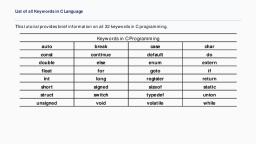
Ex:- auto, break, int, float, case, default, do, char, far, for, struct,, switch, if, union, register, return, unsigned, enum, extern, goto,, static, void, else, double, const, continue, short, signed, while., , Identifier:Identifiers refer to the names of the variables, functions and arrays. These are the, user defined names consisting of a sequence of letters and digits, with the first letter as a, character., Identifier can be a combination of both Upper and Lower case alphabets. The, underscore character is also for linking or combining different words in one long, identifier., , Constants:Constants in “C” language refer to fixed values that do not change during the, execution of “C” Program. “C’ supports several types of constants., , Numeric Constants:There are two types of numeric constants., (i), Integer constants, (ii), Real Constants, (i), Integer Constants:- An integer constant refers to a sequence of digits. There, are three types of integers , namely,, --> Decimal integer, --> Octal Integer, --> Hexa-Decimal Integer., --> Decimal integers consists of a set of digits from 0 to 9 .The decimal integers are, predefined by + or – signs., Valid examples are 123, 52, -320, 3252, etc…, --> Octal integers consist of any combination of digits from 0 to 7 , with a leading 0. Ex:037, 0551, 0,0435,….etc, --> Hexadecimal integer constants can consists of any combination of digits from 0 to 9, and letters from A to F (either uppercase or lowercase). A hexadecimal integer constant, UNIT – I, , Page 32
Page 34 :
must begin with either 0x or 0X. For instance, decimal integer 12 will be written as 0XC as, hexadecimal integer., Valid examples are, , 0x, , 0X2, , 0x7A, , 0xbcd, , Thus, the number 12 will be written 12 (as decimal), 014 (as octal) and 0xC (as, hexadecimal)., (ii), , Real Constants: - Real Constants represents the fractional numbers or numbers, with decimal point. Real numbers also called as floating numbers., Ex:- -10.38, -13.12,0.987251,…. Etc., , Character Constants:There are three types of character constants, (i), Single Character, (ii), String character, (iii), Back slash character, (i), , (ii), , (iii), , Single Character Constant:- It contains a single character enclosed, with a pair of single codes., Ex:- ‘a’, ‘g’, ‘b’, ‘9’,’7’,………..etc., String Constants: - It is a sequence of characters enclosed with in double, quotations. The Characters may be letters, numbers, special symbols, blank, spaces., Ex:- “ Avanthi”, “santhosh”,”2+3”, “c”, etc….., Back Slash Character Constants: - “C” language supports some special back slash, character constants that are used in output function., It consists of two characters, a back slash and a character. The Back slash, character constants are also known as escape sequences., The following are the list of escape Sequences., ‘\a’ ------------------> audible alert (Bell), ‘\b’ ------------------> back space, ‘\f’ ------------------> form feed, ‘\n’ ------------------> new line, ‘\r’ ------------------> carriage return, ‘\t’ ------------------> horizontal tab, ‘\v’ ------------------> vertical tab, ‘ \0’ ------------------> Null Character, , Variables:A variable is a data name, which may be used to store a data value. The values in the, variables may be changed during the execution of the program., No two variable names should be of same name within a single program. The variable’s, name always starts with alphabets or underscores symbols., Ex:- Aug, total, M1, prime, etc…., , UNIT – I, , Page 33
Page 35 :
OPERATORS:Operators are used to perform some particular action or operation to fulfil the specified, task., --> Operands: - operands are the data on which the operators are going to perform the, operation or the action., The classifications of operators based on the number of operands involved are, (a) Unary Operator (b) Binary Operator (c) Ternary Operator, Unary Operator: - Unary operator will operators on only one operand., Ex: +5, -3, ++2, ………, Binary Operator: - Binary operator will operators on two operands., Ex: - 5+4, 6-5, 6>5, 2X7, …….., Ternary Operator: - Ternary operator will operators on three operands., It is also called as Conditional operators (?:)., Another classification of operator is based on the type of operation being used are:, 1. Arithmetic Operators: - The arithmetic operators are used for performing the basic, arithmetic operations like +, -, x, %., The arithmetic operators are again further divided into two types., (A) Unary Arithmetic operators, (B) Binary Arithmetic operators., Unary Arithmetic Operators: - We have two unary arithmetic operators , the unary + (or) –, will specify whether the value is positive (or) negative., Binary Arithmetic operators: Binary operators, Description, +, Addition, Subtraction, *, Multiplication, /, Division, %, Modulus (Remainder), , Syntax, a+b, a-b, a*b, a/b, a%b, , Example, 5+3, 5-3, 5*3, 5/3, 5%3, , Results, 8, 2, 15, 1 {quotient}, 2, , 2. Logical Operators: Logical Operators, , operators, , AND, OR, NOT, , &&, ||, !, , UNIT – I, , Description of, operators, Double operand, Two pipes, Exclamation, Page 34
Page 36 :
The truth tables for the logical operators are as follows: -, , 3. Relational Operators: Relational operators specify how the two operands are related with one, another. The different relation operators are., , Note: - for the execution of a single instruction x=y+z, there are many micro instruction, generated., x=y+z, load ‘y’, A --> accumulator, load ‘z’, B, ADD A,B, Load ‘A’,X, Four micro instructions are involved., Suppose if you want to increment a variable by ‘1’ ,then above micro, instructions are again generated . So, to reduce the no. of micro instructions , the “C”, compiler has given a new set of operators called as Increment/Decrement., 4. INCREMENT/DECREMENT: The increment operator is used to increase the value of the variable, by ‘1’ .This operator variable is denoted by ‘++’., To decrease the value of the variable by ‘1’ the decrement operator is used, and is denoted by ‘- -‘., The Increment/Decrement operators are classified into two types, (a) Pre, (b) Post, , UNIT – I, , Page 35
Page 37 :
(i) Pre-Increment: - In Pre-Increment, the value is first incremental and then the, required operation or task is performed., Syntax: ++ Operand, e.g.: - ++a, (ii), , Post-Increment: - In post-increment, the required operation or task is, performed and then the value of the variable is incremented., Syntax: Operand ++, e.g.: - a ++, Pre-Increment, , Post-Increment, , a=5, b=++a, , a=5, b=a++, , a=5, b=, , a=5, b=, , O/p: a=6, b= 6, , O/p: a=6, b=5, , (iii), , Pre-Decrement: - In Pre-Decrement we first decrease the value and then, perform the actual specified value., Syntax: -- Operand, e.g.: --a, , (iv), , Post-Decrement: - In post-decrement we first perform the task and then, decrease the value of the variable by one., Syntax: Operand -e.g.: a-Pre-Decrement, Post-Decrement, a=5, b=--a, , a=5, b=a--, , a=5, b=, , a=5, b=, , O/p: a=4, b= 4, , O/p: a=4, b=5, , 5. Assignment Operators: This operator is used to assign the value to a variable. The, value can be directly passed or indirectly passed through some other variable., Syntax: e.g.: -, , UNIT – I, , Operand1= Operand2, x=5; a=b; etc….., , Page 36
Page 38 :
There are some special assignment operators which are also called as short hand, operators that reduce the number of micro–instructions., These are exclusively used only with assignment operators, where the operand value,, before and after the assignment operator will be same., Syntax: < Operand1>= <Operand1> arithmetic operator <Operand2>, <Operand1> arithmetic operator =<Operand2>, Operator, , Original Exp, , Revised, Exp, , +=, , a=a+b, , a+=b, , -=, , a=a-b, , a-=b, , *=, , a=a*b, , a*=b, , /=, , a=a/b, , a/=b, , %=, , a=a%b, , a%=b, , Result, The value of the variable ‘a’ is added with value of, variable ‘b’ and the result is stored again into, variable ‘a’., The value of the variable ‘b’ is subtracted from the, variable ‘a’ and the result is stored again into, variable ‘a’., The value of the variable ‘b’ is multiplied with value, of variable ‘a’ and the result is stored again into, variable ‘a’., The value of the variable ‘a’ is divided with value of, variable ‘b’ and the result is stored again into, variable ‘a’., The value of the variable ‘a’ is divided by value of, variable ‘b’ and the result is stored again into, variable ‘a’., , 6.Comma Operator: The comma operator is used to separate two different expressions., e.g.: - int a,b,c;, c=(a=10,b=20,a+b);, 7.Sizeof Operator: The sizeof operator is used to return the no. of bytes the operand occupies in, the memory. The operand may be a variable or a constant or a data type qualifier., Syntax: - sizeof(operand), , 8. Conditional Operator: - (Ternary Operator), This operator is used to evaluate an expression based on true or false., UNIT – I, , Page 37
Page 39 :
Syntax: - (expression)? True Part : False Part;, e.g.: - (1) x=5, y=(x>3)?6:9;, y=6., , e.g.: - (2) x=5, y=(x==3)?6:9;, y=9., , Conversation from, Binary to decimal: -, , 9. Bit-Wise Operator: - The Bit-wise operators are used to operate on the bits of the data., , One’s Compliment: - The ones complement operator is used to convert the bit from 1 to 0, and 0 to 1. The operator is used to represent ones compliment is called tilde (~) (takes only, one’s value)., e.g.: - A = 10100101 = (165)10, ~A = 01011010 = (90)10, Bit-wise AND (&): - This operator is used to perform the AND operation between the bits. It, is representing with single ampersand (&)., Example: - if a=5 b=7, c= a & b, 𝑎 = 0000 0101 {𝑏𝑖𝑛𝑎𝑟𝑦 𝑓𝑜𝑟𝑚 𝑜𝑓 5}, 𝑏 = 0000 0111 {𝑏𝑖𝑛𝑎𝑟𝑦 𝑓𝑜𝑟𝑚 𝑜𝑓 7}, 𝑐 = 0000 0101 {𝑏𝑖𝑛𝑎𝑟𝑦 𝑓𝑜𝑟𝑚 𝑜𝑓 5}, c=5, Bit-wise OR (|): This operator is used to perform the OR operation between two bits. The, operator used here is a single pipe (|)., Syntax: - operand1 | operand2, , UNIT – I, , Page 38
Page 40 :
Example: - if a=5 b=7, c= a | b, 𝑎 = 0000 0101 {𝑏𝑖𝑛𝑎𝑟𝑦 𝑓𝑜𝑟𝑚 𝑜𝑓 5}, 𝑏 = 0000 0111 {𝑏𝑖𝑛𝑎𝑟𝑦 𝑓𝑜𝑟𝑚 𝑜𝑓 7}, 𝑐 = 0000 0111 {𝑏𝑖𝑛𝑎𝑟𝑦 𝑓𝑜𝑟𝑚 𝑜𝑓 7}, , c=7, Left-Shift Operator: - (<<), Left-Shift operators are used for shifting the bits towards the left, side. After shifting the bits, the remaining left over places are added with zeros, it is, represented by “<<”., Syntax: - operand << value, Example: - 5 = 0 0 0 0, 0 1 0 1, (5<<1) =10 =, , 0 0 0, , 0, , 1 0, , 1 0, , (5 x 2 1 = 10), , (5<<1) =20 =, 0 0 0 1 0 1 0 0 (5 x 2 2 = 20), The operation a<<n will multiply the value of ‘a’ with 2n ., Right-Shift Operator: - (<<), Right-Shift operators are used for shifting the bits towards the Right, side. After shifting the bits, the remaining left most bits are filled with zeros, it is, represented by “>>”., Syntax: - operand >> value, Example: - 10 = 0 0 0 0 1 0 1 0, (10>>1) = 5 = 0 0 0 0 0 1 0 1, 10, ( 21 = 5), The operation a>>n will divide the number(operand) with 2n ., Exclusive OR: - (X-OR), The Exclusive OR operation is also called as X-OR operation. The, operator results into false if both the inputs are same and results into true if both the inputs, are different. The truth table for X-OR is, A, b, a^b, 0, 0, 0, 0, 1, 1, 1, 0, 1, 1, 1, 0, Example: - if a=5 b=7, c= a^b, 𝑎 = 0000 0101 {𝑏𝑖𝑛𝑎𝑟𝑦 𝑓𝑜𝑟𝑚 𝑜𝑓 5}, 𝑏 = 0000 0111 {𝑏𝑖𝑛𝑎𝑟𝑦 𝑓𝑜𝑟𝑚 𝑜𝑓 7}, 𝑐 = 0000 0010 {𝑏𝑖𝑛𝑎𝑟𝑦 𝑓𝑜𝑟𝑚 𝑜𝑓 2}, c=2, UNIT – I, , Page 39
Page 41 :
Type Conversions in C, A type cast is basically a conversion from one type to another., There are two types of type conversion:, 1. Implicit Type Conversion Also known as ‘automatic type conversion’., Done by the compiler on its own, without any external trigger from the user., Generally takes place when in an expression more than one data type is present. In, such condition type conversion (type promotion) takes place to avoid lose of data., All the data types of the variables are upgraded to the data type of the variable with, largest data type., bool -> char -> short int -> int ->, unsigned int -> long -> unsigned ->, long long -> float -> double -> long double, It is possible for implicit conversions to lose information, signs can be lost (when, signed is implicitly converted to unsigned), and overflow can occur (when long long, is implicitly converted to float)., Example of Type Implicit Conversion:, // An example of implicit conversion, #include<stdio.h>, int main(), {, int x = 10; // integer x, char y = 'a'; // character c, // y implicitly converted to int. ASCII, // value of 'a' is 97, x = x + y;, // x is implicitly converted to float, float z = x + 1.0;, printf("x = %d, z = %f", x, z);, }, Output:, x = 107, z = 108.000000, 2. Explicit Type Conversion– This process is also called type casting and it is user defined., Here the user can type cast the result to make it of a particular data type., The syntax in C:, (type) expression, Type indicated the data type to which the final result is converted., , UNIT – I, , Page 40
Page 42 :
// C program to demonstrate explicit type casting, #include<stdio.h>, int main(), {, double x = 1.2;, // Explicit conversion from double to int, int sum = (int)x + 1;, printf("sum = %d", sum);, }, Output:, sum = 2, Advantages of Type Conversion, , , , This is done to take advantage of certain features of type hierarchies or type, representations., It helps us to compute expressions containing variables of different data types., , UNIT – I, , Page 41
Page 43 :
UNIT-II, Chapter –I, Input and Output, Input : In any programming language input means to feed some data into program. This, can be given in the form of file or from command line. C programming language, provides a set of built-in functions to read given input and feed it to the program as per, requirement., Output : In any programming language output means to display some data on screen,, printer or in any file. C programming language provides a set of built-in functions to, output required data., , Non-formatted Input and Output Functions:, Non-formatted input and output can be carried out by standard input–output library, functions in C. These can handle one character at a time. For the input functions, it does, not require to be pressed after the entry of the character. For output functions, it prints a, single character on the console, getchar() : Reading or Accepting String Character by Character, Syntax, /* getchar accepts character & stores in ch */, char ch = getchar();, putchar() : Displaying or printing String Character by Character, Unit-2 (C language), , P.Sowmya sree, , Page 1
Page 44 :
Syntax:, putchar(char_variable);, example : putchar(ch);, , /*program on getchar() and putchar()*/, #include <stdio.h>, main (), {, char c;, printf("Enter character: ");, c = getchar(); //reads a single character, printf("Character entered: ");, putchar(c); // dispalys a character, }, , Output:, , Enter character:S, Character entered:S, , gets() and puts() functions:, The gets() function reads string from user and puts() function prints the string. Both, functions are defined in <stdio.h> header file., Syntax for gets():, Char var_name[size];// declaring a character array, gets(var_name);, , // reading string, , Syntax for puts():, puts(var_name); //printing the string, , /* program on gets() and puts()*/, #include<stdio.h>, main(), {, char name[50];, printf("Enter your name: ");, gets(name); //reads string from user, printf("Your name is: ");, puts(name); //displays string, , Output:, , Enter your name: Sowmya sree S, Your name is: Sowmya sree, , }, , Formatted Input output functions, Unit-2 (C language), , P.Sowmya sree, , Page 2
Page 45 :
scanf():, scanf() function reads all the types of data values., It is used for runtime assignment of variables., The scanf() stops functioning when some input entered does not match format, string, , Syntax:, Scanf(“format specifier”,&var1,&var2,……);, Format specifiers:, , &(address):, scanf() statement requires ‘&’ operator called address operator .The address operator, prints the memory location of the variable . scanf() statement the role of ‘&’ operator is, to indicate the memory location of the variable, so that the value read would be placed at, that location., printf(), This function displays output with specified format, It requires format conversion symbol or format string and variables names to the, print the data, The list of variables are specified in the printf() statement, The values of the variables are printed as the sequence mentioned in printf(), The format string symbol and variable name should be the same in number and, type, Unit-2 (C language), , P.Sowmya sree, , Page 3
Page 46 :
Syntax, printf(“control string”, varialbe1, variable2,..., variableN);, • The control string specifies the field format such as %d, %s, %c, %f and variables as, taken by the programmer, , /*Example program on printf() and scanf()*/, #include<stdio.h>, main(), {, int a;, float b;, char c;, printf("enter a character");, scanf("%c",&c);, printf("\nyou entered a character:%c",c);, printf("\nenter a number");, scanf("%d",&a);, printf("\nyou entered a number:%d",a);, printf("\nenter a real number");, scanf("%f",&b);, printf("\nyou entered a real number:%f",b);, , Output:, Enter a character:K, You entered a character:K, Enter a number: 10, You entered a number:10, Enter a real number: 15.66, You entered a real number:15.660000, , }, , Escape Sequence, printf() and scanf() statement follows the combination of characters called escape, sequence, Escape sequence are special characters starting with ‘\’, , Unit-2 (C language), , P.Sowmya sree, , Page 4
Page 47 :
/*Example program on Escape sequence*/, #include <stdio.h>, main(), {, printf("Hello\nWorld!"); //use of \n, printf("\nHello\tWorld!"); // use of \t, printf("\n\"Hello World!\""); //use of \", printf("\nHello\bWorld!");, //use of \b, }, , Output:, , Hello, World!, Hello World!, “Hello World”, HellWorld, , Chapter –II, Control Statements, Control Structures, "Statements used to control the flow of execution in a program”, means a statement, , through which we control the behavior of our program like what kind of function it will, perform, when it will terminate or continue under certain circumstances or conditions., All programs use control structures to implement the program logic., There are three types of Control Structures, 1. Sequence, 2.Selection, 3. Loops/ Repetition/ Iteration, 1.Sequence structure in C:, As name refers instructions are executed in the sequence in which they are written in the, program., Example: Compound Statement:, {, Statements, Statements - 1, Statements - 2, --------}, , 2.Selection structure in C:, A structure which select which statement or block of statements will execute on the basis, of our, programming logic., They are:, 1.if statements, 2.switch statement, 3.conditional statement, 4.goto statement, Unit-2 (C language), , P.Sowmya sree, , Page 5
Page 48 :
if statements:, This statements is widely used in decision making. It is further classified into, if statement, if…else statement, nestedif..else statement, else..if ladder, , if statement:, ‘if’ is a keyword in C language. It is used to execute or ignore a set of statements after, testing it., Syntax:, if (condition), {, Block of statements, }, A condition is a relational or logical expression, it produces either true(means 1) or false(means, result., the condition is true then the block of statement, executed and if the condition is false the the, block of statement is ignored and the control is, transferred to the next statement after if, statement., Flowchart for if, , Output:, a is less than 20, value of a is 10, , and, 0), If, is, , statement, , /*Example program on if statement*/, #include<stdio.h>, Unit-2 (C language), , P.Sowmya sree, , Page 6
Page 49 :
main( ), {, int a=10; //local variable declaration, if(a<20), {, printf(“a is less than 20”);, }, printf(”value of ais%d”,a);, }, , if…else statement, It is similar to if statement i.e. It is also used to execute or ignore a set of statements, after testing a condition.In if-else statement one condition and two blocks of, statements are given.First blocks contain if statement with condition and its body, part.Second is else and it contain only body part., Syntax:, , A condition is a logical or relational expression and it produces either true or false, result.If the condition is true the first block of if-else statement (which is ifstatement) is executed and second is ignored and after executing the first block , the, control is, transferred to next statement, after if -else, structure., If the condition is, false then the first blocks of, statement is, ignored and the second block, of statement is, executed. After the executing, the second block, of statement the control is, transferred to, next statement after if-else, structure., Flow Chart :, , Unit-2 (C language), , P.Sowmya sree, , Page 7
Page 50 :
Output:, Enter Number to check it is Even or Odd: 6, Number is Even, , //Program to find number is Even or Odd using if-else statement, #include<stdio.h>, main(), {, intNum;, clrscr();, printf("Enter Number to check it is Even or Odd: ");, scanf(“%d”,&Num);, if(Num%2==0), {, printf("Number is Even");, }, else, {, printf(" Number is Odd");, }, }, //Write a program to print the prime number from 2 to n where n is given by user, , #include<stdio.h>, main(), {, intnum,i=1,j,count;, printf(“Enter Num value To Print Prime Numbers between 1 and Num: ");, scanf(“%d”,&Num);, printf("Prime Numbers upto:"<<num<<"\n");, , Unit-2 (C language), , P.Sowmya sree, , Page 8
Page 51 :
while(i<=num), {, count=0;, for(j=1;j<=i;j++), {, if(i%j==0), count++;, }, if(count==2), printf(“%d”,n);, i++;, }, Printf(“n\n”);, }, , Output:, Enter Num value To Print Prime Numbers between 1 and, Num: 10, Prime Numbers upto: 10, 2, 3, 5, 7, , nestedif..else statement, If we use one if or else if statement inside another if or else if statement(s) it is called, nested if., Syntax:, , Flowchart:, The nested if...else statement allows you to, check for multiple test expressions and, execute different codes for more than two, conditions., , //Program using nested if, #include <stdio.h>, main(), Unit-2 (C language), , P.Sowmya sree, , Output:, Enter your Age: 18, You are a Teenage, , Page 9
Page 52 :
{, int age;, printf( "Enter your Age:"”;, scanf(“%d”,&age);, if (age >=10 && age<=50), {, if (age >=10 && age <= 18), {, printf("You are a Teenage\n”);, }, else, {, printf("You not a Teenager\n");, }, }, else, {, printf("You are more than 50 years");, }, }, else..if ladder, When we need to list multiple else if…else statement blocks. We can check the, various conditions using the following, syntax –, if(boolean_expression 1), {, // When expression 1 is true, }, else if( boolean_expression 2), {, // When expression 2 is true, }, else if( boolean_expression 3), {, // When expression 3 is true, }, else, {, // When none of expression is true, }, When the first Boolean condition becomes true then first block gets executed., Unit-2 (C language), , P.Sowmya sree, , Page 10
Page 53 :
When first condition becomes false then second block is checked against the condition. If, second condition becomes true then second block gets executed., Flow chart:, , //Example program on else..if ladder, #include <stdio.h>, main (), {, // declare local variable, int marks = 55;, // check the boolean condition, if( marks >= 80 ), {, // if 1st condition is true, printf("U got 1st class !!");, }, else if( marks >= 60 && marks < 80), {, // if 2nd condition is false, printf("U got 2nd class !!");, }, else if( marks >= 40 && marks < 60), {, // if 3rd condition is false, printf("U got 3rd class !!");, }, else, {, // none of condition is true, printf("U are fail !!");, }, }, , Output:, U got 3rd class !!, , Switch statement:, Unit-2 (C language), , P.Sowmya sree, , Page 11
Page 54 :
o, o, o, o, , Switch is also a control structure and it is used to select one option from a set of, options., It compares the value of an expression or a variable against a list of cases., The case labels and the value of expression or variable must be an integer or a, character., It must not be a float or double value. If the value of expression in switch is float or, double type then the compiler will generate error message., , Syntax:, switch(expression), {, case value 1: statement1;, break;, case value 2: statement 2;, break;, ., ., ., ., default: default statement;, }, //Example program on switch case, #include<stdio.h>, void main(), {, int day;, printf("1. Sunday\n");, printf("2. Monday\n");, printf("3. Tuesday \n");, printf("4. Wednesday\n");, printf("5. Thursday \n");, printf("6. Friday \n");, printf("7. Saturday \n");, printf("Enter your choice");, scanf(“%d”,&day);, switch (day), {, case 1 : printf("Sunday");, break;, case 2 : printf("Monday");, break;, case 3 : printf("Tuesday");, break;, case 4 : printf("Wednesday");, break;, Unit-2 (C language), , P.Sowmya sree, , Output:, 1., 2., 3., 4., 5., 6., 7., , Sunday, Monday, Tuesday, Wednesday, Thursday, Friday, Saturday, , Enter your choice 7, Saturday, , Page 12
Page 55 :
case 5 : printf("Thursday");, break;, case 6 : printf("Friday");, break;, case 7 : printf("Saturday");, break;, default :printf("Not an allowable day number");, break;, }, }, Conditional Statement: --------Refer to operators above, goto Statement:goto statement is used for altering the normal sequence of program execution by, transferring control to some other part of the program., , Syntax, goto label;, .. .. ... ., ... .. ..., ... .. ..., label:, statement;, ... .. ..., //Example program on goto statement, #include<stdio.h>, void main(), {, float num, average, sum = 0.0;, int i, n;, printf( "Maximum number of inputs: ");, scanf(“%d”,&n);, for(i = 1; i <= n; ++i), {, printf("Enter n%d:\n", i);, scanf(“%f”,&num);, if(num< 0.0), {, // Control of the program move to jump:, goto jump;, Unit-2 (C language), , P.Sowmya sree, , Output:, Maximum number of inputs: 3, Enter n1 :10, Enter n2 :20, Enter n3:30, Average =20, , Page 13
Page 56 :
}, sum += num;, }, jump:, average = sum / (i - 1);, printf("\nAverage = %f", average);, }, , Loops/ Repetition/ Iteration, , There may be a situation, when you need to execute a block of code several, number of times., In general statements are executed sequentially: The first statement in a, function is executed first, followed by the second, and so on., Programming languages provide various control structures that allow for more, complicated execution paths., A loop statement allows us to execute a statement or group of statements, multiple times., C provide 3 types of looping statements they are :, for loop, while loop, do..while loop, , for loop:, A for loop is a repetition control structure that allows you to efficiently write a loop, that needs to execute a specific number of times., , Syntax, for ( initialization; condition; increment /decrement), {, statement(s);, }, , , , , , , The initialization step is executed first, and only once. This step allows you to, declare and initialize any loop control variables. You are not required to put a, statement here, as long as a semicolon appears., Next, the condition is evaluated. If it is true, the body of the loop is executed. If it, is false, the body of the loop does not execute and flow of control jumps to the, next statement just after the for loop., After the body of the for loop executes, the flow of control jumps back up to, the increment/decrement statement. This statement allows you to update any loop, control variables. This statement can be left blank, as long as a semicolon appears, after the condition., , Unit-2 (C language), , P.Sowmya sree, , Page 14
Page 57 :
, , The condition is now evaluated again. If it is true, the loop executes and the, process repeats itself (body of loop, then increment step, and then again, condition). After the condition becomes false, the for loop terminates., , Flow Diagram, , //Program to print numbers from 1 to 10 using for, loop, #include<stdio.h>, void main(), {, for(int a = 1; a <=10; a ++ ), {, printf("value of a: %d\n", a);, }, }, Unit-2 (C language), , P.Sowmya sree, , Output:, value of a:1, value of a:2, value of a:3, value of a:4, value of a:5, value of a:6, value of a:7, value of a:8, value of a:9, value of a:10, , Page 15
Page 58 :
while loop:, A while loop statement repeatedly executes a target statement as long as a given, condition is true.while is a entry controlled loop i.e first the condition is checked and, then the statement is executed., , Syntax, while(condition), {, statement(s);, }, Here, statement(s) may be a single statement or a block of statements. The condition may, be any expression, and true is any non-zero value. The loop iterates while the condition is, true., Flow Diagram, , //Program to print numbers from 1 to 10 using while, loop, #include<stdio.h>, main(), {, int a = 1;, while( a <=10), {, printf("value of a: %d\n", a);, a ++ ;, }, , Output:, value of a:1, value of a:2, value of a:3, value of a:4, value of a:5, value of a:6, value of a:7, value of a:8, value of a:9, value of a:10, , }, Unit-2 (C language), , P.Sowmya sree, , Page 16
Page 59 :
do...while loop, Unlike for and while loops, which test the loop condition at the top of the loop,, the do...while loop checks its condition at the bottom of the loop., A do...while loop is similar to a while loop, except that a do...while loop is guaranteed, to execute at least one time., , Syntax, do, {, statement(s);, }while( condition );, Notice that the conditional expression appears at the end of the loop, so the statement(s), in the loop execute once before the condition is tested., If the condition is true, the flow of control jumps back up to do, and the statement(s) in, the loop execute again. This process repeats until the given condition becomes false., , Flow, , Diagram, , //Program to print numbers from 1 to 10 using do…while, loop, #include<stdio.h>, main(), {, int a = 1;, do, {, printf("value of a:%d\n ", a);, a ++ ;, } while( a <=10);, Unit-2 (C language), , P.Sowmya sree, , Output:, value of a:1, value of a:2, value of a:3, value of a:4, value of a:5, value of a:6, value of a:7, value of a:8, value of a:9, value of a:10, , Page 17
Page 60 :
}, //Program to check whether a given number is amstrong or not, #include<stdio.h>, void main(), {, Output:, int origNum, num, rem, sum = 0;, printf("Enter a positive integer: ");, Enter a positive integer: 153, scanf(“%d”,&origNum);, 153 is an Armstrong number., , num = origNum;, while(num != 0), {, rem= num % 10;, sum =sum+(rem * rem * rem);, num =num/ 10;, }, if(sum == origNum), printf("%d is an Armstrong number.", origNum);, else, printf("%d is not an Armstrong number.", origNum);, }, , break Statement, The break statement terminates the loop (for, while and do...while loop) immediately, when it is encountered. The break statement is used with decision making statement such, as if...else,switch., Syntax of break statement, break;, , Flowchart of, , Unit-2 (C language), , break statement, , P.Sowmya sree, , Page 18
Page 61 :
/*Example program on break*/, #include<stdio.h>, main(), Output:, 0, 1, 2, 3, 4, , {, int i;, for(i=0;i<=10;i++), {, if(i==5), break;, printf("%d\n",i);, }, }, , continue Statement, The continue statement skips some statements inside the loop. The continue statement is, used with decision making statement such as if...else., Syntax of continue Statement, continue;, , Flowchart of continue Statement, , Unit-2 (C language), , P.Sowmya sree, , Page 19
Page 62 :
main(), {, , {, , /*Example program on continue*/, , Output:, 0, 1, 2, 3, 4, 6, 7, 8, 9, 10, , #include<stdio.h>, , int i;, for(i=0;i<=10;i++), if(i==5), continue;, printf("%d\n",i);, , }, }, , Chapter –II, Arrays and Strings, ARRAYS:, Array is a collection of similar data type. A single variable can hold only one value at a, time, If we want a variable to store more than one value of same type we use array., Array is linear data structure., (Instead of declaring individual variables, such as number0, number1, ..., and number99,, you declare one array variable such as numbers and use numbers[0], numbers[1], and ...,, numbers[99] to represent individual variables.), A specific element in an array is accessed by an index.All arrays consist of contiguous, memory locations., We are having 2 types of arrays they are:, Unit-2 (C language), , P.Sowmya sree, , Page 20
Page 63 :
One Dimensional array, Multi Dimensional array, One, , Dimensional array, , Declaring Arrays, To declare an array in C, a programmer specifies the type of the elements and the, number of elements required by an array as follows −, datatype arrayName [ arraySize ];, This is called a single-dimensional array. The arraySize must be an integer constant, greater than zero and datatype can be any valid C data type, Example:, int a[6];, , Initializing Arrays, You can initialize C++ array elements either one by one or using a single statement as, follows:, type arrayName[ arraySize ]= {list};, The number of values between braces { } cannot be larger than the number of elements, that we declare for the array between square brackets [ ]., Example: int a[5]={2,3,4,5,6};, If you omit the size of the array, an array just big enough to hold the initialization is, created. Therefore, if you write:, int a[]={2,3,4,5,6};, Accessing Array Elements :, An element is accessed by indexing the array name. This is done by, placing the index of the element within square brackets after the name of the array., Example: int a[10]; a[0]=5; a[1]=2; . . ., Unit-2 (C language), , P.Sowmya sree, , Page 21
Page 64 :
For example, an array containing 5 integer values of type int called ‘a’ could be, represented as:, , a, /*Example program on reading and displaying array values*/, #include<stdio.h>, main(), {, int a[10],i,n;, printf( “Enter the size of an array:”);, scanf(“%d”,&n);, printf(“\nEnter the array elements”);, for(i=0;i<n;i++), scanf(“%d”,&a[i]); //reading elements into an array, printf(“\nthe elements are:\n”);, for(i=0;i<n;i++), printf(“%d\n”,a[i]); //displaying elements from an array, }, , Output:, Enter the size of an array:5, Enter the array elements, 12345, the elements are:, 1, 2, 3, 4, 5, , //C++ Program to Find Largest and Smallest Element in Array, #include<stdio.h>, main(), {, int Arr[100],n,i,small,large;, printf( "Enter number of elements you want to insert ");, scanf(“%d”,&n);, for(i=0;i<n;i++), {, printf("Enter element %d:",i+1);, scanf(“%d”, Arr[i]);, }, small=Arr[0];, large=Arr[0];, for(i=1;i<n;i++), {, if(Arr[i]<small), small=Arr[i];, if(Arr[i]>large), Unit-2 (C language), , P.Sowmya sree, , Output:, Enter number of elements, you want to insert 4, Enter element 1:10, Enter element 2:1, Enter element 3:30, Enter element 4:100, Largest element is : 100, Smallest element is : 1, , Page 22
Page 65 :
large=Arr[i];, }, printf("\nLargest element is :%d",large);, printf("\nSmallest element is :%d",small);, }, , Multi Dimensional array:, Arrays with more than one dimension are called, multidimensional arrays., Syntax: datstype name[size1][size2]...[sizeN];, , Two Dimensional array, The simplest form of the multidimensional array is the two-dimensional array. A twodimensional array is, in essence, a list of one-dimensional arrays. To declare a twodimensional integer array of size x,y, you would write something as follows:, datatype arrayName [ x ][ y ];, .Where type can be any valid C data type and arrayName will be a valid C identifier., A two-dimensional array can be think as a table, which will have x number of rows and, y number of columns. A 2-dimensional array a, which contains three rows and four, columns can be shown as below:, , Thus, every element in array a is identified by an element name of the form a[ i ][ j ],, where a is the name of the array, and i and j are the subscripts that uniquely identify each, element in a., Initializing Two-Dimensional Arrays, Two-Dimensional arrays may be initialized by specifying bracketed values for each row., Following is an array with 3 rows and each row have 4 columns., int a[3][4] = {, {0, 1, 2, 3} , /* initializers for row indexed by 0 */, {4, 5, 6, 7} , /* initializers for row indexed by 1 */, Unit-2 (C language), , P.Sowmya sree, , Page 23
Page 66 :
{8, 9, 10, 11} /* initializers for row indexed by 2 */, };, The nested braces, which indicate the intended row, are optional. The following, initialization is equivalent to previous, example:, int a[3][4] = {0,1,2,3,4,5,6,7,8,9,10,11};, Accessing Two-Dimensional Array Elements, An element in 2-dimensional array is accessed by using the subscripts, i.e., row index, and column index of the array., For example:, int val = a[2][3];, The above statement will take 4th element from the 3rd row of the array., //Example Program on two dimensional array, #include<stdio.h>, main(), {, // an array with 5 rows and 2 columns., int i,j,a[5][2] = { {0,0}, {1,2}, {2,4}, {3,6},{4,8}};, // output each array element's value, for ( i=0; i < 5; i++ ), for ( j = 0; j < 2; j++ ) {, printf( "a[%d][%d]:%d\n",i,j,a[i][j]);, , Output:, a[0][0]: 0, a[0][1]: 0, a[1][0]: 1, a[1][1]: 2, a[2][0]: 2, , }, }, , a[2][1]: 4, , Multi Dimensional array, C++ allows multidimensional arrays., Syntax:, type name[size1][size2]...[sizeN];, Example: int threedim[5][10][4];, Initialisation of three dimensional array, , a[3][0]: 3, a[3][1]: 6, a[4][0]: 4, a[4][1]: 8, , Example: int test[2][3][4] = {3, 4, 2, 3, 0, -3, 9, 11, 23,, 12, 23,2, 13, 4, 56, 3, 5, 9, 3, 5, 5, 1, 4, 9};, STRINGS:, A String is an array of characters i.e. the characters arranged one after another, in the memory .Any group of characters defined between double quotations is called as, String., Unit-2 (C language), , P.Sowmya sree, , Page 24
Page 67 :
Eg:"Hello", "Welcome friend", Declaration of a String:, The general format for declaring String variable is, Syntax: char arrayname[size];, Here the size determines the number of characters in the array name., Array name must be any valid variable name., Ex: char name[10];, A String constant is a one dimensional array of characters, terminated by null, character ('\0')., When the compiler assigns a character string to a character array, it automatically, supplies a null character at the end of the string. Therefore the size should be equal to, maximum number of characters in the string plus '1'., Initialization of String:, Character arrays may be initialize when they are declared.The initialization, can be done in either of the following ways., Ex:1. char name[7]={'S', 'A', 'C', 'H', 'I', 'N', '\0'};, 2. char name[7]="SACHIN";, Here in example-1 when we initialize a character array by listing the elements, the null, terminator ('\0') should be explicitly specified., In example-2 when the character array is initialized as a string constant,null, terminator is not necessary,Since the 'C' compiler places the null character automatically., 'C' allows to initialize a character array without specifying the size .In this case, the size, will be determined automatically based on the number of elements initialized., Ex:- char name[]="SACHIN";, /* program to illustrate a simple string */, #include<stdio.h>, main(), {, char add[30];, printf("Enter Your place:\n");, scanf("%s",add);, printf("Your place is:%s",add);, getch();, }, , Output:, Enter Your place:, Hyderabad, Your place is: Hyderabad, , Initialization of String through keyboard:, The scanf() function is used to initialize the string through keyboard., Ex: char name[15];, scanf("%s",name);, Unit-2 (C language), , P.Sowmya sree, , Page 25
Page 68 :
'%s' is used a format specifier to read the string (character array)., Here the problem with scanf() function is that it terminates the string when it finds any, white space such as space etc., Ex: If the following string is given through keyboard, PAVAN KALYAN, The array name stores only PAVAN because after PAVAN there is a space so, scanf() treats it as the end of the string., /* program to illustrate the drawback of scanf() function*/, #include<stdio.h>, #include<conio.h>, main(), {, Char name[20];, clrscr();, printf("Enter Your name:\n");, scanf("%s",name);, printf("Your name is:%s",name);, , Output:, Enter Your name:, Prakash Raj, Your name is: Prakash, , }, /* Program to print the string in following format, S, SO, SOW, SOWM, SOWMY, SOWMYA, */, #include<stdio.h>, main(), {, char name[]="SOWMYA";, int i,j;, for(i=0;i<=6;i++), {, for(j=0;j<i;j++), printf("%c",name[j]);, printf("\n");, }, }, String Handling functions:, 'C' library supports a large number of string handling functions that can be used, to manipulate strings.if we are using the following string functions we must compulsory, include <string.h> in our program., Unit-2 (C language), , P.Sowmya sree, , Page 26
Page 69 :
The string Handling functions are:, 1. strlen(), 2. strcat(), 3. strcpy(), 4. strcmp(), 5. strlwr(), 6. strupr(), 7. strrev(), 1. strlen() function: This function counts and returns the number of characters in a, string., Syntax:n=strlen(string);, Here 'n' is an integer variable which receives the value of the length of the, string., /* program to calculate the length of the string */, #include<stdio.h>, #include<string.h>, main(), {, char s[15]="hello";, printf("length of hello is :%d",strlen(s));, }, Output:, Length of hello is :5, 2.strcat() function: This function is used to join two strings together, Syntax: strcat(string1,string2);, String 1 and string2 are character arrays.when the strcat() function is executed,string2 is, appended to string1.It does so by removing the null character at the end of string1 and, placing string2 from there .The string at string2 remains unchanged., /* program on strcat() function*/, #include<stdio.h>, #include<string.h>, main(), {, char s1[15]="hello";, char s2[10]="world";, strcat(s1,s2);, printf("After concatenation:\n");, printf("%s",s1);, }, Output:, After concatenation:, Unit-2 (C language), , P.Sowmya sree, , Page 27
Page 70 :
Hello world, 3. strcpy() function: strcpy() function is used to copy one string to another., Syntax: strcpy(string1,string2);, Here string2 will be copied to string1, /* program on strcpy() function*/, #include<stdio.h>, #include<string.h>, main(), {, char s1[15]="hello";, char s2[10], strcpy(s2,s1);, printf("first string:\n");, printf("%s",s1);, printf("second string:\n");, printf("%s",s2);, }, Output:, First string:hello, Second string:hello, 4.strcmp() function:This function compares two strings and has a value 0 if they are, equal.If they are not equal it has the numberic difference between the ASCII values of the, first non-matching pairs of characters., Syntax: n=strcmp(string1,string2);, Here 'n' is an integer variable which receives the value of the length of the, string., /* program on strcpy() function*/, #include<stdio.h>, #include<string.h>, main(), {, int i;, char s1[10]="ABC";, char s2[10]="ABC";, i=strcmp(s1,s2);, printf("i=%d",i);, }, Output:, i=0, Unit-2 (C language), , P.Sowmya sree, , Page 28
Page 71 :
5.strlwr() function:Converts the string to lowercase., Syntax: strlwr(string);, Ex: strlwr("RAMU"), Output:ramu, 6.strupr() function:Converts the string to Uppercase., Syntax: strupr(string);, Ex: strlwr("ramu"), Output:RAMU, 7.strrev() function: Displays the string in reverse ., Syntax:strrev("string");, Ex: strrev("college"), o/p:egelloc, /*program to count No of words ,Lines in a text.*/, #include<stdio.h>, void main(), {, char line[80],ctr;, int i,c,end=0,ch=0,w=0,l=0;, printf("Enter The Text\n");, while(end==0), {, c=0;, while((ctr=getchar())!=’\n’), line[c++]=ctr;, line[c]=’\o’;, if(line[0]==’\o’), break;, else, {, w++;, for(i=0;line[i]!=’\o’;i++), if(line[i]==’ ‘||;line[i]==’\t’), w++;, }, l=l+1;, ch=ch+strlen(line);, }, printf("\n");, printf("Number Of Lines:%d\n",l);, prinf("Number Of Words:%d\n",w);, printf("Number Of Characters:%d\n",ch);, }, Unit-2 (C language), , P.Sowmya sree, , Page 29
Page 72 :
ctype.h, The ctype.h header file of the C Standard Library declares several functions that, are useful for testing and mapping characters., All the functions return non-zero (true) if the argument c satisfies the condition, described, and zero(false) if not., Library Functions under ctype.h, Function, , Work Of Function, , isalnum, , Tests whether a character is alphanumeric or not, , isalpha, , Tests whether a character is aplhabetic or not, , iscntrl, , Tests whether a character is control or not, , isdigit, , Tests whether a character is digit or not, , isgraph, , Tests whether a character is grahic or not, , islower, , Tests whether a character is lowercase or not, , isprint, , Tests whether a character is printable or not, , ispunct, , Tests whether a character is punctuation or not, , isspace, , Tests whether a character is white space or not, , isupper, , Tests whether a character is uppercase or not, , isxdigit, , Tests whether a character is hexadecimal or not, , tolower, , Converts to lowercase if the character is in uppercase, , toupper, , Converts to uppercase if the character is in lowercase, , 1.isalnum():, The C library function void isalnum(int c) checks if the passed character is, alphanumeric., /*program on isalnum()*/, Unit-2 (C language), , P.Sowmya sree, , Page 30
Page 73 :
#include <stdio.h>, main(), {, char ch;, printf("Enter any character\n");, scanf("%c", &ch);, if ( isalnum ( ch ) ), printf ( "\nEntered character is alphanumeric" ) ;, else, printf ( "\nEntered character is not alphanumeric" ) ;, }, OUTPUT:, Enter any character, @, Entered character is not alphanumeric, 2. isalpha():, , , isalpha( ) function in C language checks whether given character is alphabetic or not., Syntax for isalpha( ) function is given below., , int isalpha ( int x );, EXAMPLE PROGRAM FOR ISALPHA( ) FUNCTION IN C:, #include <stdio.h>, int main(), {, char ch;, printf("Enter any character\n");, scanf("%c", &ch);, if ( isalpha ( ch ) ), printf ( "\nEntered character is alphabetic" ) ;, else, printf ( "\nEntered character is not alphabetic" ) ;, }, OUTPUT:, Enter any character, 1, Unit-2 (C language), , P.Sowmya sree, , Page 31
Page 74 :
Entered character is not alphabetic, 3.iscntrl():, iscntrl( ) function in C language checks whether given character is control character, or not. Syntax for iscntrl( ) function is given below., int iscntrl( int x );, , , Control characters in C language are ‘\a’ ( alert ), ‘\b’ ( backspace ), ‘\f’ ( form feed, ), ‘\n’ ( new line ), ‘\r’ ( carriage return ), ‘\t’ ( horizondal tab), ‘\v’ ( vertical tab), and ‘\0’ ( null )., , EXAMPLE PROGRAM FOR ISCNTRL() FUNCTION IN C:, , #include <stdio.h>, int main(), {, char ch[5] ="abc\a";, int i = 0;, while(1), {, if(iscntrl(ch[i])), {, printf ( "control character is found at " \, "%dth position\n", i+1);, break;, }, i++;, }, return 0;, }, OUTPUT:, control character is found at 4th position, 4. isdigit():, , , isdigit( ) function in C language checks whether given character is digit or not., Syntax for isdigit( ) function is given below., , int isdigit ( int x );, , Unit-2 (C language), , P.Sowmya sree, , Page 32
Page 75 :
EXAMPLE PROGRAM FOR ISDIGIT() FUNCTION IN C:, #include <stdio.h>, int main(), {, char ch;, printf("Enter any character\n");, scanf("%c", &ch);, if ( isdigit ( ch ) ), printf ( "\nEntered character is digit" ) ;, else, printf ( "\nEntered character is not digit" ) ;, }, OUTPUT:, Enter any character, 200, Entered character is digit, 5. isgraph():, isgraph( ) function in C language checks whether given character is graphical, character or not. Syntax for isgraph( ) function is given below., int isgraph( int x );, , , All printable characters are graphical characters except space ( ‘ ‘ )., , EXAMPLE PROGRAM FOR ISGRAPH() FUNCTION IN C:, In this program, isgraph( ) function checks whether character is graphical, character or not., If its a graphical character, it is printed in output. Else, control is coming out of while, loop. Output is printed as “fresh” since space (” “) is not a graphical character and it, can’t be printed in output., , #include <stdio.h>, int main(), {, char string[50] ="fresh 2 refresh \n string";, int i = 0;, while(1), {, if(isgraph(string[i])), {, putchar(string[i]);, i++;, Unit-2 (C language), , P.Sowmya sree, , Page 33
Page 76 :
}, else break;, }, return 0;, }, OUTPUT:, fresh, 6.islower():, islower( ) function in C language checks whether given character is lower case or, not. Syntax for islower( ) function is given below., int islower( int x );, EXAMPLE PROGRAM FOR ISLOWER() FUNCTION IN C:, #include <stdio.h>, int main(), {, char ch;, printf("Enter any character\n");, scanf("%c", &ch);, if ( islower ( ch ) ), printf ( "\nEntered character is lower case character") ;, else, printf("\nEntered character is not lower case character");, }, OUTPUT:, Enter any character, a, Entered character is lower case character, 7.isprint():, , , isprint( ) function in C language checks whether given character is printable, character or not. Syntax for isprint( ) function is given below., int isprint( int x );, EXAMPLE PROGRAM FOR ISPRINT() FUNCTION IN C:, In this program, isprint( ) function checks whether character is printable or not., , Unit-2 (C language), , P.Sowmya sree, , Page 34
Page 77 :
, , If its a printable character, it is printed in output. Else, control is coming out of while, loop. Output is printed as “fresh2refresh” since “\n” is a control character and it can’t, be printed in output., #include <stdio.h>, int main(), {, char string[50] ="fresh2refresh \n string";, int i = 0;, while(1), {, if(isprint(string[i])), {, putchar(string[i]);, i++;, }, else break;, }, return 0;, }, OUTPUT:, fresh2refresh, 8. ispunct(), , , spunct( ) function in C language checks whether given character is punctuation or, not. Syntax for ispunct( ) function is given below., int ispunct( int x );, EXAMPLE PROGRAM FOR ISPUNCT() FUNCTION IN C:, #include <stdio.h>, int main(), {, char ch = '!';, if ( ispunct ( ch ) ), printf ( "Character is a punctuation character" ) ;, else, printf ( "\nCharacter is not a punctuation character" ) ;, }, OUTPUT:, Character is a punctuation character, , Unit-2 (C language), , P.Sowmya sree, , Page 35
Page 78 :
9. isspace(), isspace( ) function in C language checks whether given character is space or not., Syntax for isspace( ) function is given below., int isspace( int x );, EXAMPLE PROGRAM FOR ISSPACE() FUNCTION IN C:, #include <stdio.h>, int main(), {, char ch;, printf("Enter any character\n");, scanf("%c", &ch);, if ( isspace ( ch ) ), printf ( "\nEntered character is space" ) ;, else, printf ( "\nEntered character is not space" ) ;, }, OUTPUT:, Enter any character, a, Entered character is not space, 10. isupper(), isupper( ) function in C language checks whether given character is upper case or, not. Syntax for isupper( ) function is given below., int isupper ( int x );, EXAMPLE PROGRAM FOR ISUPPER() FUNCTION IN C:, #include <stdio.h>, int main(), {, char ch;, printf("Enter any character\n");, scanf("%c", &ch);, if ( isupper ( ch ) ), printf ("\nEntered character is uppercase character");, else, printf("\nEntered character is not uppercase character");, }, OUTPUT:, Enter any character, Unit-2 (C language), , P.Sowmya sree, , Page 36
Page 79 :
A, Entered character is upper case character, , 10. isxdigit(), isxdigit( ) function in C language checks whether given character is hexadecimal or, not. Syntax for isxdigit( ) function is given below., , int isxdigit( int x );, EXAMPLE PROGRAM FOR ISXDIGIT() FUNCTION IN C:, #include <stdio.h>, int main(), {, char ch;, printf("Enter any character\n");, scanf("%c", &ch);, if ( isxdigit ( ch ) ), printf ( "\nEntered character is hexadecimal" ) ;, else, printf ( "\nEntered character is not hexadecimal" ) ;, }, OUTPUT:, Enter any character, #, Entered character is not hexadecimal, 11. tolower(), tolower( ) function in C language checks whether given character is alphabetic, and converts to lowercase. Syntax for tolower( ) function is given below., int tolower( int x );, EXAMPLE PROGRAM FOR TOLOWER() FUNCTION IN C:, #include <stdio.h>, int main(), {, char ch;, printf("Enter any character\n");, scanf("%c", &ch);, Unit-2 (C language), , P.Sowmya sree, , Page 37
Page 80 :
if(isalpha(ch)), printf ( "\nEntered character is converted into " \, "lower character : %c\n",tolower ( ch ) ) ;, else, printf("Entered character is not an alphabetic");, }, OUTPUT:, Enter any character, A, Entered character is converted into lower character : a, , 12. toupper(), toupper( ) function in C language checks whether given character is alphabetic, and converts to uppercase. Syntax for toupper( ) function is given below., int toupper( int x );, EXAMPLE PROGRAM FOR TOUPPER() FUNCTION IN C:, #include <stdio.h>, int main(), {, char ch;, printf("Enter any character\n");, scanf("%c", &ch);, if(isalpha(ch)), printf ( "\nEntered character is converted into " \, "upper character : %c\n",toupper ( ch ) ) ;, else, printf("Entered character is not an alphabetic");, }, OUTPUT:, Enter any character, a, Entered character is converted into upper character : A, , Unit-2 (C language), , P.Sowmya sree, , Page 38
Page 81 :
UNIT-III, FUNCTIONS, 3.1 Functions, A function is a sub-Program (or) self-contained block of statements that is defined, for performing a specific task, (OR), A function is a reusable block of code that gets executed on calling it. It can, be treated as sub program., The concept of reusability is achieved using functions, every function in “c”, language should return a value., Advantages of functions:, 1. It improves the understandability of a program., 2. It allows reusability., 3. A function can be called any number of times., 4. Programs with functions need less maintenance., Functions are classified based on two parameters, (i) Communication (ii) Function Definition, Based on communication the functions are classified into 4 ways and they are as, follows, (a) void functionname(void), (b) void functionname(argument), (c) return type functionname(argument), (d) return type functionname(void), Based on function definition, Functions are classified into two types. They are:, 1. Library Functions/Predefined Functions, 2. User defined Functions, Library Functions/Pre defined Functions: These are the functions which are, already predefined to the c-compiler by the developers of ‘C’., Ex: printf(), scanf(), clrscr(), getch(), etc…, are predefined functions., User defined Functions: The functions which are written by the user as per his, requirement are called as user defined functions.
Page 82 :
3.2 Using Functions/Components of Functions:, Programs using functions will contain the 3 major components., 1. Function Prototype Declaration, 2. Function Definition, 3. Function call, 3.2.1 Function Prototype Declaration:, Before the function is defined in the program the function name and its, details should be provided to the compiler and it can be done by declaring the, function above the main function and such statement is known as function, prototype., Syntax: return_type function_name(arguments/parameters list);, The prototype of function consists of 3 parts:, 1. Function name, 2. Argument list, 3. Return type of the function, The function name specifies the name of the function and tells the compiler, that, it can use the function with this name., The arguments in the function specify the type and no. of arguments that are to, be used within the function. The arguments are also known as parameters., The return type specifies the type of value to be returned by the function., The function prototype declaration should always terminate with semicolon., Ex: void display();, Here display is the function name and it does not contain any arguments, and it does not return anything that is the reason we written void as the return, type., int add(int,int);, Here add is the function name and it contains two arguments of integer, type and the return type is int., , 3.2.2 Function Definition:, It is the actual function that contains the programming statements to, perform a specific task. The programming statements should be written in
Page 83 :
between the { } braces. The function definition is also called as the body of the, function., Syntax: return_type function_name(argument list), {, ------- statement(s);, ---}, Ex 1: void display(), {, printf(“Welcome to functions”);, }, , Ex 2: int add(int x, int y), {, int z;, z=x+y;, return z;, }, 3.2.3 Function call:, Defining a function does not do anything. A function performs its tasks (or), operations when it is executed. To execute the function, it should be called. A, function can be called by the name of the function and such statement is known, as function call., While calling the function the required arguments should be passed (if necessary), and if function returns any value then that value should be stored in some, variable for further accessing of it., Syntax: function_name(argument list);, Ex: display();, add(10,20);, Example program on functions, #include<stdio.h>, void display();, int main()
Page 84 :
{, printf(“Welcome”);, display();, display();, printf(“\n Bye Bye”);, }, void display(), {, printf(“\n Hai from function”);, }, Output:, Welcome, Hai from function, Hai from function, Bye Bye, , 3.3 User defined Functions are divided into four types:, 1., 2., 3., 4., , Functions with no arguments and no return value, Functions with argument and no return value, Functions with no arguments and return value, Functions with argument and return value, , 3.3.1 Function with no argument and no return type:, In this type of functions, the functions will not carry any arguments to the, called function and called function does not return any values to the function call., #include<stdio.h>, void sum();, int main(), {, sum();, }, void sum(), {, int a,b,c;, printf(“\n Enter two values:”);, scanf(“%d%d”,&a,&b);
Page 85 :
c=a+b;, printf(“\n The sum is:%d”,c);, }, 3.3.2 Functions with argument and no return value:, In this type of functions, the functions will carry arguments to the called, function and called function does not return any values to the function call., #include<stdio.h>, void sum(int,int);, int main(), {, int a,b;, printf(“\n Enter two values:”);, scanf(“%d%d”,&a,&b);, sum(a,b);, }, void sum(int x, int y), {, int z;, z=x+y;, printf(“\n The sum is:%d”,z);, }, 3.3.3 Functions with no arguments and return value:, In this type of functions, the functions will not carry any arguments to the, called function and called function will return any value to the function call., #include<stdio.h>, int sum();, int main(), {, int z;, z=sum();, printf(“The sum is:%d”,z);, }, int sum(), {, int a,b,c;, printf(“\n Enter two values:”);, scanf(“%d%d”,&a,&b);
Page 86 :
c=a+b;, return c;, }, 3.3.4 Functions with argument and return value:, In this type of functions, the functions will carry arguments to the called, function and called function will return any value to the function call., #include<stdio.h>, int sum(int,int);, int main(), {, int a,b,c;, printf(“\n Enter two values:”);, scanf(“%d%d”,&a,&b);, c=sum(a,b);, printf(“The sum is:%d”,c);, }, int sum(int x, int y), {, int z;, z=x+y;, return z;, }, , 3.4 Call by Value and Call by Reference: A function can be called using the following two mechanisms: 1. Call by value, 2. Call by reference, 3.4.1. Call by Value: In the call by value mechanism the values from the actual, parameters are copied into the formal parameters., The changes or modifications done to the formal parameters will, not affect the values of the actual parameter unless and until they are returned, back from the function to the main program (from called place to the calling, place).
Page 87 :
We use call by value mechanism when the actual parameters are, independent of the formal parameters., // program for swapping of two numbers, demonstrate the call by value, mechanism., #include<stdio.h>, void swapv(int a, int b);, int main(), {, int x,y;, printf(“\n enter the value of x ,y”);, scanf(“%d%d”,&x,&y);, printf(“\n the values before swapping x=%d, y=%d”,x,y);, swapv(x,y);, printf(“ \n the values after swapping x=%d, y=%d”,x,y);, }, void swapv(int a, int b), {, int temp;, temp=a;, a=b;, b=temp;, }, 3.4.2 Call by reference: To overcome the problem of call by value we use the call by, reference mechanism, where the address of actual parameters is passed into, formal parameters instead of passing the values of the actual parameters., Here the formal parameters are declared as the pointer variables,, which are used to hold (or) store the addresses of the other variables., The function is called by passing the address of actual parameters, using the address of operators (&)., The * (astrik) operator is used for declaring pointer variables as well as, accesing values at special location., The changes or modifications done to the formal parameters will affect the, values of the actual parameter
Page 88 :
// program for swapping of two numbers, demonstrate the call by references, mechanism, #include<stdio.h>, void swapr(int *a,int *b);, int main(), {, int x,y;, printf(“\n enter the value of x ,y”);, scanf(“%d%d”,&x,&y);, printf(“\n the values before swapping x=%d, y=%d”,x,y);, swapr(&x,&y);, printf(“ \n the values after swapping x=%d, y=%d”,x,y);, }, void swapr(int *a, int *b), {, int temp;, temp=*a;, *a=*b;, *b=temp;, }, Scope: the scope is a region of a program in which a variable is available for use., Visibility: - it is the programs ability to access a variable from the memory., Life Time: - The lifetime of a variable is the duration of time in which a variable, exists in the memory during execution, Actual parameters: - The parameters that are defined in the calling function or in, the main program are called actual parameters., Formal Parameters: - The parameters that are defined in the called function (or), function declaration statement are called formal parameters., , 3.5 Passing Arrays to Functions:Whenever we need to pass a list of elements as argument to the function,, it is preferred to do so using an array., Declaring function with arrays in parameter list:
Page 89 :
There are two possible ways to do so, one will lead to call by value and the other, is used to perform call be reference., We can either have an array in parameter., int sum (int arr[]);, Or, we can have a pointer in the parameter list, to hold base address of, array., int sum (int* ptr);, 3.5.1 Passing element of one-dimensional array to a function, Single element of an array can be passed in similar manner as passing variable to, a function., // C program to pass a single element of an array to function, #include <stdio.h>, void display(int age), {, printf("%d", age);, }, int main(), {, int ageArray[] = { 2, 3, 4 };, display(ageArray[2]); //Passing array element ageArray[2] only., }, , Output:- 4, 3.5.2 Passing an entire one-dimensional array to a function, While passing arrays as arguments to the function, only the name of the, array is passed (,i.e, starting address of memory area is passed as argument)., //C program to pass an array containing age of person to a function. This function, should find average age and display the average age in main function., #include <stdio.h>, float average(float age[]);
Page 90 :
int main(), {, float avg, age[] = { 23.4, 55, 22.6, 3, 40.5, 18 };, avg = average(age); /* Only name of array is passed as argument. */, printf("Average age=%.2f", avg);, }, float average(float age[]), {, int i;, float avg, sum = 0.0;, for (i = 0; i < 6; ++i) {, sum += age[i];, }, avg = (sum / 6);, return avg;, }, Output, Average age=27.08, 3.5.3 Passing Multi-dimensional Arrays to Function, To pass two-dimensional array to a function as an argument, starting address of, memory area reserved is passed as in one dimensional array, #Example: Pass two-dimensional arrays to a function, #include <stdio.h>, void displayNumbers(int num[2][2]);, int main(), {, int num[2][2], i, j;, printf("Enter 4 numbers:\n");, for (i = 0; i < 2; ++i), for (j = 0; j < 2; ++j), scanf("%d", &num[i][j]);, // passing multi-dimensional array to displayNumbers function
Page 91 :
displayNumbers(num);, return 0;, }, void displayNumbers(int num[2][2]), {, // Instead of the above line,, // void displayNumbers(int num[][2]) is also valid, int i, j;, printf("Displaying:\n");, for (i = 0; i < 2; ++i), for (j = 0; j < 2; ++j), printf("%d\n", num[i][j]);, }, Output, Enter 4 numbers:, 2, 3, 4, 5, Displaying:, 2, 3, 4, 5, , 3.6 Recursion: The process of calling a function by itself is called recursion and the, function which calls itself is called recursive function. Recursion is used to solve, various mathematical problems by dividing it into smaller problems. This method, of solving a problem is called Divide and Conquer., In programming, it is used to divide complex problem into simpler ones, and solving them individually., Syntax of Recursive Function, returntype recursive_func ([argument list]), {, statements;
Page 92 :
... ... ..., recursive_func ([actual argument]);, ... ... ..., }, Flowchart of Recursion, , Note: In order to prevent infinite recursive call, we need to define proper exit, condition in a recursive function., For example, consider the program below:, Example #1: C Program to show infinite recursive function, #include<stdio.h>, int main(), {, printf("Hello world");, main();, return 0;, }
Page 93 :
In this program, we are calling main() from main() which is recursion. But we, haven't defined any condition for the program to exit. Hence this code will print, "Hello world" infinitely in the output screen., , 3.6.1 Types of recursion, 1.Direct Recursion, 2.Indirect Recursion, 3.6.1.1 Direct Recursion: A function is said to be direct recursive if it calls itself directly., Example #2: C Program Function to show direct recursion, int fibo (int n), {, if (n==1 || n==2), return 1;, else, return (fibo(n-1)+fibo(n-2));, }, In this program, fibo() is a direct recursive function. This is because,, inside fibo() function, there is a statement which calls fibo() function again, directly., 3.6.1.2 Indirect Recursion, A function is said to be indirect recursive if it calls another function and, this new function calls the first calling function again., Example #3: C Program Function to show indirect recursion, int func1(int n), {, if (n<=1), return 1;, else, return func2(n);, }, int func2(int n), {, return func1(n);
Page 94 :
}, In this program, func1() calls func2(), which is a new function. But this new, function func2() calls the first calling function, func1(), again. This makes the, above function an indirect recursive function., //WAP to find factorial using recursion, Factorial of a number is the product of that number with their all below integers., , For example (Factorial of 5) is: 5! = 5*4*3*2*1 = 120, , /*C program to find factorial of a number using recursion.*/, #include <stdio.h>, //function for factorial, long int factorial(int n), {, if(n==1), return 1;, else, return n*factorial(n-1);, }, int main(), {, int num;, long int fact=0;, printf("Enter an integer number: ");, scanf("%d”, &num);, fact=factorial(num);, printf("Factorial of %d is = %ld",num,fact);, printf("\n");, return 0;, }, Output: -
Page 95 :
Enter an integer number: 5, Factorial of 5 is = 120, , Fibonacci Series Without using recursion: The series in which the current value is the sum of previous, two values except the first two terms is called Fibonacci series., e.g:- 0 1 1 2 3 5 8 13 21 . . . . . . ., The mathematical equation for Fibonacci series using recurrence relation is, 𝑎𝑛 = 𝑎𝑛 −1 + 𝑎𝑛 −2 , 𝑛 ≥ 2, 𝑎0 = 0, 𝑎1 = 1, Logic:Step 1:- a=0, b=1, c=a+b, printc(1), , Step 3:- a, b, , b ; a=1, c; b=2, c=a+b, print->c(3), , Step 2:- a, b, , b ; a=1, c; b=1, c=a+b, print->c(2), , Step 4:- a, b, , b ; a=2, c; b=3, c=a+b, print->c(5), , The Fibonacci numbers can be written in two ways, where the input can be, treated as up to the limit (or) that many Fibonacci numbers., //WAP in ‘C’ Language to generate the Fibonacci series up to the first ‘n’, numbers., #include<stdio.h>, #include<conio.h>, void main(), {, int a=0,b=1,c;
Page 96 :
int limit,count=2;, clrscr();, printf(“\n Enter The limit”);, scanf(“%d”,&limit);, printf(“%d%d”,a,b);, while(count<limit), {, c=a+b;, printf(“\t %d”,c);, a=b;, b=c;, count++;, }, getch();, }, , Fibonacci Series with using recursion: /*C program to print fibonacii series till N terms.*/, #include <stdio.h>, //function to print fibonacii series, void getFibonacii(int a,int b, int n), {, int sum;, if(n>0), {, sum=a+b;, printf("%d ",sum);, a=b;, b=sum;, getFibonacii(a,b,n-1);, }, }, int main(), {
Page 97 :
int a,b,sum,n;, int i;, a=0;, //first term, b=1;, //second term, printf("Enter total number of terms: ");, scanf("%d",&n);, printf("Fibonacii series is : ");, //print a and b as first and second terms of series, printf("%d\t%d\t",a,b);, //call function with (n-2) terms, getFibonacii(a,b,n-2);, printf("\n");, return 0;, }, Output:, Enter total number of terms: 10, Fibonacii series is : 0 1 1 2 3 5 8 13 21 34, // C program to count digits of a number using recursion., , #include <stdio.h>, //function to count digits, int countDigits(int num), {, static int count=0;, if(num>0), {, count++;, countDigits(num/10);, }, else, {, return count;
Page 98 :
}, }, int main(), {, int number;, int count=0;, printf("Enter a positive integer number: ");, scanf("%d",&number);, count=countDigits(number);, printf("Total digits in number %d is: %d\n",number,count);, return 0;, }, Output:Enter a positive integer number: 123, Total digits in number 123 is: 3, // Sum of digits of a number program using recursion., #include <stdio.h>, //function to calculate sum of all digits, int sumDigits(int num), {, static int sum=0;, if(num>0), {, sum+=(num%10); //add digit into sum, sumDigits(num/10);, }, else, {, return sum;, }, }, int main(), {, int number,sum;
Page 99 :
printf("Enter a positive integer number: ");, scanf("%d",&number);, sum=sumDigits(number);, printf("Sum of all digits are: %d\n",sum);, return 0;, }, Output:, Enter a positive integer number: 1230, Sum of all digits are: 6, // C program to calculate length of the string using recursion., We will not use standard function strlen() to calculate the length of the string., #include <stdio.h>, //function to calculate length of the string using recursion, int stringLength(char *str), {, static int length=0;, if(*str!=NULL), {, length++;, stringLength(++str);, }, else, {, return length;, }, }, int main(), {, char str[100];, int length=0;, printf("Enter a string: ");, gets(str);, length=stringLength(str);, printf("Total number of characters (string length) are: %d\n",length);
Page 100 :
return 0;, }, Enter a string: santhosh, Total number of characters (string length) are: 8, , 3.7 Scope of Variables, C variable is a named location in a memory where a program can, manipulate the data. This location is used to hold the value of the variable., The value of the C variable may get change in the program., C variable might be belonging to any of the data type like int, float, char etc., RULES FOR NAMING C VARIABLE:, 1., 2., 3., 4., 5., , Variable name must begin with letter or underscore., Variables are case sensitive, They can be constructed with digits, letters., No special symbols are allowed other than underscore., sum, height, _value are some examples for variable name, , DECLARING & INITIALIZING C VARIABLE:, Variables should be declared in the C program before to use., Memory space is not allocated for a variable while declaration. It happens, only on variable definition., Variable initialization means assigning a value to the variable., Type, Syntax, Variable declaration data_type, variable_name;, Example: int x, y, z; char flat, ch;, Variable, data_type variable_name = value;, initialization, Example: int x = 50, y = 30; char flag = ‘x’,, ch=’l’;
Page 101 :
THERE ARE THREE TYPES OF VARIABLES IN C PROGRAM THEY ARE,, 1. Local variable, 2. Global variable, 3. Format Parameters, 1. EXAMPLE PROGRAM FOR LOCAL VARIABLE IN C:, The scope of local variables will be within the function only., These variables are declared within the function and can’t be accessed, outside the function., In the below example, m and n variables are having scope within the main, function only. These are not visible to test function., Likewise, a and b variables are having scope within the test function only., These are not visible to main function., , #include<stdio.h>, void test();, int main(), {, int m = 22, n = 44;, , m, n are local variables of main function, m and n variables are having scope within this, main function only. These are not visible to test, funtion., If you try to access a and b in this function, you, will get 'a' undeclared and 'b' undeclared error ., , printf("\n values : m = %d and n = %d", m, n);, test();, }, a, b are local variables of test, function, , void test(), a and b variables are having scope, within this test function only. These, {, are not visible to main function., int a = 50, b = 80;, If you try to access m and n in, printf("\nvalues : a = %d and b = %d", a, b);, this function, you will get 'm', }, undeclared and 'n' undeclared, error, , Output:, , values : m = 22 and n = 44, values : a = 50 and b = 80
Page 102 :
2. EXAMPLE PROGRAM FOR GLOBAL VARIABLE IN C:, The scope of global variables will be throughout the program. These, variables can be accessed from anywhere in the program., Global variables are defined outside a function, usually on top of the, program. Global variables hold their values throughout the lifetime of your, program and they can be accessed inside any of the functions defined for, the program., This variable is defined outside the main function. So that, this variable is, visible to main function and all other sub functions., #include<stdio.h>, void test();, int m = 22, n = 44;, int a = 50, b = 80;, int main(), {, printf("All variables are accessed from main function");, printf("\n values: m=%d:n=%d:a=%d:b=%d", m,n,a,b);, test();, }, void test(), {, printf("\n All variables are accessed from test function");, printf("\n values: m=%d:n=%d:a=%d:b=%d", m,n,a,b);, }, OUTPUT:, All, variables, are, accessed, from, main, function, values : m = 22 : n = 44 : a = 50 : b = 80, All, variables, are, accessed, from, test, function, values : m = 22 : n = 44 : a = 50 : b = 80
Page 103 :
3. Formal Parameters, Formal parameters are treated as local variables with-in a, function and they take precedence over global variables., , Following is an example –, #include <stdio.h>, /* global variable declaration */, int a = 20;, int main (), {, /* local variable declaration in main function */, int a = 10;, int b = 20;, int c = 0;, printf ("value of a in main() = %d\n", a);, c = sum( a, b);, printf ("value of c in main() = %d\n", c);, return 0;, }, /* function to add two integers */, int sum(int a, int b) {, printf ("value of a in sum() = %d\n", a);, printf ("value of b in sum() = %d\n", b);, return a + b;, }, Output:-
Page 104 :
value of a in main() = 10, value of a in sum() = 10, value of b in sum() = 20, value of c in main() = 30, , 3.8 Storage Classes: From “C” compilers point of view, a variable name identifies, some physical location within the computer, where the string of bits representing, the variables value is stored., There are basically two kinds of locations in a computer, where, such a value may be kept., (i), Memory, (ii), CPU Registers, It is the variables storage class, which determines where the values should be, stored. The variable storage class specifies some of the following thing:, (a) Where the variable would be stored., (b) What will be initial value of the variable if the initial value is not specifically, assigned i.e. the default initial value., (c) What is the scope of the variable i.e. in which function the value of the, variable would be available., (d) What is the life of the variable, i.e. how long the variable exists., The four different storage classes we have are:, (i), Automatic storage class, (ii), Register storage class, (iii) Static storage class, (iv) External storage class, Automatic storage class: Automatic variables are declared inside a function in which they are, utilized. They are created when the function is called and destroyed, automatically, when the function is exited. Because of this reason, automatic, variables are private or local to the function in which they are declared.
Page 105 :
Hence, automatic variables are also referred as local or internal, variables. The following are the characteristics (or) features of automatic storage, classes:, Storage: Memory, Default initial value: Garbage value., Scope: Local to the block in which the variable is defined., Life: till the control remains within the block in which the variable is defined., Syntax: auto datatype var-name;, The automatic variables are declared using the keyword auto., e.g: - auto int i;, The variable by default is declared using automatic storage class., Program to demonstrate automatic storage class., #include<stdio.h>, void main(), {, auto int i;, printf(“i=%d”,i);, }, Register storage class: The variables declared as register is stored in CPU registers., The values accessed from CPU registers are faster than the values accessed from, the memory; if a variable is used very frequently in the program then we declare, that variable as a register variable. The following are the features of the variables, defined under register storage class., Storage: CPU registers, Default initial value: Garbage value., Scope: Local to the block in which the variable is defined., Life: till the control remains within the block in which the variable is defined., Syntax: register datatype var-name;
Page 106 :
The register variables are declared using a keyword register., // Program to demonstrate register storage class., #include<stdio.h>, int main(), {, register int i;, for(i=1;i<=10;i++), printf(“\n i=%d”,i), }, , o/p:, , i=1, i=2, ., ., i=10, , Static Storage class: The variables defined under static storage class persists the, values until the end of program. The features (or) characteristics defined for the, variables under static storage class are as follows:, Storage:, Memory, Default initial value: Zero, Scope: Local to the block which the variable is defined., Life: Value of the variable persists between different function calls. ., Syntax: static datatype var-name;, // Program to demonstrate static storage class., #include<stdio.h>, void increment();, int main(), {, clrscr();, increment();, increment();, increment();, }, void increment(), {, static int i=5;, printf(“ \n value of i before increment= %d “,i);
Page 107 :
i=i+20;, printf(“\n value of i after increment=%d”,i);, }, , External Storage class: The variables that are alive and active throughout the, entire program are defines under external storage classes, these variable also, called as global variables and are declared before the iteration of the main, function. The features of the variables defined under external storage class are., Storage:, Memory, Default initial value: Zero, Scope: Global, Life: as long as program execution does not come to an end., Syntax: extern datatype var-name;, By default the variables declared before main function are external variables.
Page 108 :
3.9 Pointers, Pointers are used to hold the address of other variable., The different benefits of pointers are, Pointers are more efficient in handling array’s and data structures., Pointers can be used to return multiple values from a function via function, arguments., Pointers permit references to functions and thereby facilitating passing of, functions as arguments to other functions., The use of pointer arrays to character strings results in saving of data, storage space in memory, Pointers allow ‘C’ to support dynamic memory management., Pointers provide an efficient tool for manipulating dynamic data structures, such as structures, linked lists, queues, stacks and trees., Pointers reduce length and complexity of programs., They increase the execution speed and thus reduce the program execution, time., The Following declaration, int i=3;, Specifies the ‘C’ compiler about 3 things, (i), Reserve the space in memory to hold the integer value, (ii), Associate the name ‘i’ with this memory location., (iii) Store the value ‘3’ at this location
Page 109 :
(iv) There are 2 operators in ‘c’ language using which we can access, the pointers, (a) Address of Operator, (b) Value of Operator, The address of Operator is denoted by ‘&’ symbol where it points, to the address of the variable., The value at address operator is denoted by ‘*’ symbol. This is, also called as Indirection operator which extracts the value at the, specified address., e.g:, void main(), {, int i=3;, printf(“%d”,i);, printf(“%u”,&i);, printf(“%d”,*(&i));, }, , 3, 5152, 3, , In this program, there may be situations where we need to store the, address of variables and access the variables using that address, for, such purpose we require pointers which are used to store the address, of variables., Syntax for Declaring Pointers:-
Page 110 :
datatype *pointer_name, e.g. int *ptr;, , 3289, , used to store the address, , ptr(8080), , int i=3;, ptr=&i;, Program:void main(), {, int i=3;, int *y;, y=&i;, printf(“i=%d”,i);, printf(“i=%d”,*(&i));, printf(“i=%d”,*y);, printf(“Address of i=%u”,&i);, printf(“Address of i=%u”,y);, }, Output:i=3;, *(&i)=*(6289)=3, *y=*(6289)=3, Address of i=6289(&i=6289), Address of i=6289(y=6289), printf(“Address of i=%u”,&i); ----- 5090, printf(“y=%d”,*(&y); --- *(5090)=6289, printf(“Value =%d”,*(*(&y)));--- *(*(&y)) =*(*(5090)), =*(6289)
Page 111 :
=3, In the above program int *y means ‘y’ is a pointer variable which holds, the address of an integer variable., > The declarations char *ch, float *f does not mean that these, pointer variables store characters or floating values., > char *ch means it creates a pointer variables which will store the, address of the character variable., > float *f means it creates a pointer variable which will store the, address of floating variable., The following declarations int **k specifies that ‘k’ is a pointer, variable which is declared to store the address of another pointer, variable, , #include<stdio.h>, void main(), {, int i=5;, int *ptr;, ptr =&I;, printf(“%d”,i);, printf(“%d”,*ptr);, printf(“%d”,++i);, printf(“%d”,++*ptr);, printf(“%u”,*ptr++);, }, , Output:, printf(“%d”,i);, printf(“%d”,*ptr);, printf(“%d”,++i);, printf(“%d”,++*ptr);, printf(“%u”,*ptr++);, , 5, 5, 6, 7, junk Value
Page 112 :
In the above program there is a lot of difference between “++*ptr” and “*ptr++”, “++*ptr” will evaluate the value at the location specified by “ptr” and then, increments by “1”., “*ptr++” will first increment the location address and then refers to the, value at that particular., , 3.10 POINTERS AND STRUCTURES, We know the name of an array stands for the address of its zeroth, element the same concept applies for names of arrays of structures. Suppose, item is an array variable of struct type., /*Program to demonstrate usage of structure with pointers*/, #include <stdio.h>, #include <conio.h>, void main(), {, structst, {, int id;, char *name;, char *address;, };, structst employee, *stptr;, clrscr();, stptr = &employee;, stptr->id = 1;, stptr->name = "Angelina";, stptr->address ="Rohini,Delhi";, printf("Employee Information:\nid=%d\nName=%s\nAddress=%s\n", stptr>id,stptr->name,stptr->address);, getch();, }
Page 113 :
Output of the program:, Employee Information:, id=1, Name=Angelina, Address=Rohini,Delhi, , 3.11 POINTERS AND FUNCTIONS, Pointers can be used to pass addresses of variables to called functions,, thus allowing the called function to alter the values stored there., We looked earlier at a swap function that did not change the values, stored in the main program because only the values were passed to the function, swap., This is known as "call by value"., If instead of passing the values of the variables to the called function,, we pass their addresses, so that the called function can change the values stored, in the calling routine. This is known as "call by reference" since we are, referencing the variables., The following shows the swap function modified from a "call by value" to, a "call by reference". Note that the values are now actually swapped when the, control is returned to main function., /*Write a program to demonstrate usage of functions with pointers*/, #include <stdio.h>, void swap ( int*a,int *b ) ;, int main ( ), {, int a = 5, b = 6;, printf("a=%d b=%d\n",a,b) ;, swap (&a, &b) ;, printf("a=%d b=%d\n",a,b) ;, return 0 ;, }, void swap(int *a, int *b )
Page 114 :
{, int temp;, temp= *a; *a= *b; *b = temp ;, printf("a=%d b=%d\n", *a, *b);, }, Results:, a=5 b=6, a=6 b=5, a=6 b=5, , 3.12 POINTERS AND ARRAYS, An array is actually very much like pointer. We can declare the, arrays first element as a[0] or as int *a because a[0] is an address and *a is also an, address the form of declaration is equivalent. The difference is pointer is a, variable and can appear on the left of the assignment operator that is value. The, array name is constant and cannot appear as the left side of assignment operator., /*Write a program to find smallest and biggest element in an array using, pointers.*/, #include<iostream.h>, int main(), {, int i,n,small,big,*ptr,a[50];, printf("Enter the size of the array :");, scanf(“%d”,&n);, printf(“Array elements are as follows:\n");, for(i=0;i<n;i++), scanf(“%d”,&a*i+);, ptr=a;, /*contents of a[0] assigned to small and big*/, small=*ptr;, big=*ptr;, /*pointer points to next element in the array ie a[1]*/, ptr++;, /*loop n-1 times to search for smallest and biggest element in the array*/, for(i=1;i<n;i++), {, if(small>*ptr)
Page 115 :
small=*ptr;, else, if(big<*ptr), big=*ptr;, ptr++; /*pointer is incremented to point to a[i+1]*/, }, printf("The smallest element is :”,small);, printf("\nThe biggest element is :",big);, }, Output of the program:, Enter the size of the array :7, Array elements are as follows:, 33, 55, 66, 11, 22, 44, 50, The smallest element is :11, The biggest element is :66, /*Write a C program working pointers to Arrays*/, #include<stdio.h>, #include<conio.h>, /*asum is function to calculate sum of array elements*/, intasum(int a[],constint n) /*a is array and n is size of array*/, {, int sum=0,*ptr;, /*aend means to find size as pointer */, int *constaend=a+n;, for(ptr=a;ptr<aend;++ptr), sum+=*ptr;, return sum;, }, void main(), {
Page 116 :
int x[50]; /*x is array with size as 50*/, inti,n;, clrscr();, printf("How values required in x array:");, scanf("%d",&n);, for(i=0;i<n;i++), scanf("%d",&x[i]);, printf("The sum of x array elements is %d",asum(x,n));, getch();, }, Output of the program:, How values required in x array: 5, 10 20 30 40 50, The sum of x array elements is 150, An array of pointers is similar to an array of any predefined data type. As a, pointer variable always contains an address, an array of pointes is collection of, addresses. These can be addresses of ordinary isolated variables or addresses of, array elements. The elements of an array of pointers are stored in memory just, like the elements of any kind of array. All rules that apply to other arrays also, apply to the array of pointers., The syntax and defining an array of pointers is the same as array, definition, except that the array name is preceded by the star symbol during, definition and is as shown below:, Data type *Array_Name[array_size];, An array of pointers is useful for holding a pointer to a list of strings. They, can be utilized in implementing algorithm involving excessive data movements., /*W.A.P. for sorting string using pointers.*/, #include<string.h>, #include<stdio.h>, #include<conio.h>, void main(), {, inti,j,n;, char *str[20],temp[20];clrscr();
Page 118 :
anil, kiran, naresh, rama, suresh, , 3.13 Pointers to Pointers:, A pointer to a pointer is a form of multiple indirection, or a chain of pointers., Normally, a pointer contains the address of a variable. When we define a pointer, to a pointer, the first pointer contains the address of the second pointer, which, points to the location that contains the actual value as shown below., , A variable that is a pointer to a pointer must be declared as such. This is done by, placing an additional asterisk in front of its name. For example, the following, declaration declares a pointer to a pointer of type int −, int **var;, When a target value is indirectly pointed to by a pointer to a pointer, accessing, that value requires that the asterisk operator be applied twice, as is shown below, in the example −, #include <stdio.h>, void main (), {, int var;, int *ptr;
Page 119 :
int **pptr;, var = 3000;, /* take the address of var */, ptr = &var;, /* take the address of ptr using address of operator & */, pptr = &ptr;, /* take the value using pptr */, printf("Value of var = %d\n", var );, printf("Value available at *ptr = %d\n", *ptr );, printf("Value available at **pptr = %d\n", **pptr);, }, When the above code is compiled and executed, it produces the following, result −, , Value of var = 3000, Value available at *ptr = 3000, Value available at **pptr = 3000, , 3.14 Array of pointers:, The way there can be array of int’s (or) an array of float’s. Similarly there, can be array of pointers. Since a pointer variable always contains an address, an, array of pointers would be a collection of addresses., Example:, int arr[3];, An array of 3 elements will be created with the name arr., arr, 0, 1, 2, 65530, , 65531, , 65532, , 65533, , 65534, , 65535, , Here arr[0]=10, arr[1]=20, arr[2]=30 we can assign because arr can contain values., int *arr[3];, An array of pointer variables will be created with the name arr., arr, 0, 1, 65530, , 65531, , 65532, , 65533, , 65534, , 2, 65535
Page 120 :
Here arr*0+=10, arr*1+=20, arr*2+=30 we can’t assign values to the array. Here arr, is a pointer of array type. So it can contain the addresses of any array elements., #include<stdio.h>, #include<conio.h>, void main(), {, int *arr[3];, int a[]={10,20,30};, int i;, clrscr();, for(i=0;i<3;i++), {, arr[i]=&a[i];, }, printf(“\n The addresses of array elements are”);, for(i=0;i<3;i++), {, printf(“\n %u”,&arr*i+);, }, getch();, }, , 3.15 Memory Allocation Process: -
Page 121 :
Global variables, static variables and program instructions get their, memory in” permanent storage area” whereas local variables are stored in area, called Stack. The memory space between these two regions is known, as “Heap area”. This region is used for dynamic memory allocation during, execution of the program., The size of heap keeps changing when program is executed due to creation and, death of variables that are local to functions and blocks., Here if we are unable to allocate the memory because of heap, overflow then a NULL pointer is returned. The process of allocating memory at, runtime is known as “ Dynamic Memory Allocation”., The ‘C’ language has four different memory management functions, that can be used for allocating and freeing memory during program execution., 1. malloc, 2. calloc, 3. free, 4. realloc, 1. malloc():, A block of memory may be allocated using the function, malloc. The malloc function reserves a block of memory of specified size, and returns a pointer of void type., Declaration of this function:, Void *malloc(size_t size);, Since this function return type is a void pointer, we can assign, it to any type of pointer., It takes the following form:, ptr=(cast_type*)malloc(size_t size);, „ptr‟ is a pointer of type cast_type. The malloc returns a pointer (of, cast type) to an area of memory with size specified., Ex 1: X=(int *)malloc(100*sizeof(int));, On Successful execution of this statement, a memory space equivalent, to “100 times the size of an int “bytes are reserved and the address of
Page 122 :
the first byte of the memory allocated is assigned to the pointer “X” of, type of “int”., Ex 2: int *p;, p=(int *)malloc(5*sizeof(int));, „5‟ locations of integer size is allocated and base address is stored in p., char *ch;, ch=(char *)malloc(10);, It allocates 10 bytes of space for pointer „ch‟ of type char and base, address, is stored in ch., Note: the storage space allocated dynamically has no name and therefore, its, contents, can, be, accessed, only, through, a, pointer., We should check whether the allocation is successful before using the, memory pointer., //Write a program to create a dynamic array and store value into array, and display., , #include<stdio.h>, void main(), {, int *a,n,i;, clrscr();, printf("enter no. of elements ");, scanf("%d",&n);, a=(int *)malloc(n*sizeof(int t));, printf("enter the elements \n");, for(i=0;i<n;i++), {, scanf("%d",a+i);, }, printf("given elements");, for(i=0;i<n;i++), {, printf("%d \t",*(a+i)), }, }, O/P:, Enter no. of elements 5, Enter the elements 1 2 3 4, Given elements 1 2 3 4 5, , 5
Page 123 :
2.calloc():, calloc is another memory allocation function used for requesting, memory space at run time for storing derived data types such as arrays and, structures. While malloc allocates a single block of storage space, calloc allocates, multiple blocks of storage, each of same size and then sets all bytes to zero., Declaration of this function:, Void * calloc(size_t n items, size_t size);, Since this function return type is a void pointer, we can assign it to any type of, pointer., It takes the following form:, Ptr=(cast_type *)calloc(size_t n items, size_t size);, The above statement allocates contiguous space for n blocks, each of size, specified. All the bytes are initialized to zero and a pointer to the first byte of the, allocated region is returned. If there is not enough space, a NULL pointer is, returned., // Write a c program to create dynamic character array and store the characters, in the array and display., #include<alloc.h>, void main(), {, char *ch,n,i;, printf("enter no. of characters");, scanf("%d",&n);, ch=(char *)calloc(n,sizeof(char ));, printf("enter characters");, for(i=0;i<n;i++), {, scanf("%c",ch+i);, }, printf("given characters or string is:");, for(i=0;i<n;i++), printf("%c",ch+i);, }
Page 124 :
O/P:, Enter no. of characters: 5, Enter characters: HELLO, Given characters or string is HELLO., , 3. free():When we no longer need the data we stored in a block of memory, and we donot intend use that block for storing any other information, we may, release that block o memory for future use, using the "free" function., free(ptr);, ptr--> it is a pointer to a memory block which has already been created by, malloc or calloc., , 4.realloc():When previously allocated memory is not sufficient we need, additional space for more elements. It is also possible that the memory, allocated is much larger than necessary and we want to reduce it. In both the, cases, we can change the memory size already allocated with the function, realloc. This process is called reallocation of memory., Syntax:, void *realloc(void *block, size_t size);, EX:, int *ptr;, ptr=malloc(size);, Then reallocation of space may be done by statement, ptr=realloc(ptr, new size);
Page 125 :
This function allocates a new memory space of size “new size” to the, pointer variable “ptr” and returns a pointer to the first byte of the memory, block. The “new size” may be larger or smaller than the “size”., The “new size” memory block may or may not begin at the same place, as the old one.
Page 126 :
Programming in C, , UNIT-IV, 4.1 Structure: A structure is a collection of elements of dissimilar type, A structure is a grouping of variables of different data types, under one single name. A Structure is a convenient tool for handling a group of, logically related data items., A Structure is a user-defined data type i.e. also called as “Conglomerate, Data type”. A structure stores data of similar or heterogeneous data type., Difference between Array and Structure: Both the arrays and Structures are classified as structured data types, as, they provide a mechanism that enable us to access and manipulate data in a, relatively easy manner. But, they differ in a no. of ways., An array is a collection of relational data elements of same type., Structures can have elements of different data types., An array is a derived data type, where as a structure is a programmer defined, (User Defined), Any array behaves like a built in data type. All we have to do is to declare an, array variable and use it. But in case of structure we have to design and, declare a data structure, before the variables of that type are declared and, used., Structures help to organize complex data in a more meaning full way., Syntax for creating a structure: struct structure_name, {, Datatype member1;, Datatype member2;, Datatype member3;, ;;;, ;;;, };, , Unit – IV, , 1
Page 127 :
Programming in C, , The structures are declared using a key word “struct”., Every structure is identified by a name called as structure_name., The structure elements (or) members which are called as fields or attributes, are declared inside the structure b/w the opening and closing braces ({ })., The structure elements or members may belong to a different data type., The structure definition should be terminated with a semi-colon (;)., e.g., , struct student, ------------- structure_name, {, int rno;, char name[20];, members/ structure elements, char class[10];, };, , Declaring Structure variables: The structure variables are used to, access the structure elements. So here, we are supposed to declare, structure variables for accessing structure elements., Syntax 1: - struct structure_name var1,var2…….;, e.g.:- (i) struct student s1,s2,s3;, Syntax 2: struct structure_name, {, ---------------------}var1,var2,…….var n;, Example: struct student, {, int rno;, char name[20];, char class[10];, }s1,s2,s3;, If the structure variables are declared using the array concept then it, is called as array of structures., Unit – IV, , 2
Page 128 :
Programming in C, , Accessing Structure Members: The structure elements (members) are accessed using, the dot(.) operator., , Syntax: - Strucure_variable. struture_member, The different possible ways for assigning the values to the, structure elements using structure variables as follows: Example: (i) s1.rno=101;, scanf(“%d”, &s1.rno);, strcpy (s1.class,” MSCs”);, scanf (“%s”, s1.Name);, gets (s1. Name);, Size of Structure: The size of structure is the sum of all the sizes of all, the structure elements., Example: struct student, {, int rno;, char name[20];, char class[10];, }Ram,Rahim,Rahul;, Student, rno, , Name, , 4 bytes, , 20 bytes, , class, 10 bytes, , size of student structure = 34 bytes { 4+20+10}, , Unit – IV, , 3
Page 129 :
Programming in C, , Initialization of Structures:, Structure variables can be initialized at the compile time like any, other normal variables., Example:-, , struct student, {, int rno;, char name[15];, char class[10];, };, struct student stud1={101,”RAM”,”MPCs”};, , The initialization of structure variables must be done only at the time of, declaration of structure variables., The compile time initialization of a structure variable must, have the following elements:1) The key word “struct”., 2) The structure_name, 3) The name of variable declared, 4) The assignment operator (=)., 5) A set of values for the members of the given structure variable,, separated by comma’s and enclosed in braces., 6) A terminating semi colon., The values of the structure members of one structure variable can be, copied into another structure variable using assignment operator., Example: struct student stud2;, stud2=stud1;, Two structure variables cannot be compared directly with equal to, (==) operator. Here, to compare two structure variables, we are, supposed to compare each independent structure member of the two, structure variables., Unit – IV, , 4
Page 130 :
Programming in C, , #include <stdio.h>, struct student, {, char name[50];, int roll;, float marks;, } s;, int main (), {, printf("Enter information:\n");, printf("Enter name: ");, scanf("%s", s.name);, printf("Enter roll number: ");, scanf("%d", &s.roll);, printf("Enter marks: ");, scanf("%f", &s.marks);, printf("Displaying Information:\n");, printf("Name: ");, puts(s.name);, printf("Roll number: %d\n",s.roll);, printf("Marks: %.1f\n", s.marks);, }, , 4.2 Union: Unions are also user-defined data types same as structures. Here, we, use a keyword for defining union definitions. The only difference b/w structures, and unions is storage., In structure the memory allocated is the sum of the size of all structure, elements. Whereas, in unions the memory allocated is the size of the maximum, structure element., , Unit – IV, , 5
Page 131 :
Programming in C, , Example 1:union xyz, {, int x;, char ch[10];, float f;, }, Size of (xyz)=10 bytes., , , Example2 :union direction, {, int up;, int down;, int left;, int right;, }, Sizeof(direction)=2 bytes., , Below table will help you how to form a C union, declare a union, initializing and accessing, the members of the union., Using normal variable, , Using pointer variable, , Syntax:, union tag_name, {, data type var_name1;, data type var_name2;, data type var_name3;, };, , Syntax:, union tag_name, {, data type var_name1;, data type var_name2;, data type var_name3;, };, , Example:, union student, {, int mark;, char name[10];, float average;, };, , Example:, union student, {, int mark;, char name[10];, float average;, };, , Declaring union using normal variable:, union student report;, , Declaring union using pointer variable:, union student *report, rep;, , Initializing union using normal variable:, union student report = {100, “Mani”, 99.5};, , Initializing union using pointer variable:, union student rep = {100, “Mani”, 99.5};, report = &rep;, , Accessing union members using normal, variable:, report.mark;, report.name;, report.average;, , Accessing union members using pointer, variable:, report -> mark;, report -> name;, report -> average;, , Unit – IV, , 6
Page 132 :
Programming in C, , 4.3 DIFFERENCE BETWEEN STRUCTURE AND UNION IN C: (Structure vs Unions), , struct student, {, int mark;, char name[6];, double average;, };, , Unit – IV, , union student, {, int mark;, char name[6];, double average;, };, , 7
Page 133 :
Programming in C, , Array of Structures in C, , There can be array of structures in C programming to store many information of, different data types. The array of structures is also known as collection of, structures., Let's see an example of structure with array that stores information of 5 students, and prints it., #include<stdio.h>, #include<string.h>, struct student, {, int rollno;, char name[10];, };, int main(), {, int i;, struct student st[5];, printf("Enter Records of 5 students");, for(i=0;i<5;i++), {, printf("\nEnter Rollno:");, scanf("%d",&st[i].rollno);, printf("\nEnter Name:");, scanf("%s",&st[i].name);, }, printf("\nStudent Information List:");, for(i=0;i<5;i++), {, printf("\nRollno:%d, Name:%s",st[i].rollno,st[i].name);, }, }, , Unit – IV, , 8
Page 134 :
Programming in C, , 4.4 Enumeration, Enumeration (or enum) is a user defined data type in C. It is mainly, used to assign names to integral constants. An enum is a keyword. size of the, enumerator data type is 2 byte. It works like the Integer., It is used for creating a user defined data type of integer. Using enum we can, create sequence of integer constant value, Syntax:enum tagname {value1, value2, value3,....};, In above syntax enum is a keyword. It is a user defiend data type., In above syntax tagname is our own variable. tagname is any variable, name., value1, value2, value3,.... are create set of enum values., , It is start with 0 (zero) by default and value is incremented by 1 for the sequential, identifiers in the list. If constant one value is not initialized then by default sequence, will be start from zero and next to generated value should be previous constant, value one., Example of Enumeration in C, enum week {sun, mon, tue, wed, thu, fri, sat};, enum week today;, In above code first line is creating user defined data type called week., Unit – IV, , 9
Page 135 :
Programming in C, , week variable have 7 value which is inside { } braces., today variable is declare as week type which can be initialize any data or, value among 7 (sun, mon,....)., Example of Enumeration in C, #include<stdio.h>, enum ABC {x,y,z};, int main(), {, int a;, a=x+y+z; //0+1+2, printf("Sum: %d",a);, }, Output, Sum: 3, Example of Enumeration in C, #include<stdio.h>, enum week {sun, mon, tue, wed, thu, fri, sat};, int main(), {, enum week today;, today=tue;, printf("%d day",today+1);, }, Output, 3 day, Here "enum week" is user defined data type and today is integer type variable, which initialize Tuesday. In above code we add "today+1" because enum is start, from 0, so to get proper answer we add "1". Other wise it give "2nd day"., , Unit – IV, , 10
Page 136 :
Programming in C, , Files in C, Introduction:, A file is a collection of bytes stored on a secondary storage device,, which is generally a disk of some kind., , Why files are needed?, , , , , , When a program is terminated, the entire data is lost. Storing in a file will, preserve your data even if the program terminates., If you have to enter a large number of data, it will take a lot of time to enter, them all., However, if you have a file containing all the data, you can easily access the, contents of the file using few commands in C., You can easily move your data from one computer to another without any, changes., , Types of Files, When dealing with files, there are two types of files you should know about:, 1. Text files, 2. Binary files, , 1. Text files, Text files are the FILENAME.txt files that you can easily create using Notepad or, any simple text editors., When you open those files, you'll see all the contents within the file as plain text., You can easily edit or delete the contents., They take minimum effort to maintain, are easily readable, and provide least, security and takes bigger storage space., , File Operations, In C, you can perform four major operations on the file, either text or binary:, 1. Creating a new file, 2. Opening an existing file, 3. Closing a file, Unit – IV, , 11
Page 137 :
Programming in C, , 4. Reading from and writing information to a file, , 1. Creating a new file, When working with files, you need to declare a pointer of type file. This declaration, is needed for communication between the file and program., FILE *ptr;, , 2. Opening a file (for creation and edit), The fopen() library function is used to Open a text file. We also need to mention, the mode when we open a file., The syntax for opening a file in standard I/O is:, , ptr = fopen("fileopen","mode");, For Example:, , fopen("C:\\first.txt","w");, , , Let's suppose the file first.txt doesn't exist in C: drive, then it will create a, new file named first.txt and opens it for writing as per the mode 'w'., , Modes for opening Files, File, Mode, , Meaning of Mode, , During Inexistence of file, , r, , Open for reading., , If the file does not exist, fopen() returns NULL., , w, , Open for writing., , If the file exists, its contents are overwritten. If, the file does not exist, it will be created., , a, , Open for append. i.e, Data is added, to end of file., , If the file does not exists, it will be created., , rb, , Open for reading in binary mode., , If the file does not exist, fopen() returns NULL., , wb, , Open for writing in binary mode., , If the file exists, its contents are overwritten. If, the file does not exist, it will be created., , Unit – IV, , 12
Page 138 :
Programming in C, , File, Mode, ab, , Meaning of Mode, , During Inexistence of file, , Open for append in binary mode. i.e,, If the file does not exists, it will be created., Data is added to end of file., , 3. Closing a File, The file (both text and binary) should be closed after reading/writing., Closing a file is performed using library function fclose()., fclose(fptr); //fptr is the file pointer associated with file to be closed., , 4. Reading and writing to a text file, For reading and writing to a text file, we use the functions fprintf() and fscanf()., They are just the file versions of printf() and scanf(). The only difference is that,, fprint and fscanf expects a pointer to the structure FILE., , Writing to a text file, Example 1: Write to a text file using fprintf(), #include <stdio.h>, #include<stdlib.h>, int main(), {, int num;, FILE *fptr;, fptr = fopen("C:\\program.txt","w");, if(fptr == NULL), {, printf("Error!");, exit(1);, }, printf("Enter num: ");, scanf("%d",&num);, Unit – IV, , 13
Page 139 :
Programming in C, , fprintf(fptr,"%d",num);, fclose(fptr);, }, This program takes a number from user and stores in the file program.txt., After you compile and run this program, you can see a text file program.txt created, in C drive of your computer. When you open the file, you can see the integer you, entered., , Reading from a text file, Example 2: Read from a text file using fscanf(), #include <stdio.h>, #include<stdlib.h>, int main(), {, int num;, FILE *fptr;, if ((fptr = fopen("C:\\program.txt","r")) == NULL), {, printf("Error! opening file");, // Program exits if the file pointer returns NULL., exit(1);, }, fscanf(fptr,"%d", &num);, printf("Value of n=%d", num);, fclose(fptr);, }, This program reads the integer present in the program.txt file and prints it onto the, screen., If you successfully created the file from Example 1, running this program will get, you the integer you entered., Other functions like fgetc(), fputc() etc. can be used in similar way., , Unit – IV, , 14
Page 142 :
Programming in C, , scanf("%d", &age);, fprintf(fptr, "Age =%d\n", age);, printf("Enter the salary \n");, scanf("%f", &salary);, fprintf(fptr, "Salary = %f \n", salary);, fclose(fptr);, }, , 2. Binary files, Binary files are mostly the .bin files in your computer., In Binary files the information is stored in the binary form (0’s and 1’s), To write or read information from a binary file it must be opened in the binary, mode and it can be done by post fixing ‘b’ to the file modes like ‘r’, ‘w’, ‘a’, , Example:, fopen(“filename”, “rb”); // Opens a binary file for reading, fopen(“filename”, “wb”); // Opens a binary file for writing, Information written onto the text file does not have security because it can be, readable and understandable by anyone whereas information written onto the, binary file has security because it cannot be readable and understandable., To store contents in a binary file and to read contents from a binary file we cannot, use fprintf(), fscanf(), fputc(), fgetc() functions because they are used to read/write, only formatted text., We use fwrite() to store contents in a binary file and we use fread() to read contents, from a binary file., Syntax:, fwrite(&rec,b,n,Filepointer);, fread(&rec,b,n,Filepointer);, , Unit – IV, , 17
Page 143 :
Programming in C, , ***Different ways of accessing files:, File management not only deals with storing information in the file but also deals, with accessing information from the file. The information from a file can be, accessed mainly in two different ways:, 1. Sequential access, 2. Random access, 1., , Sequential Access: Using sequential access method it is possible to, retrieve the information from a file sequentially i.e., fetching the records one, by one sequentially. To achieve this we may use functions like fgetc(), fgets(),, etc..,, , 2., , Random Access: Using random access method it is possible to retrieve, the information from a file randomly i.e., fetching the records randomly from, a file. To achieve this we may use functions like fseek(), etc..,, , Unit – IV, , 18
Page 145 :
Programming in C, , Working with Text files: C provides four functions that can be used to read text files from the disk. These, are, , , , , , fscanf(), fgets(), fgetc(), fread(), , C provides four functions that can be used to read text files from the disk. These, are, fprintf(), fputs(), fputc(), fwrite(), fprintf() :This function is same as the printf() but it writes formatted data into the file, instead of screen (output), This function has same parameters as in printf() but it has one additional parameter, which is file pointer type., Syntax: fprintf(filepointer,”formatted string”, var1,var2…), Ex:- fprintf(fp,”%s”,text);, #include<stdio.h>, #include<conio.h>, void main(), {, FILE *fp;, fp = fopen("sample.txt","w");, // Open File in Write Mode, fprintf(fp,"Welcome To files concept");, }, , Unit – IV, , 20
Page 147 :
Programming in C, , fread():This Function is Used in Binary Mode. Function Reads Block of Data, from Binary Mode File and Assign it to the Region of Memory, To Write Variable x of type Float to File, float x;, FILE *fptr;, int fread(&x,sizeof(x),1,fptr);, , Character Input and Output: When used with files, the term character I/O refers to single character as well as, lines of charcters., a), b), c), d), , fputc(), fgetc(), putc(), getc(), , fputc() :The function fputc() takes one charcter, it may be character constant, or character variable and prints the prints the value to the current file pointer, position., Unit – IV, , 22
Page 150 :
Programming in C, , ftell():ftell() function return the current position of the file pointer. It takes as argument, the file pointer., Syntax: ftell(filepointername), n=ftell();, Where n would hold the relative offset of the current position of file pointer in bytes., fseek():The fseek() function is to move the file pointer to the desired location with a file., Syntax:-, , fseek(filepointer,offset,position/whence);, , filepointer is the pointer to the file concerned,, offset is the number of bytes to offset from whence., whence − This is the position from where offset is added. It is specified by one of the, following constants –, S.No. Constant & Description, 1, 2, , SEEK_SET (or) 0, Beginning of file, SEEK_CUR (or) 1, Current position of the file pointer, , SEEK_END (or) 2, End of file, Offset is positive or negative. This is the number of bytes which are skipped backward (if, negative) or forward (if positive) from the current position., 3, , #include <stdio.h>, int main(), {, FILE *fp;, fp = fopen("myfile.txt","w+");, fputs("hello world", fp);, fseek( fp, 6, SEEK_SET );, fputs("mscs students", fp);, fclose(fp);, }, rewind() :rewind() function takes the file pointer as argument and reset the position to the, start of the file., Unit – IV, , 25
Page 151 :
Programming in C, , C Dynamic malloc() Function - Definition and Usage, , , , , In C- Programming the malloc () function is used to allocate space in memory during the, execution/runtime of the program., malloc () does not initialize the memory allocated during execution, It carries garbage, value., malloc () function returns null pointer if it couldn’t able to allocate requested amount of, memory., , Syntax, malloc (number *sizeof(int));, , #include <stdio.h>, #include <conio.h>, #include <stdlib.h>, void main(), {, char *ch;, /* memory is allocated dynamically */, ch = malloc( 20 * sizeof(char) );, if( ch== NULL ), {, printf("Couldn't able to allocate requested memory\n");, }, else, {, strcpy( ch,"hello mpcs");, }, printf("Dynamically allocated memory content : " \ "%s\n", ch );, free(ch);, getch();, }, , C - calloc() Function - Definition and Usage, , , , Calloc () function is similar to malloc function., But in Calloc function the memory space will be initialized before the memory allocation, is set as zero., , Syntax, , calloc (number, sizeof(int));, , Unit – IV, , 26
Page 152 :
Programming in C, , #include <stdio.h>, #include <conio.h>, void main(), {, char *ch;, clrscr();, /* memory is allocated dynamically */, ch = calloc( 20,sizeof(char) );, if( ch== NULL ), {, printf("Couldn't able to allocate requested memory\n");, }, else, {, strcpy( ch,"hello mscs");, }, printf("Dynamically allocated memory content : " \, "%s\n", ch );, free(ch);, getch();, }, , C - realloc() & free() Function - Definition and Usage, , , , In C- Programming the realloc () function is used for modifying the allocated memory, size by malloc () and calloc () functions to new size., In C-Programming the realloc function is used for extending the allocate memory space., , Syntax, , realloc (pointer_name, number * sizeof(int));, , Free() Function :, , , In C-Programming the free function is used to frees the allocated memory by malloc (),, calloc (), realloc () functions and returns the memory to the system., , Syntax, , free (pointer_name);, , Q: What is Memory leak?, Ans:-, , It is a common term used in a program. Whenever you are allocating memory to a, variable dynamically, it occupies memory and after completing the use of variable,, the memory is not releasing (de allocating) properly is called as memory leak., , Unit – IV, , 27
Page 153 :
Programming in C, Important Questions of all Units, Unit-I, 1., What is computer? Explain classification of computers?, 2., Define software. Explain system software and application software, 3., Explain major hardware components of computer in detail (Input and output devices), 4., Define operating system. Explain common functions of operating system., 5., Explain memory hierarchy and its types., 6., Write about functional overview of CPU., 7., Explain generations of programming languages, 8., What is algorithm? Explain how to state an algorithm (step form, pseudo code, flow chart)., 9., Define flow chart. Explain guidelines, advantages and limitations of usage flow charts., 10. Explain general structure of c program, 11. Explain data types in c., 12. Explain types of operators with example programs., 13. Explain conditional operator in c with a an example program., 14. Write about process of compilation., Unit-II, 1., 2., 3., 4., 5., 6., 7., 8., 9., , Unit-III, 1., 2., 3., 4., 5., 6., 7., 8., , Difference between while and do-while?, Explain about selection/Branching/condition statements with example?, Explain about looping statements with example?, Write about ctype.h with example program?, Write about string.h with example program?, Input / Output operations (formatted I/O and Unformatted I/O), Switch statement with example?, Arrays and its types?, Matrix multiplication, addition & Subtraction?, , What is function? Write about function components?, Call by value & call by reference?, Local & Global variables, Recursion, What is function ? Explain about user defined functions?, Declaration, initialization and accessing a pointer ., Define a pointer and its usage?, malloc() & calloc() functions? / Dynamic Memory allocation., , Unit-IV, 1. Structure ( Declaring, Initialization and access)., 2. Union ( Declaring, Initialization and access)., 3. Array of structures, 4. Difference between structure and Union., 5. Enumeration datatype(enum), 6. Explain functions used for random access files., 7. Explain four essential actions required to use a file., 8. Explain working with text files., 9. Working with binary files., , Unit – IV, , 28