Page 1 :
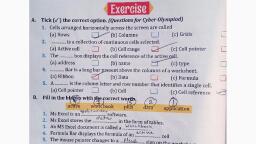
Guns, , A. Tick (V ) the correct option. (Questions for Cyber Olympiad), 1. Cells arranged horizontally across the screen are called, (a) Rows (J (b) Columns LJ (c) Grids, DR ccestect is a collection of continuous cells selected. —, , a, , (a) Activecell .(] (b)Cellrange (2}~ (c) Cell pointer, , Bo Theses box displays the cell reference of the active cell., (a) address (ay (b) name (c) type, , , , BN cin Bar is a long bar present above the columns of a worksheet., (a) Ribbon (b) Data ee) (c) Formula, , Bee Acie ncertsc is the column letter and row number that identifies a single cell., (a) Cell pointer [| (b) Cell ah, (c) Cell reference, , , , , ; ast, Ms Excel is an wi... . software., , Ms Excel stores the... ... in the form of tables., An MS Excel document is called a... Kbeel<,, , Formula Bar displays the formula of an eden Bn cell, , The mouse pointer changes to a....Pi48, sign on the worksheet, C. Write ‘T’ for True and ‘F’ for False statements., , 1. There are 1048576 rows in a worksheet., , GUE ol ee, , 2. Enter key is used to move to the next adjoining cell,, , Computer #5 72, , lel, , n, , |, , io
Page 3 :
Chapter-6, Introduction to MS Excel 2007, , Think and answer., , 1). What are the different types of data, that can be entered into MS Excel, worksheet?, , Ans- The three types of data you can, enter into a cell are data, labels and, formulas., , *Data — Values, usually numbers but can, be letters or a combination of both., *Labels — Headings and descriptions to, make the spreadsheet easier to, understand., , *Formulas — Calculations that update., , 2). What is the purpose of Formula Bar?, Ans-Formula Bar is a long bar present, above the columns of a worksheet. It, displays the formula for the data of an, , active cell.
Page 4 :
3). What do you understand by cell, reference?, , Ans-Cell reference is the column letter, and row number that identifies a single, , cell., , 4). How do you differentiate between a, workbook and a worksheet?, Ans-Workbook-Each Excel file is known, as workbook .It can hold many, worksheets .The default workbook is, Book 1., , Worksheet-Worksheet is a collection, of cells in the form of rows and, columns .There are by default ,three, , worksheets in a workbook.
Page 5 :
5).How do you exit MS Excel 2007, , application?, , Ans- 1).Click on the Office Button., 2).Select close option from the drop, , down list to come out of the current, , Excel workbook., , 3).Select Exit Excel option to come out, , of MS Excel 2007 application .