Page 1 :
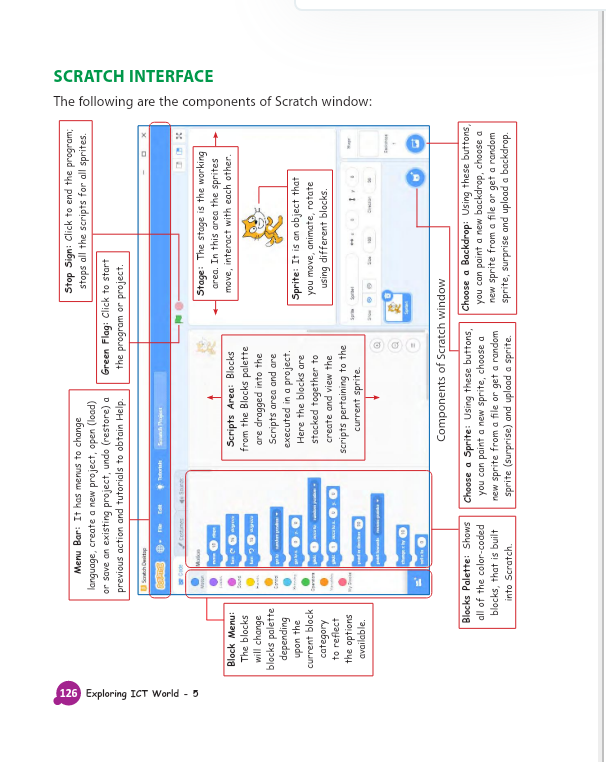
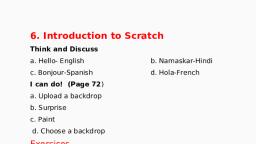
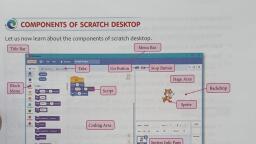
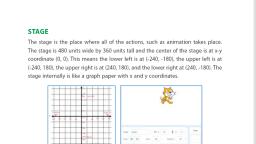
SCRATCH INTERFACE, The following are the components of Scratch window:, 126 Exploring ICT World - 5, Stop Sign: Click to end the program;, stops all the scripts for all sprites., Menu Bar: It has menus to change, language, create a new project, open (load), or save an existing project, undo (restore) a, previous action and tutorials to obtain Help., Green Flag: Click to start, the program or project., depg e, parus, Stage: The stage is the working, area. In this area the sprites, Scripts Area: Blocks, from the Blocks palette, Block Menu:, move, interact with each other., The blocks, will change, blocks palette, are dragged into the, Scripts area and are, executed in a project., Here the blocks are, buipuadap, upon the, current block, Sprite: It is an object that, stacked together to, you move, animate, rotate, using different blocks., create and view the, to reflect, the options, available., scripts pertaining to the, current sprite., Components of Scratch window, Blocks Palette: Shows, Choose a Backdrop: Using these buttons,, you can paint a new backdrop, choose a, new sprite from a file or get a random, sprite, surprise and upload a backdrop., Choose a Sprite: Using these buttons,, all of the color-coded, you can paint a new sprite, choose a, blocks, that is built, D, new sprite from a file or get a random, into Scratch., sprite (surprise) and upload a sprite.