Page 1 :
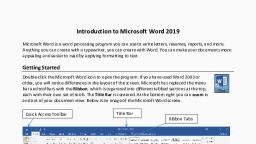
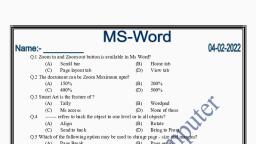
Solution., Chapter #3 advanced feature of Ms Word processor., Fill in the blanks.(Page #23), Print layout features of Ms Word. Allow us to see on screen how the text will printed on the page before actually printing it., The layout on paper is called hard copy., Justify Align Texts at both the left and right margins of a paragraph., We can select the text by double click the mouse over the desired text., To cancel change in the document, we click the undo button. On the quick access toolbar., Fill in the blanks (page #33.), The base set up group of page layout tab helps to adjust the page margin orientation and size., Bottom margins set the distance from the bottom of the page to the last line of text., We can leave space for binding by. Gutter margin., Portrait is the default page orientation., Any document open in Ms Word has A4 page size., We can add columns to a document from the page layout tab., Page break marks the end of a page of text., Book worksheets, Mention is the following statements are true or false., Vertical alignment and helps to position the text within a section of a document Related to the left and right margin.(True.), The thickness and the style of the border remains fixed .ie., it cannot be changed. (False), we can add more buttons to the quick access toolbar.(true), By default the format tab is present in a ribbon.(false), We can change the shape of the word art object by the shape of outline tools in the format tab. (True), A crop pictures look like the original pictures, only the size is smaller.(false), The Watermark button adds a bright pictures background to the document.(true), Written, Mentain the shortcut for the following following operations., Cut. ------ CTRL+X, Copy.----CTRL+ C, Paste --'CTRL+V, Print ---CTRL+P, Italic---- CTRL +I, Underline the highlighted section – CTRL+U, Undo the last action.---CTRL+Z, Name the tools in each case., I helps to quickly access command like undo, repeat, save.—Quick Access toolbar, I am a text styling features that is used to create text and to add more impacts to the text. –Word Art, I Provide an outline to a picture.—picture border, I remove unwanted area From a picture.---crop, Match the following., Gutter margin ------binding, Landscape ----- Orientation., Paper size. ----'Column, End of a page ---- page break, Cover page ------' first page, Text on top of each page ------- header, Write T for true and F for falls., The page setup dialog box helps to change the margin in a document and to change the paper size.( True), In portrait mode, the vertical edge is Create weather in number. of the paper is smaller than the horizontal edge.( True), Columns gives a paragraph look to the document.(False), Page break marks the end of a document.(True), Page break can be added to the document using Home tab.((True.), Ms Word provide predesigned cover pages.(True), Design Tab is opened when header or footer is added to the document.( True), We should always see the preview of the document before printing it.(True), Print helps to take the soft copy of a document.(False), We can adjust the top, bottom, left, right and gutter margin of a document.( True), Fill in the blanks., Normally, the introduction. page is the first page, but we can place it anywhere in the document., A header is printed in the top margin, and the footer is printed in the bottom margin., Print preview display on screen the way a document will print on paper., Portrait and landscape are two type of Page orientation., Zoom out helps to get a close view of our document and zoom in helps to see more of the page at a reduced size., In the print dialog box, we can click on selection to print the selected portion of the document., The document which is stored in the memory and its display on a screen is called soft copy., The copy of document which is printed on paper is called hard Copy., Who am I?, I specify the distance of the next from right Left, top and bottom age of the papers.--- Margin., I specify the direction in which a document is displayed or printed.----Page orientation., I marked the end of the Page----- page break., I am generally the first page of the document and give a professional look to the document.----- Cover page, I have to add companies name, address, topic title and the page number at the top of the bottom of every page of the document.---- Header, I help to see exactly how the document looked like before printing.---- print preview., Choose the correct answer., Page setups of cells are available in ________ tab, Insert, Page layout., Home., View., Increase setup dialog box. We can adjust the., Margin, size,, layout., All of this., The margins of a document can be adjusted by adjusting ____ margin of the document., Left and right., Top and bottom., Gutter, all of this., Ms Word allow paper size of., A4., A3., Both A3 and A4, None of these., We can divide a document into _____column., 1, 2, Multiple, 3, Page break can be inserted in a document from _____ tab., Home, insert, page layout, views., Cover page is generally the _____ page of the document., Last, second,, first, any., _____ Tab is opened when header and footer is added to a document., Insert, view, design, format., _____ Short cut opens the print preview of the document., CTRL +F1., CTRL + F2., CTRL + F3., CTRL + F4., shortcut open Shortcut open the print dialog box. print dialog box, CTRL+I, CTRL+A, CTRL+P, CTRL+U, Write the purpose of the following., The ribbon:- The purpose of the ribbon is to provide quick access to commonly used tasks within each program., Quick access toolbar:- You can move the Quick Access Toolbar from one of the two possible locations, and you can add buttons that represent commands to the Quick Access Toolbar, Word Art:- WordArt is a quick way to make text stand out with special effects. You begin by picking a WordArt style from the WordArt gallery on the Insert tab, and then customize the text as you wish., Clip Art:- it is a collection of pictures which may be integrated into a document, presentation, banner and other stuff that requires visuals., Choose the correct answer., Double click on a picture, select it and make the ____ action., Insert, home, format, view., Page border can be given to the document from the ____ tab., Insert, Review, Home, page layout., Shapes can be added to the document from _____ tabs., Home, insert, page layout, view., When we open a new Document the _____ tab is activate., Insert, home, page layout, view., The style of a picture can be changed by._____, Picture shape gallery, Picture style gallery, Picture border, Picture effects, Answer The following questions., Can you change the location of quick access toolbar? If yes then how?, Ans:- How to Move the Quick Access Toolbar Below the Ribbon in Microsoft Word, Click the drop-down arrow on the far right of the Quick Access Toolbar ., Select Show Below the Ribbon ., To move the toolbar back, click the drop-down arrow again and select Show Above the Ribbon ., What is word art?, Ans :- Word art or text art is a form of art that includes text, forming words or phrases, as its main component; it is a combination of language and visual image ., What are the different methods of formatting a picture?, Ans:- To crop an image:, Select the image you want to crop. The Format tab will appear., From the Format tab, click the Crop command., Cropping handles will appear on the sides and corners of the image. Click and drag any handle to crop the image., To confirm, click the Crop command again. The image will be cropped., What is the text wrap features of Ms Word?, Ans:- Text wrap is a feature supported by many word processors that enables you to surround a picture or diagram with text. The text wraps around the graphic. tag. Text wrap is also called text flow., How do you search for an image in the large clip art gallery?, Ans :- Click the [Insert] tab > From the "Illustrations" group, click [Clip Art]. A clip art pane will open to the right of the document. In the "Search for" box, type a term or keyword for the clip art you would like to find (e.g., "car") > Click [Go]., What is the purpose of the crop tool on the picture toolbar?, Ans:- The Crop Tool is used to crop or clip an image. It works on all the layers of the image, visible and invisible. This tool is often used to remove borders, or to eliminate unwanted areas to provide you with a more focused working area., How old do you resize an image?, Ans :- To resize a picture, on the Picture Format tab, enter the measurements you want in the Height and Width boxes