Page 1 :
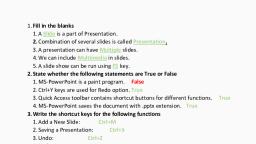
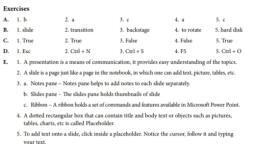
6.Introduction to MS PowerPoint 2016, Exercises, 1. Tick () the correct answer., a. Ctrl+N is the keyboard shortcut to open a new presentation in MS PowerPoint., b. The slideshow feature is used to: show slides one at a time during a presentation., C. A new slide can be inserted using the file tab., d. A presentation is saved with .pptx extension., e. The Slide view pane contains the current slide in the presentation., 2. Fill in the blanks using the given words., a. MS PowerPoint is used to create presentations., b. The shortcut to save a presentation is Ctrl+S, c. Save, Undo, Paste and Slideshow is found in the Quick Access toolbar., d. File, Home and Insert tabs are available in the Ribbon, e. The Slide show button starts the slide-by-slide presentation of your project., 3. Match the following., a. Open. ii (I) Alt+F4, b. Close i (ii) Ctrl+O, c. Opening a new slide iv (iii) Ctrl+N, d. Opening a new presentation. iii (iv) Ctrl+M, 4. Answer the following questions., a. What is Microsoft PowerPoint?, Ans- Microsoft PowerPoint is a computer application program from the Microsoft office suite, used to design presentations., b. What are the different parts of the MS PowerPoint window?, Ans-The components of MS PowerPoint are: Quick Access Toolbar, Title bar, Ribbon, Status Bar, Notes pane and Outline Pane., C. How to create a new presentation in PowerPoint?, Ans-To create a new presentation, follow the steps given below:, (i) Select the File tab on the top right corner., (ii) Click the New option., (iii) Click on the Blank Presentation option, d. How to save a presentation in MS PowerPoint?, Ans- To save a presentation, follow the steps given below:, (i) Select the File tab and click the Save As option., (ii) Select the location to save the file., (iii)Type the file name in the field Enter file name here and click on Save., The file is saved with .pptx extension., e. What are the two ways to close a presentation in MS PowerPoint?, Ans- To close a presentation, follow the steps given below:, (i) Select the File Tab on the top left corner., (ii) Click on the Close option., And The other way to close a presentation in PowerPoint is, Click on Close (X) button on the top right corner of the screen.