Page 2 :
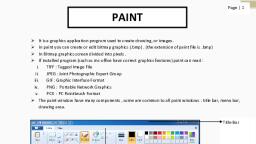
The Paint window appears., TITLE, BAR, CONTROL, BUTTON, Hone, PAINT, RIBBON, Seled, fetsts, BUTTON, COLOR BOX, SHAPES, GALLERY, DRAWING, AREA, VERTICAL, SCROLL BAR, HORIZONTAL, SCROLL BAR, 9 1152 648pr, MS-Paint stands for Microsoft Paint., Fun Activity, Label the parts given below:, (a) Shapes gallery, (c), Title Bar, (b) Drawing Area, (d), Color Box, lithe Bar, 92. Untitled - Paint, Home, Viee, Crop, O000 00 -, th Covn, Paite, Setet, A Rutate, colan, Sh, aren, Inage, Color, Shapes, Gallery, Drawring, area, 100% O, 9 11 40pr, MS-Paint, 45, 2
Page 3 :
NNODO4A, O DRAWING SHAPES, We can draw various shapes. We just need to follow the steps, shown below:, Step 1:Click on the shapes gallery., Step 2:Choose the shape that you want to draw., Step 3:Drag the mouse to increase or decrease the size., ERASER TOOL, While drawing something in your drawing notebook if, something goes wrong what do you use ?, ERASER, Here, in Paint also, we have an Eraser tool to erase a part or whole, of the drawing., To use eraser, we need to follow the given steps:, 46 MS-Paint, 3

Page 4 :
UNAD - Perrt, 000000, Bthes, teler, Click on the, Eraser tool., 2 Drag the mouse pointer, over the area that has to, be erased., + 526, 189px, 19 347 228 ps, 1 1152 x 648px, 100% O - 0 O, Filling in Colours, We use 'Fill with color tool' to fill in colours in the drawing., IR2 C Untitied - Paint, Home, View, M Cror, NODOGA One-, OResise, of, Color Color, Parte, Stlect, Brushes, 1 Rotate-, Edit, colors, Crpboard, Image., ShApts, Color, 2 Click on Fill with, color tool., 3 Choose any colour from, the color box., 4 Click on the shape that, you want to colour., 1 Draw any shape., 12 379 - 180px, 19 1152 - 648ps, 100% G, -0-, MS-Paint, 47, 4
Page 5 :
I., Fill in the missing letters :, 1. C_QLQUR I NG, 2. SHAPES, 3. DRAWING, 4. ER ASERTQOL, 48, MS-Paint