Page 1 :
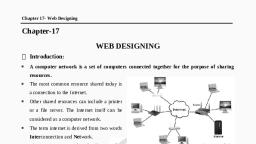
internet is the largest information base an, , Internet has revolutionized the world economy as well as society. Using Internet we, can share data and information across the globe instantly. The servers, share their, “gata or information resources available on the Internet, initiate request to servers for various services), , mt . They rely on servers for files, devices,, ssing power etc., proce:, , The servers store files and information in the form of web sites. These web sites, consist of millions of pages which contain text, , web pages via hyperlink. These web sites can, the world using Internet connection., , » graphic, video, audio and link to other, be accessed by different users around, , Have you ever thought what lies behind a web Page? Which technology is used as a, , -packend to write the web pages. We need a language to create web sites. HTMLis the, most widely used language to design web contents for the Internet., , - fll HISTORY OF HTML, , IBM sowed the seed for HTML in the early 1980s, Initially, it was known by the name, « called GML (General Mark-up Language). It was a powerful language that aimed at, , creating a document in which one could mark the title, headings, text, font selection, ~andmuch more. In 1986, this concept got standardization by ISO and was renamed to, , _ SGML (Standard Generalized Mark-up Language). In 1989, Sir Tim Berners-Lee and, _ his team redesigned this language and named it as HTML (Hyper Text Mark-up, ~~ Language)., , HTML, , , , HTMLis a complete code package that allows a user to create web, Pages. It includes text and graphics. You can add links to your web, Pages. Hyperlinks are the highlighted text segments or images that, , connect a page to other pages on the web. Let us analyze the word, HTML., , , , , , , , , , , , , Hyper text is the text used to link various web pages. Itis the text on, ».. aweb page, which on clicking opens a new web page., , c It means highlighting the text either by underlining or displaying it in, different colours, or both., , ~ Itrefers to the mode of communication between web pages. HTML, ‘has its own syntax and rules., , LT. apps @kKips», , Fact File, , WWW is founded by, Tim Berners-Lee., World Wide Web, , consortium (W3C) is, , the main international, standard, organisation for the, World Wide, Web.(Abberviated,, Www or w3), , WSC, , , , , , , , , , , , , , HSN TAT, , , , HTMLS was, introduced on January, 18, 2011. HTML5, contains features like, video playback and, drag-and-drop that, have been previously, dependent on thirdparty browser plug-ins, such as Adobe Flash, etc., , sensitive language.
Page 2 :
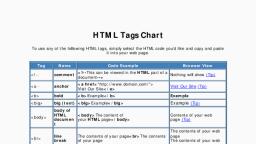
effects, alignment, cofours, ate, , STRUCTURE OF AN HTML DOCUMENT:, , ichis shown bey,, aes and Body whic! Clow,, The Standard structure of an HTML documenthas two sections: jee, , ARHTML docdimant, “oa <HTML>, SHIML>, r <Head>, <Title> title of the web page</Title>, </Head>, <Body>, The main content of the HTML document is written here along with the *, which enhance the appearance of a web page., </Body>, ANHTML document, peipeietlas <HTML>, , <HIMitag =, , , , * The HTML document starts with <HTML> tag and ends with </HTML> tag. Each documentis Consie, bea single page. Everything is written within these tags. Ifthe commands are not enclosed in tags,, , web browser will assume the commands as simple text. The HTML page is divided into two sees, Header <HEAD>, and the Body <BODY>., , , , , , The Header is where you put information that is important about the web page, but you will Not able toss, your browser window., , The <TITLE> tag has to be given within the <HEAD>, . Should be short and less than 64 characters. The <, your browser, but notin the actual viewing pane., , tags. It contains the title of the document, T:, TITLE> tag changes the text that appears on tres, , ‘The <HEAD> is the first element contained inside the <HTML> element. It contains no text withinitsel, , The <BODY> tag contains the text which gets displayed on the web Page along with other tas:, , matting elements, images, heading, list etc. to enhare, Q ‘Every opening fag must have an endin, , ig tag. The closing tag has a forward si, have only an opening tag. slash (/), , . However, sore?, , , , , , , C A gle brackets <>, Alltags have thei : ‘ae Bt, HTML follows specific rules known ac syalax. These lr own attributes and default val, , f =98 af@ not case sensitive. For example, <0!”, , AS NAME>. ae ee Same effect. There are infinite combination of HTML ta veloneril we, , for forms, images a sts. Everything displayed on a Web page requ 9 thet!, 2 i ‘uires the use of a tag., , , , , , , , be categorized,, , , , aR
Page 3 :
NTAINER ELEMENTS, , 4TML, the tags that include both ON, , and OFF tags are called Container elements. A tag is opened using, sning angle brackets <> and closed us, , ing closing brackets </>., rexample, <HTML> tag has its closing tag which is <HTML> and attributes as well, sie using Tag sets as containers, we Should always balance the flow., , , , Correct Way Incorrect Way, Tag 1 Tag 1, Tag2 Tag2, [ Mag2 Mag 1, Tag Mag 2, MPTY ELEMENTS, , moty elements contain only ON tags. They do not have OFF tags. These elements do not enclose any data., istead they function their own. For exam, , ple, <BR> tagis an empty tag which breaks the line and displays the text, vom thenextline., , El] HOWTO CREATE AN HTML DOCUMENT, , fo create an HTML document, you can type the text in any word :, wocessor, like WordPad, Notepad. The extension given to the | he, gage is always -htmi. Let us see how to open and create an HTML A, , , , , ii, , <HEAD> |, Jocumentusing N . S<TITLE> i, ocumentusing Notepad Title of the web page j, <TITLE>, <IHEAD>, <BODY> i, Text, which you want to show on your web page j, ‘<BR> will be given here. 4, </BODY> q, Type the HTML [<HTML>, , code as shown in, thefig. 9.1. Fig. 9.1: Creating an HTML Program in Notepad, , * Open Notepad by clicking on Start > All Programs >, Accessories > Notepad., , The Notepad window will appear., , Click on File > Save menu Option. The Save As dialog box will, appear. Select the folder to save the file. Select All Files in Save, As type option. Mention the name in File name text box with an, extension .html., , + Click on Save button., , , , , 1G AN HTML DOCUMENT, , ly need a web browser such as Internet Explorer, Netscape Navigator, Mozilla Firefox, Internet Explorer, as itis a part of Windows. To view your first web page,, , menu and choose Internet Explorer option. The Intemet Explorer window will, , LT. apps @Kips
Page 4 :
™~, , n File menu of Internet Explorer windows ang, , Click o 2 =a Stig, i box will appear. Click 9,, , option. The Open dialog D0 hee will apes Brot,, , to locate the HTML file. A dialog Peer,, , have stored your Em,, Choose the path where you Open button = AMa, %, select your file. Click on Op Ne Click Oy, , , , and, , dialog box., Your web page will be #=, shownon the web browser., , , , , , , You can observe that the text |, , given within the <TITLE> tag is -£="==, displayed on the title bar of the x, Internet Explorer window and the text given within the <BODY> tag is, displayed in the body of the Internet Explorer. Just notice the Address bar, of the Internet Explorer. The complete path of the filename with an, extension “html” is displayed here., , You can also type the path in the Address bar, instead of choosing it from, the Open dialog box., , Ul ATTRIBUTES, , An attribute is a property value that modifies an HTML element. Attributes appear inside the Opening tg 2, value is always inside the quotation marks., For example: <font size=4, color=“blue"> Here size and color are the attributes of the <Font> tag., , Fall TYPES OF ELEMENTS, , CONTAINER ELEMENTS, , Heading, , This tag is used to define different heading levels in the HTML document. There are six heading lev, H1 heading style displays the text in the largest size and is used for main heading, the text increas, size. The lowest level H6 reduces the font size 8 pt. The lower levels are used for sub headings and, things. It is not essential to use these heading levels in hierarchy. These heading tags are wri, <BODY> tag of the document., , , , , , , , Fig. 9.3: Opening an HTML Document, , Fig. 9.4: Displayed Web Page, Internet Explorer, , , , , , , , , , , , , <HTML>, <HEAD>, <TITLE> Using Heading Styles</TITLE>, , </HEAD><BODY>, <H1>KIPS LEARNING SOLUTION PVT. LTD. </H1>, , , , KIPS LEARNING SOLUTION PVT.LTD., , , , , , , , <H2>KIPS LEARNING SOLUTION PVT.LTD. </H2>, <H3> KIPS LEARNING SOLUTION PVT. LTD. </H3>, <H4>KIPS LEARNING SOLUTION PVT. LTD. </Ha>, » <H15> KIPS LEARNING SOLUTION PVT.LTD. </H5>, “cH@> KIPS LEARNING SOLUTION PVT.LTD. </He>, , , , , , , , , , , , , , , , LT. apps @ Kies» EA 7, , KIPS LEARNING SOLUTION PVT.LTD., IPS LEARNING SOLUTION PVT. LID., , IPS LEARNING SOLUTION PVT. LTD., , Mm Uae sotnov ng. im, , eR tue mcms erin,, , , , - </BODY> = : :, </HTML> 2 Fig. 9.5: Displaying the Heading Styles, oh kee ee peeing the Heading SY