Notes of B.Com 1st Sem Comp. D.S., Compulsory English Email.pdf - Study Material
Page 1 :
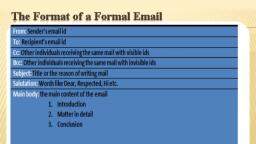
“Unit 4: WRITING Skiii5, , ], , Emails, , ‘Email’ refers to the means by which people can use electronic devices (such, as a phone or computer) to exchange electronic mail. Users can send ang, receive emails instantly to and from anyone with a valid email address fron,, anywhere in the world. Because of their speed and convenience, emails are, used not only for personal but for academic and business communication,, Emails are easily accessible, anytime and anywhere in the world. Audio, and video clips easily fit into this format and can be Sent as an attachment, or within the message., Keep the following guidelines in mind when writing emails;, , * Enter the recipient's email address in the To field; if there is more, , * Enter the email addresses of People who wish to keep their privacy, in the BCC (blind carbon Copy) field. The addresses you type here, will not be seen by other Tecipients,, , * Do not skip the Subject field. The subject must give a clear idea of, the content of your message so that the recipient will immediately, , know what the email is about, Make the title in the subject field, , short but specific so that the recipient can quickly locate a particular, , message among others from you., , Scanned with CamScanner
Page 2 :
EMAILS 61, , address, date, recipient’s name and address, salutation, subject line,, , plimentary close, sender's name and designation., , com, apital letters; it is considered to, , « Do not type the email message in c, be a rude act, and it will offend the recipient., Do not risk writing anything confidential,, password or credit card number, in your messages. ‘Though email, gives privacy to users, remember that your message can be retrieved, by hackers, criminals or other people looking to exploit your, , information., , such as your ATM, , EMAIL ETIQUETTE, , a set of guidelines (dos and don'ts) to help you, , Email etiquette refers to, ly. As with all written communication,, , use email effectively and appropriate, your emails should be clear, correct, concise and courteous., , Formatting, , « Format your email in plain text rathe, Language (HTML) because some email, HTML., , * Write a salutation or greeting for each new subject, if you exchange several emails over the same topic (for example, a, meeting day and time) it is not necessary to include a greeting because, it is as though you are carrying on a conversation. When we carry, on conversations, we do not say hello each time we speak., , * Use capitalisation and punctuation in the same way that you would, in any other document. Do not type in all caps; it looks like you are, yelling at the reader. Remember, if you emphasise everything, you, will have emphasised nothing., , * Do not type in all lower case. Do not violate the rules of English, grammar and usage. If you do so you would be making it difficult, , for the reader to read., , than Hyper Text Mailing, 1 clients may not read, , email. However,, , Proofread, , © Take the time to proofread your document before you send it. Use, the spell check and grammar check tools of your email client /, , service., , Scanned with CamScanner
Page 3 :
62, , Be Aware of Your Reader, , Attachments, , , , sy, , SEMESTER I UNIT 4: WRITING SKILLS, , Always keep the reader in mind, ‘This helps you use appropy;, tone and forms in your writing. For example, emails that te rate, to your employer may be formal and brief in comparison to thes, you send to a colleague or friend. "Ose, Secondly, if you send an email to more than four people regular, you should create mailing groups so that the recipients do not oe, to scroll through names before they can get to the content of ‘, email. It also helps to keep some email addresses anonymous, x, some perceive it as rude for their names and email addresses to o, posted for strangers to see., , Emails are public documents, despite the fact that you may senq an, email to someone privately. Therefore, only include those statement,, in an email that you can openly defend, should your Message be, circulated or shown to other parties., , Using emoticons and other virtual gestures may be appropriate in, some cases, but not in all cases. It is always essential to consider the, type of relationship you have with the receiver of your message before, including virtual non-verbals. If your relationship is more casual,, then using symbols is fine. If your relationship is more formal, then, it is best to refrain from using them., , Don’t ‘spam’ your readers and send them unnecessary or frivolous, messages. Soon, they will quit opening any message from you., , , , Send longer messages and formal reports as attachments., , Title the document that you are attaching in a way that is easy for), the recipient to find once they download it to their hard drive. For, example, if you are sending a document that is a programme schedule, then title it ‘program schedule.doc.’, , In the body of your email, tell your recipient what type of software, is required to open the attachment and specify the title of the, attachment., , Make sure that you do not send overly large attachments as some, email clients have a limit on file sizes they can send and receive. Do, not send unnecessary attachments; if you’ve already presented all of, , Scanned with CamScanner
Page 4 :
EMAILS 63, , the relevant information in an email message, do not attach a word, document repeating the same information., , Keep the Body of the Email Purposeful, , + The body of the email must be brief (preferably one page or the, length of your computer screen before scrolling) so that readers do, not have to scroll., , « See that your message is short. On the other hand, d, message so short that the reader has no idea what, about. Include at least a summary in the first paragraph of y, message. Very often, organisations seeking to reduce their paper costs, will use email as their primary source of communication. Longer, emails generally consist of: orientation schedules and information,, memos, convention information, newsletters, and policy changes., , © When you need to write a long email try to include: (1) an executive, summary at the top of the document and (2) a note on how soon a, response is required from the recipient(s)., , « Present your messages in a logical and easyUse numbers, bullets or sub-headings if possibl, , the clarity of your message., , o not keep your, you are talking, our, , to-understand manner., e. This will add to, , Executive Summary, «This isa short summary of everything in the email including the main, purpose. For example: “This email contains important information, about Team Work Activities Week. You will find the five-day, schedule, names of the speakers, the menu, hotel arrangements, and, testimonials from employees who previously participated.”, ¢ Such a feature is particularly helpful in long emails., , Required Response, ¢ Your reader might possibly read the first few lines of your document, thoroughly and browse through the rest. If you need to have them, respond by a certain time with certain information, that should be, stated within the executive summary. For example: ‘Please let me, know by Wednesday whether you are attending the meeting.’, , Scanned with CamScanner
Page 5 :
1 SEMESTER I UNIT 4: WRITING SKILLS, 64 SE, Email Management, , + ‘Clean’ your inbox b, e Respond to emails in, , y regularly checking your emai's,, a timely manner., , Mopet EMAILS, ing model emails as examples of what one sh, Ould ang, , Look at the follow n, ing official emails., , should not do while writ, , From:
[email protected], Date: 02.05.2020 Mon 14:12:14, To:
[email protected], , Ce:, , Subject: REMINDER!, , Rajan, , y ;, , an one know that I am no longer responsible for retail ord, , my ee in our internal circulars, Jagan has tak ee, , oe se i = and it is better you contact him in future re wt, , a, , a = a I shall be happy if you personally take not i |, , 8 the same to the notice of your staff. 7, , , , , , , , , , | Dinesh, , , , , , workplace. The subj, * subject line ;, ject line is not very specific, nor is it polite since iti, , in all Caps. It is ab;, i : Tupt to simp}, instead of address Ply say the name a :, is written in a taaliioe by Saying, ‘Dear al ee at ient of the a, ne and a more suitable formal ain 3 < in, ; 8, , he email which follows., , Compare the above email with ¢, , eet, , , , Scanned with CamScanner



 Learn better on this topic