Page 1 :
Shama Sherwani:, Note Making Class 11 CBSE Format, Examples, , |. How to make notes:, , 1. Read the passage carefully., , 2. Give a heading to your work. The heading will be based on the following considerations., (i) What is the main idea of the passage?, , (ii) Frame a heading based on the main idea., , (iii) Write it in the middle of the page., , 3. Give subheadings, , (i) How has the main idea been presented and developed?, , (ii) Are there two or three subordinate/associated ideas?, , (iii) Frame subheadings based on these., , 4. Points are to be noted under each subheading., , Are there further details or points of the subtitles that you wish to keep in these notes? These, are called points. Points may have subpoints., , 5. All subheadings should be at a uniform distance from the margin., 6. Indenting - Points should also be at the same distance away from the margin., 7. Do not write complete sentences., , 8. Abbreviations should be used., , Il. Help with abbreviations:, , 1. Use standard abbreviations and symbols as far as possible., , (i) Capitalise the first letters of the names of states, countries or organisations., For example: UP, USA, UK and UNO., , (ii) Common abbreviations
Page 2 :
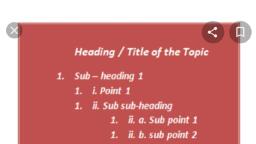
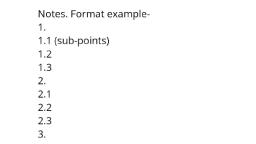
Sc. (for science), Mr, Mrs, Dr, govt, BSc, etc., , (iii) Common symbols such as i.e., e.g., -., tve, -ve, + (leading to) + (rising), | (falling), =, >, <, (iv) Measurements and figures — 100", 100’, 100 kg, 100 mm, 100 mL., , 2. Make your own abbreviations., , (i) Keep the main sounds of the words: edn (education), progm. (programme)., , (ii) It is a good practice to keep the first few and the last letters of the word such as education —, edu’n, developing - dev'ing. Retain the suffix so that later when you are going over the notes,, you may recall the full form of the word, for example: ed’nal (educational), prog've (progressive)., , 3. Take the following caution:, , (i) Do not get overenthusiastic about abbreviations., , (ii) You should not abbreviate every word., , (iii) One abbreviation in one point is enough., , (iv) As a general rule, the heading should not be abbreviated., (v) You may use abbreviations in subheadings., , Ill. Your notes should look like this:, , (i) Indenting is essential., , Notice that indenting, i.e. shifting from the margin, has been used to clearly indicate, subheadings, points and subpoints. Subheadings, though separated by points, occur below one, another. Similarly, points and subpoints should also come below one another. Such use of, indenting gives your notes a visual character. At a glance, you can see the main idea and its, various aspects., , (ii) Numbering-You may follow any system but you should be consistent, that is, you should, follow the same system throughout. Some examples are given below., , IV. Abbreviations:, , Note-making is an informal exercise as it is meant for your use only. You will not present a, formal document in note form. Notes will be developed into a more formal piece of writing., Since notes are informal and are meant for your use only, you can abbreviate long words or use
Page 3 :
accepted abbreviations and symbols., , Writing a summary: The summary is an abstract of the passage. Expand your heading and, subheadings and write down the ideas developed in the passage in the specified word limit., , 1. Read the passage given below and answer the questions that follow:, , 1. Flexibility and mobility are essential not only to reduce the risk of injuries but to generally feel, better. Living a nine to five desk life can be demanding on health and wellness. Here is how you, can keep the most common problems at bay., , 2. Even if you are not exercising you need to make sure that you maintain correct posture and, sit at your desk in the right way. It is important that your chair is placed correctly and your legs, are not left hanging. Proper alignment ensures that your neck and back are not strained., Exercises and abdominal crunches two to three times a week can strengthen the core. It will, help take the pressure off your back and will make it easier to maintain good posture. Chairs, with a back that support your upper back are preferable for those who work long hours in front, of screens., , 3. Constant typing, writing reports, and answering e-mails can exert your wrists leading to longterm damage. The frequency of your use and how you position your wrists at your keyboard can, be a reason. The telltale signs of exertion would be a tingling sensation or numbness. One, should not ignore initial signs. Make sure that you rest your wrist at regular intervals. To relieve, tension quickly fold your hands ina NAMASTE in front of your chest with elbows moving out, and lower your hands till you feel a good stretch in your wrists. Also rotating your fists inside, and outside provides much relief to strained wrists., , 4. Since those who work on desks spend a lot of time looking at a computer screen, they are at, arisk of straining their eyes. This may also lead to dry eyes and fatigue. Poor eyesight is the, result of continued and improper exposure to screens. Keeping the computer screen at an, optimal distance helps a lot in minimising strain to eyes. The screen shouldn't be too close or, too far. To ease eye strain use good lighting and make it a point to look at a distance away from, your screen every twenty to thirty minutes., , (a) On the basis of your reading of the above passage make notes on it using headings and, subheadings., , Use recognisable abbreviations and a format you consider suitable. Also, supply a title to it., (b) Write a summary of the passage in not more than 80 words using the notes made., , Answer:
Page 4 :
(a) Health and Wellness for Desk users, , 1. Correct posture, , 1.1 Place chair correctly for neck and back, 1.2 Don't hang legs, , 1.3 Excises & abdominal crunches, , 1.4 Choose chairs with support from upper back, , 2. Maintaining wrist flexibility, 2.1 Wrong position can cause wrist damage, cause tingling, 2.2. Relax wrists reg'ly in Namaste position and stretch, , 2.3 Rotate wrists inside and outside., , 3. Preventing eye strain, , 3.1 Eye strain can cause dry eyes and fatigue, 3.2 Keep computer screen at an optimal distance to prevent poor eyesight, 3.3 Use good light’g, , 3.4 Look at a distant spot every 20-30 minutes., Key to the Abbreviations Used, , 1. corr'ly — correctly, , 2. ex'cises — exercises, , 3. abdom'l - abdominal, , 4. damg - damage, , 5. reg'ly — regularly, , 6. light’g — lighting
Page 5 :
(b) Summary, , Desk users are at risk of losing flexibility, mobility, and wellness due to long working hours., , Good selection of office chairs and proper posture are essential for neck and back health., Damage to the wrists can be prevented by exercising them frequently. Eyes too are at a risk due, to looking at the computer screen for long. Optimal distance from the screen will prevent, fatigue, dry eyes and poor vision. Good lighting is essential. One should look away from the, screen every 20-30 minutes.