Assignment of Class 10th, Information Technology Database - Study Material
Page 1 :
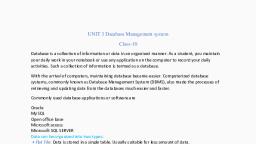
SESSION 1: THE CONCEPT OF DATABASE MANAGEMENT SYSTEM, 1. Database: A database is an organized collection of data. It is considered as a container of, information., In the manual system, you would maintain several files with different bits of information while in the, computerized system you would use database programs such as Microsoft Access, OpenOffice.org Base, and, MySQL, to organize the data as per your business need., , 2. Database Management System :A database management system is a software package with, computer programs that controls the creation, maintenance, and use of a database. for example, Oracle, IBM DB2, Microsoft SQL Server, Microsoft Access, PostgreSQL, MySQL, FoxPro, and, SQLite., 3. Data can be organized into two types:, • Flat File : Data is stored in a single table. Usually suitable for less amount of data., • Relational : Data is stored in multiple tables and the tables are linked using a common field., Relational is suitable for medium to large amount of data., • Database Servers : Database servers are dedicated computers that hold the actual databases and, run only the DBMS and related software., 4. Advantages of Database :, 1) Reduces Data Redundancy : Database reduces data redundancy (duplication of data), 2) Sharing of Data : In a database, the users of the database can share the data among themselves., 3) Data Integrity : Data integrity means that the data is accurate and consistent in the database., 4) Data Security : Database provides data security as only authorized users are allowed to access the, database and their identity are authenticated by using a username and password., 5) Privacy : The privacy rule in a database states that only the authorized users can access a database, according to its privacy constraints., 6) Backup and Recovery : Database Management System automatically takes care of backup and, recovery., 5. Some key features of a database:, 1) A database can have one or many tables., 2) Each table in a database contains information about one type of item., 3) Every table has a key field which ensures that there are 100% unique values throughout the, database., 6. Important Terms :, 1) Primary Key : A primary key is a unique value that identifies a row in a table. It helps the database, to search for a record., 2) Composite Primary Key : When primary key constraint is applied on one or more columns then it is, known as Composite Primary Key., 3) Foreign key : The foreign key identifies a column or set of columns in one (referencing) table that, refers to a column or set of columns in another (referenced) table.
Page 2 :
ASSESSMENT, Fill in the blanks:, 1) A ____DATABASE_________ is an organized collection of data., 2) A ___DBMS_ is a software package that can be used for creating and managing databases., 3) A ___RDBMS___ is a database management system that is based on the relational model., 4.Three popular DBMS software are _ORACLE_ , _MYSQL_, & _ Microsoft Access _, 5) A _PRIMARY KEY___ is a unique value that identifies a row in a table., 6) Composite Key is a combination of __ONE OR MORE__ columns., Short Answer Questions, Q1. What does DBMS stands for?, Q2. What does RDBMS stands for?, Ans. RDBMS stands for Relational Database Management System. It is a database management system which, is based on relational model., , Q3. How is data organized in a RDBMS?, Q4. State the relationship and difference between a primary and foreign key?
Page 3 :
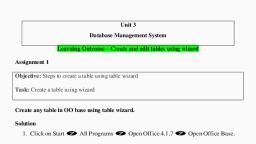
SESSION-2 : CREATE AND EDIT TABLES USING WIZARD & SQL COMMANDS, Data in a relational database management system (RDBMS) is organized in the form of tables., DATABASE OBJECTS :, 1) Table : A table is a set of data elements (values) that is organized using a model of vertical columns, and horizontal rows., 2) Columns or Fields or Attributes: A column is a set of data values of a particular simple type, one for, each row of the table., 3) Rows or Records or Tuples : A row also called a Record or Tuple represents a single data item in a, table. Every row in the table has the same structure., Creating Database Using OpenOffice :, 1) Open the OpenOffice Base Application by Clicking on Start>Programs>OpenOffice.org 4>OpenOffice.org, Base., , 2) Create a new database by selecting the option Create a new database, 3) Database wizard appear. Click Finish. The Save As dialog box appears., 4) Specify a name for the database in the File name: field and click Save., Create Tables :Tables are the basic building blocks of a database. You store the data in the database in, the form of tables., There are different ways to create a table:, a) Use Wizard To Create Table: The following are the steps to create a table:, 1) Click on Tables > Use Wizard to Create Table, 2) Click the Select Fields > Choose Category > Select the table > Click on Next Button., 3) Select the fields as per the requirements. Click on Next button, 4) Set the data types and properties of the selected fields. Click on Next Button, 5) Set the Primary Key and Click on Next Button, 6) Window to rename the table will open. A user can either go ahead with the same table name, or can change it., 7) Click on Finish to insert the data in the table., b) Creating table using Design View, 1) Click on Create Table in Design View., 2) Specify the field name and data type of the field., 3) Save the table by clicking on File > Save, 4) Specify the table name. The default name is Table1. Click OK., 5) An alert appears, if there is no primary key in the table., 6) Click yes and set the primary key and finally save the table., Data Types :Datatypes are used to identify which type of data (value) we are going to store in the, database. Data types in OpenOffice base are broadly classified into five categories listed below., Numeric Types, Alphanumeric Types, Binary Types, Date time, Other Variable types
Page 4 :
• Numeric Types :Numeric data types in a database can be used for storing information such as, mobile number, roll number, door number etc. The different types of numeric data types, available are listed here., • Alphanumeric Types :This data type is used to store information which has alphabets as well as, numbers for example address, book summary field etc. The different types of Alphanumeric, Types available are listed here., • Binary Types :Binary data types are used for storing data in binary formats. Binary data types in, a database can be using for storing photos, music files, etc., • DATE TIME :Date time data types in a database can be used for storing information such as, date of birth, date of admission, date of product sale, etc., ASSESSMENT, Fill in the blanks:, 1) A table is a set of data elements that is organized using a model of vertical and horizontal, __________________., 2) A _______________ is a set of data values of a particular type, one for each row of the table., 3) A____________________ _ represents a single, data item in a table., 4) _______________________ are used to identify which type of data we are going to store in the, database., 5) There are __________________ ways to create a table., 6) Field properties can be set in both the _________________ and _______________ ., Short Answer Questions, Q1. In how many ways tables can be created in Base?, Q2. Why are data types used in DBMS /RDBMS?, Q3. List datatypes available in Numeric Datatype?, Q4. List datatypes available in Alphanumeric Datatype?, Q5. Define the structure of a table., Q6. Differentiate between Tuples and Attributes of a table., Q7. Name different Binary data types.
Page 5 :
SESSION 3: PERFORM OPERATIONS ON TABLE, In OpenOffice Base, data is stored in tables which can be inserted, modified and removed using, appropriate options., Inserting Data In The Table : To insert the data in the table, follow the steps:, 1) Select the table > Double click on it., 2) The table will open in Datasheet View., 3) Insert the required number of records in Datasheet View., Editing Records In The Table : To edit the data in the table, follow the steps:, 1) Select the table > Double click on it., 2) The table will open in Datasheet View., 3) Edit the required record in Datasheet View., Deleting Records From The Table : To remove the data from the table, follow the steps:, 1) Select the table > Double click on it., 2) The table will open in Datasheet View., 3) Select the data > right click on selected data > select the Delete option, Field Properties :, To set the field properties: Select the table > Right click > Select the option Edit > the table will open, in Design View., In design view there are different properties of fields according to the data type set for each field., The properties of numeric type data is given below :, 1) AutoValue – if set to yes then field will get the auto numeric values., 2) Length – By default length of the field is 10 but the size of the field can be set to maximum length., 3) Default Value – A default value can be set for a field if user don’t provide any value while entering, the values in the table., 4) Format – This property helps to set the format of the data entered in the field such as 91-222-333., The properties of character type data is shown below :, 1) Entry Required – if set to yes then it will be must to insert the value in the field., 2) Length – By default length of the field is 10 but the size of the field can be set to maximum length., 3) Default Value – A default value can be set for a field if user don’t provide any value while entering, the values in the table., 4) Format – This property helps to set the format of the data entered in the field such as 91-222-333., Sorting Data :Sorting means to arrange the data in either ascending order of descending order., Referential Integrity :Referential integrity is used to maintain accuracy and consistency of data in a, relationship. In Base, data can be linked between two or more tables with the help of primary key and, foreign key, Referential integrity helps to avoid:, 1) Adding records to a related table if there is no associated record available in the primary key table., 2) Changing values in a primary if any dependent records are present in associated table(s)., 3) Deleting records from a primary key table if there are any matching related records available in, associated table(s).
Page 6 :
Creating and Editing Relationships between Tables :, A relationship refers to an association or connection between two or more tables. Relationships, between tables helps to:, Save time as there is no need to enter the same data in separate tables., Reduce data-entry errors., Summarize data from related tables., You can create a relationship between any two tables by selecting Relationships option from the Tools, menu., There are three types of relationships which can be created in tables:, 1) ONE to ONE Relationship : In this relationship, both the tables must have primary key columns., 2) One to Many Relationship : In this relationship, one of the table must have primary key column., 3) Many to Many Relationship : In this relationship, no table has the primary key column., Remove the Relationships, The relationships applied on the tables can be removed also with the help of Delete option. Right Click, on the relationship thread and select Delete option., ASSESSMENT, Fill in the blanks:, 1) The types of languages used for creating and manipulating the data in the Database are ________ &, _______., 2) A ________ is a standard for commands that define the different structures in a database., 3) A _________________ is a language that enables users to access and manipulate data in a database., 4) A ______________ is a part of DML involving information retrieval only., 5) A popular data manipulation language is _____., 6) _________________ are the basic building blocks of a database., 7) There are _______________________ types of Relationships in a table., Short Answer Questions:, Q1. What is the file extension for databases created using OpenOffice.Org Base?, Q2. List any three file formats that can be managed using OpenOffice.Org Base?, Q3. How many types of relationships can be created in Base? Explain each of the them., Q4. What do you mean by Sorting? In how many ways it can be done?, Q5. Explain Referential Integrity with the help of an example.



 Learn better on this topic